
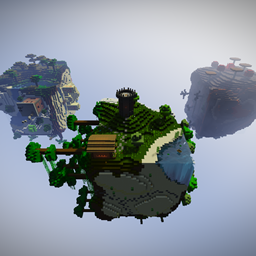
CUBE BLOCK x3
This projekt is based on the skyblock map "Cube Block". 3 new are added to the already known cube, which include lots of new biomes and features.
PMC page: https://www.planetminecraft.com/project/cube-block-x3/
Features:
- different biomes
- Caves
- Custom villager shops
- Custom landscape
- Custom mobs
- Empty map
- Hidden chests
- Easter eggs
- Canyons
- Structures
- Dungeon
- Mine shaft
- Custom items
- Nether Cube
- Star Cube
- End Cube
- and moooore...
Achievements!
- Build a cobblestone generator
- Go to all cubes
- Build an infinite water source
- Find a dungeon
- Build a cornfield
- A trade with the villagers
- Go to the Nether
- Go to the end
- Build a monster trap
- Build a Functioning Redstone circuit
- Find a Diamond
- Find a Smaragt
- Build a Nether portal
- Collect a pearl of Ender
- Farme obsidian
- Find a Nether Fortress
- Get through the Ender fountain
- Holding Farm Animal
- Find lava
- Build a Golem
- Use an anvil
- Use a brew stand
- Find a Disc
- Grab the final egg
- Craft a Cake
- Build a house
- Find a sponge
- Fine a "Mystery Scroll"
- Angle a fish
- Find an mine
- Find the Star Cube
- Find an Easter Egg
- Go to all four biomes
- Tame an ocelot
- Tame a Wolf
- Find a Pumpkin
- Find a melon
- Find and kill Herobrine
- Find a way out of the Nether Cube
- Find the secret chest in the end
- Find 3 Dungeons
- All without cheating: b
- Play with a friend: b
- Find a hay bale
- Tame and Ride a Horse
- Trade with 3 different villagers
- Crafte or find a diamond sword
- Collect 10 Smaragte
- Collect 5 Diamonds
- Collect 15 Redstone
如何安装 Cube Block x3
With Millida Launcher
Install Millida Launcher
The launcher is free: download it at millida.net/launcher and sign in with any nickname.
Click “Install” on this page
The launcher opens and installs the map for Minecraft 1.10–1.14.4 automatically.
Launch the game
A profile with it appears in the launcher: click “Play”.
Manually
Download the map archive
Pick the file Cube Block x3 v.1.3 - by XxRexRaptorxX.zip (21 MB).
Unpack it into the saves folder
The world folder (with level.dat inside) must sit directly in .minecraft/saves.
Open the world
“Singleplayer”: the map will be in your world list.
On a server
Replace the world folder
Stop the server and put the map folder in place of world (or set its name in level-name).
Use the “To server” button
On Millida Hosting, the button at the top of the page uploads the file to your server and restarts it for you.
版本
含依赖项
| Minecraft | 加载器 | 文件 | 日期 | 操作 |
|---|---|---|---|---|
| 1.13.1 | — | Cube Block x321.1 MB |
评价
成为第一个评价 Cube Block x3 的人



