

关于 Decorations Plus 数据包

Decorate your world with over 60 new decorations without any resourcepacks or mods! Video showcases: v1.0 | v3.0 | v4.0 | v6.0
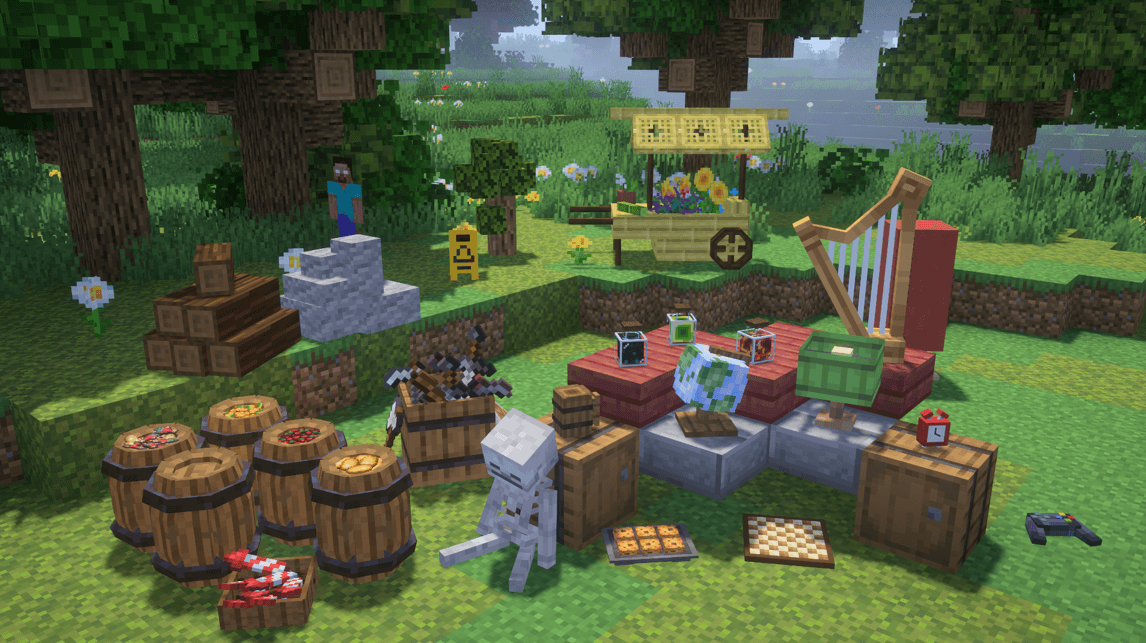
Decorations List:

Credits:
BD Models for hosting a vast library of Block Display models, and the Block Display Minecraft community for creating them!
Model Creators:
- DaftCraftYT - Bamboo Flower Cart, Controller, Round Barrel
- AlmazAr3 - Caution Sign, Telescope, Nintendo Switch, Restaurant Sign
- ZolMik - Chess Board, Red Clock
- Bom2u - Cookie Oven, Book and Ink
- Mastay - Fake Herobrine
- HappyWaffle5897 - Fire Log Pile
- yersacaltara - Firework Small Box
- shard - Globe, Wooden Beer Mug
- F0X_jL - Lamp, Large Candlestick
- fluffa01 - Little Creeper (modified)
- Kromakur - Magma Block Potion, Sculk Potion, Slime Block Potion
- Dewox - Punching Bag
- Deadtale2659 - Rocks
- Miiidav - Sitting Skeleton
- LeRocher44 - Tiny Tree
- Rasterio_ - Trash Can, Bread Basket, Bar Stool
- KRiSinnit - Window Barricades
- Yegor_Mechanic - Sewing Machine
- ItzDuck_ - Harp
- Ya_Brutal - Glow Berries Barrel, Sweet Berries Barrel, Fish Barrel, Potato Barrel, Weapons Barrel, Cartography Table
- Ares_Ryuu - Japanese Bamboo Plant
- q8h - Easter Basket
- _cv9itoi_tattok_ - Ducky
- HaniVindinggame - Animal Skull, Open Book, Books and Candles
- Vinc_bde - Bricks
- comrade_floppa - Little Villager
- Markovich001 - Broken Pot
- bl4ck_bone - Little Enderman
- Voodus_ - Ship in a Bottle
- S2ml - Standing Fishing Rod
- Layms - Target Practice
- Fituu_ - Training Dummy
- PinkMike - Bottles
- AlbensL - Potted Plants
如何安装 Decorations Plus
With Millida Launcher
Install Millida Launcher
The launcher is free: download it at millida.net/launcher and sign in with any nickname.
Click “Install” on this page
The launcher opens and installs the data pack for Minecraft 26.3 automatically.
Launch the game
A profile with it appears in the launcher: click “Play”.
Manually
Download the archive
Pick the file decoplus-v6.3-MC26.3.zip (375 KB) for your game version.
New world: “Data Packs”
When creating a world, click “Data Packs”, drag the archive into the window, then move it to “Selected”.
Existing world: the datapacks folder
Put the archive into saves/<world>/datapacks and type /reload in game.
On a server
Archive goes into the server world’s datapacks
The world/datapacks folder on the server; players do not need to install anything.
Reload the data
Type /reload in the server console or restart the server.
Use the “To server” button
On Millida Hosting, the button at the top of the page uploads the file to your server and restarts it for you.
版本
含依赖项
| Minecraft | 加载器 | 文件 | 日期 | 操作 |
|---|---|---|---|---|
| 26.3 | — | decoplus-v6.3-MC26.3.zip375 KB 1 |
常见问题
Which Minecraft versions does Decorations Plus work on?
Only Minecraft 26.3: there are no files for other versions.
Does Decorations Plus work on a server?
Yes: the data pack goes into the datapacks folder of the server world, and players do not need to install anything.
Where can I download Decorations Plus safely?
On this page: the file decoplus-v6.3-MC26.3.zip (375 KB) is stored on Millida’s server, with no link shorteners. SHA-1 checksum: ada2370a27afe6360aa4b70d89274f506259e07d.
评价
成为第一个评价 Decorations Plus 的人


