

Sodium Options API Mod cho Minecraft 1.20.1
API cấu hình để thêm tùy chọn Sodium với menu phân loại tốt hơn
- lượt tải
- 168 lượt tải
- lượt xem
- 460 lượt xem
- Đã cập nhật
- Đã cập nhật 03.09.2026
- 1.20 — 1.20.1
 Forge
Forge- Máy khách
Giới thiệu mod Sodium Options API

Mod này thêm các sự kiện đa nền tảng để tích hợp menu tùy chọn Sodium/Embeddium. Ví dụ, bạn có thể thêm một trang tùy chọn vào Embeddium trên Forge, Fabric Sodium 0.5 trên 1.20.1, và Fabric/NeoForge Sodium 0.6 trên 1.21.1 chỉ với một sự kiện:
OptionGUIConstruction.EVENT.register((pages) -> pages.add(new TestOptionPage()));
Nếu bạn là người dùng cuối và chưa cài đặt mod này như một thư viện cho một tiện ích Sodium khác, bạn có thể cài nó cùng với Reese's Options để có menu danh mục được cải thiện, với hỗ trợ menu thả xuống giúp điều hướng dễ dàng hơn. Điều này sẽ có hiệu lực ngay cả với các mod không sử dụng API này mà chèn trực tiếp vào tùy chọn Sodium.
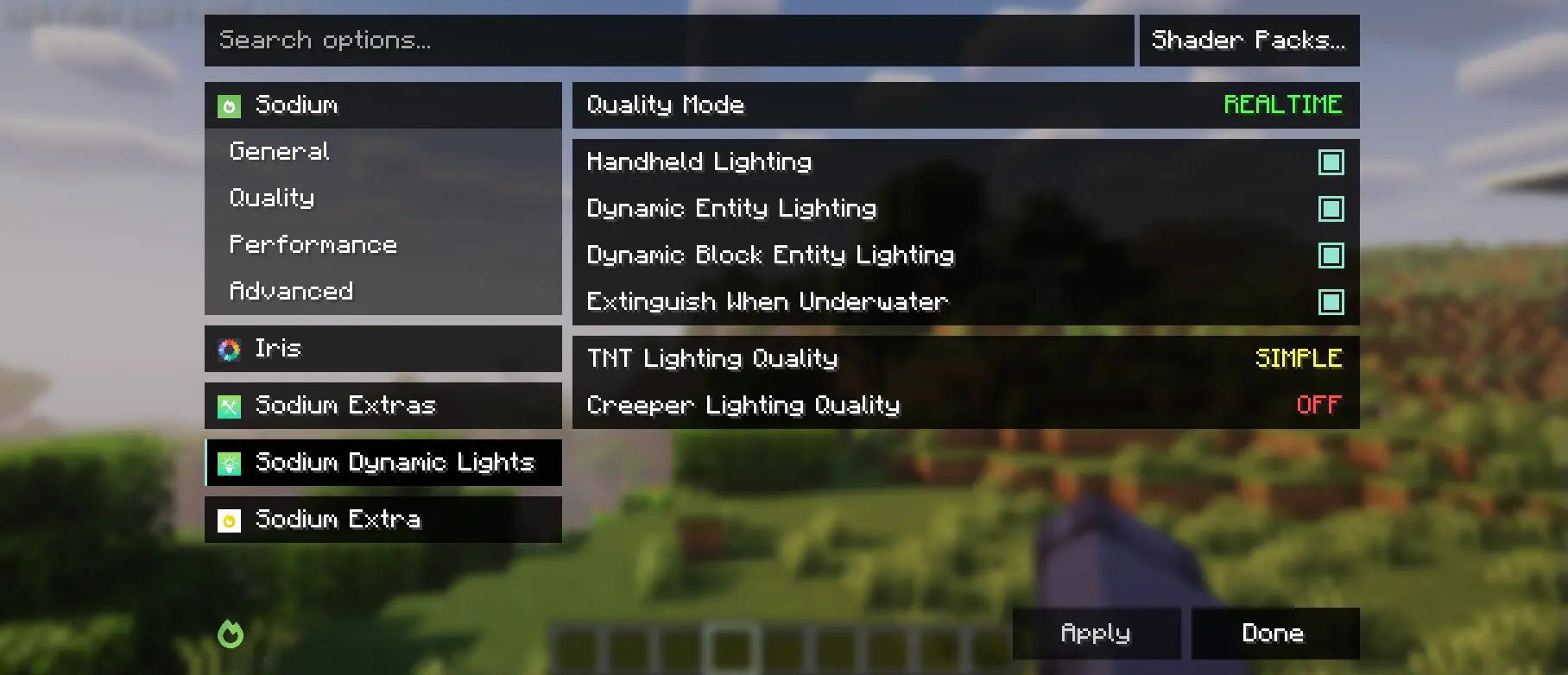
Mod này một phần là bản fork của API danh mục và sự kiện tùy chọn của Embeddium, với nhiều thay đổi để hỗ trợ Sodium gốc. Mặc dù nó thay đổi menu Reese's Sodium Options, nhưng nó thực hiện điều đó thông qua mixin vì lý do tương thích, nên bạn sẽ cần cài đặt cả hai.
Sử dụng API
Đầu tiên, bạn sẽ cần thêm mod này vào môi trường phát triển của mình, sử dụng bản phát hành Maven cho Curseforge hoặc Modrinth.
modImplementation("maven.modrinth:sodium-options-api:version")
Sau đó, mod này cung cấp ba sự kiện trong toni.sodiumoptionsapi.api:
- OptionGUIConstruction.EVENT, được gọi một lần trong hàm khởi tạo GUI, cho phép thêm toàn bộ trang. Đây có lẽ là cái bạn muốn.
- OptionPageConstruction.EVENT, được gọi cho mỗi OptionPage. Dùng cái này nếu bạn muốn thêm một nhóm công tắc vào tab hiệu năng hoặc đại loại vậy.
- OptionGroupConstruction.EVENT, được gọi cho mỗi nhóm tùy chọn. Dùng cái này nếu bạn muốn chèn một tùy chọn vào một nhóm hiện có, hoặc sửa đổi những cái gốc.
Cách cài đặt Sodium Options API
With Millida Launcher
Install Millida Launcher
The launcher is free: download it at millida.net/launcher and sign in with any nickname.
Click “Install” on this page
The launcher opens and installs the mod for Minecraft 1.20–1.20.1 on Forge automatically, together with its dependencies: Embeddium.
Launch the game
A profile with it appears in the launcher: click “Play”.
Manually
Install Forge
The loader must match the game version of the mod file, for example Minecraft 1.20.1. After installing it, a separate profile appears in your launcher.
Download the file for your version
In the version list above, pick the file sodiumoptionsapi-forge-1.0.10-1.20.1.jar (434 KB) for your game version.
Put it in the mods folder
The folder is inside .minecraft (Windows: %appdata%\.minecraft\mods). If it does not exist, create it. Required dependencies go there too: Embeddium.
Launch the loader profile
Open “Mods” in the main menu: Sodium Options API should be in the list.
Sodium Options API works on the player’s side only: there is no need to install it on a server.
Minecraft 1.20.1 runs on Java 17: with a different Java version the game may close right after launch.
Phiên bản
Kèm phụ thuộc
| Minecraft | Loader | Tệp | Hành động |
|---|---|---|---|
| 1.20.1 | Forge | 1.20.1434 KB 167 |
Yêu cầu để chạy
- Embeddiumbắt buộc
Câu hỏi thường gặp
Which Minecraft versions does Sodium Options API work on?
There are files for 1.20.1, 1.20. The newest is 1.20.1.
Is Sodium Options API for Forge or Fabric?
Only for Forge: 1.20–1.20.1. There are no files for Fabric or NeoForge: a mod for another loader will not start.
What does Sodium Options API need to work?
Required: Embeddium. Without it the mod will not start: dependencies go into the same mods folder.
Do I need to install Sodium Options API on a server?
No. Sodium Options API works on the player’s side only: there is no need to install it on a server.
Which Java does Sodium Options API need?
Minecraft 1.20.1 runs on Java 17. If the game closes right after launch, the usual cause is the wrong Java version in the profile settings.
Where can I download Sodium Options API safely?
On this page: the file sodiumoptionsapi-forge-1.0.10-1.20.1.jar (434 KB) is stored on Millida’s server, with no link shorteners. SHA-1 checksum: 7529fbf938787ed13a251cbf40936f8c29ec4b6c.
Đánh giá
Hãy là người đầu tiên đánh giá Sodium Options API


