

Vulkanite Збірка для Minecraft 1.21.11
Модпак, який змушує Minecraft працювати надзвичайно добре завдяки Vulkan.
- завантажень
- 19 завантажень
- переглядів
- 126 переглядів
- Оновлено
- Оновлено 04.09.2026
- 1.21.11
 Fabric
- Клієнт
Vulkanite
Vulkanite is a modpack based on the excellent mod VulkanMod. (From 20.1.0, Vulkanite now also provides Beryl, so it's technically Vulkanite/Berylite.)
Major Modpack Update following versions 20.1.0 and up
After the announcement that Minecraft is switching to native Vulkan, the goal of the modpack has changed. It keeps its role of giving an easy-to-install, fully fledged, vanilla+, performance-enhancing modpack, but now it works with Beryl in order to bring "Vibrant Visuals"-like shaders to Minecraft Java. You can always turn off the shader aesthetic in the Video Settings.
How does the modpack work?
Using the VulkanMod changes the rendering from OpenGL 3.2 to Vulkan 1.2+. This allows the average Minecraft player to play at a very high framerate while making the most of their hardware. With that, Vulkanite also includes libraries that help with the user interface, like Jade 🔍 and adds support for custom textures, models and sounds. C²ME is also a core part of the performance optimisation, and it benefits greatly from using Java 22 (until Minecraft 1.21.11 included).
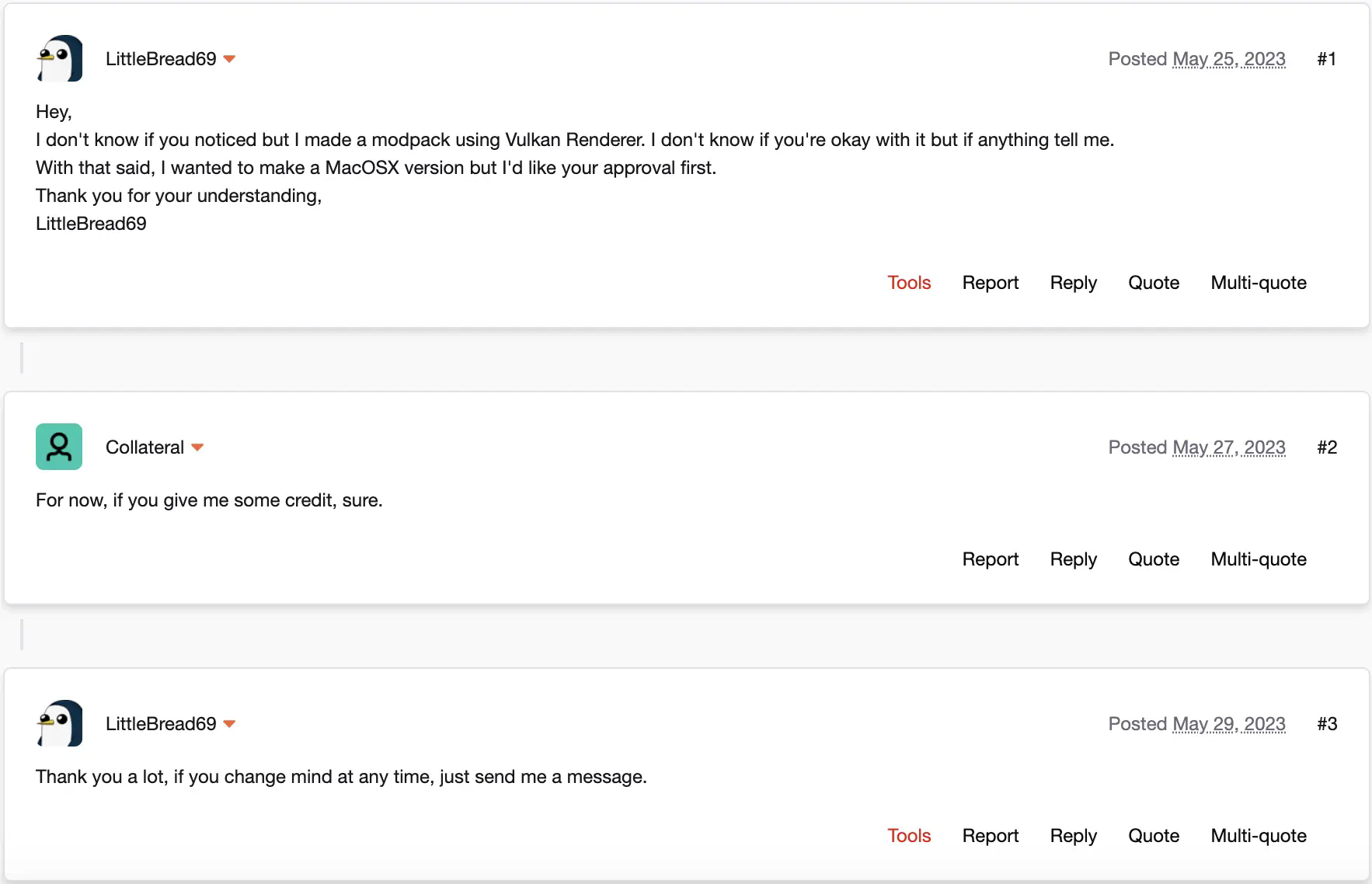
This modpack is approved by xCollateral, the developer of the mod at its core: Vulkan Renderer/VulkanMod.
This modpack should run on Windows without any problems and should run on Linux pretty much equally well. The modpack should work on MacOS too (1.20.6+).
Requirements
These requirements were tested on previous versions of Vulkanite, so here be dragons.
Minimum
- 4-core CPU
- 2 GHz base clock
- iGPU
- 2 GB RAM
- 2 GB VRAM
- Java 21
Recommended
- 6-core CPU
- 2.8 GHz base clock
- dGPU GTX 970 or better
- 8 GB RAM
- 4 GB VRAM
- Java 22 (C2ME benefits a lot from it)
Modpack approval by xCollateral
Як встановити Vulkanite
With Millida Launcher
Install Millida Launcher
The launcher is free: download it at millida.net/launcher and sign in with any nickname.
Click “Install” on this page
The launcher opens and installs the modpack for Minecraft 1.21.11 on Fabric automatically.
Launch the game
A profile with it appears in the launcher: click “Play”.
Manually
Download the modpack archive
In the version list above, pick the file Vulkanite 20.1.0.mrpack (6 KB).
Import it into a launcher
A launcher that supports modpacks (Millida Launcher, Prism) takes the archive via “Add modpack”, then “From file”. No need to unpack it yourself.
Allocate memory
Modpacks need more memory than the plain game: set 4–6 GB in the profile settings.
Minecraft 1.21.11 runs on Java 21: with a different Java version the game may close right after launch.
Версії
Із залежностями
| Minecraft | Завантажувач | Файл | Дії |
|---|---|---|---|
| 1.21.11 | Fabric | 1.21.116.1 КБ 19 |
Що потрібно для запуску
- BetterF3уже включено
- [ETF] Entity Texture Featuresуже включено
- Fabric Language Kotlinуже включено
- CICADAуже включено
- Dependencyуже включено
- Entity Cullingуже включено
- InvMoveуже включено
- Chat Headsуже включено
- Lithiumуже включено
- Dependencyуже включено
- Jade 🔍уже включено
- Language Reloadуже включено
Відгуки
Станьте першим, хто оцінить Vulkanite


