

WireSight Shadery pre Minecraft 1.20.1, 1.21.1
🟢 A lightweight Minecraft shaderpack that turns the world into a neon-green wireframe modeling view. 🧊⚡
 OptiFine
 Fabric
O shaderoch WireSight
📖 English 📖 简体中文(大陆)

🟢 WireSight
🧱 WireSight is an experimental, low-overhead Minecraft Java shaderpack that renders the world like a solid modeling view: dark green faces with bright green block edges.
⚙️ The pack targets the OptiFine shaderpack format shared by Iris, Oculus, and OptiFine. Its core path uses GLSL 1.20, a single terrain pass, normal depth writes, and no shadows or full-screen post-processing.
💬 Shaderpack usage / 🐛 Bug reports / 👨💻 Development discussion — Join our QQ Group: 259248174 🎉 (This group is gone)
💬 Shaderpack usage / 🐛 Bug reports / 👨💻 Development discussion — Join our QQ Group: 1085190201 🎉
💡 Mention me in the group for faster replies ~ ✨
🖼️ Preview
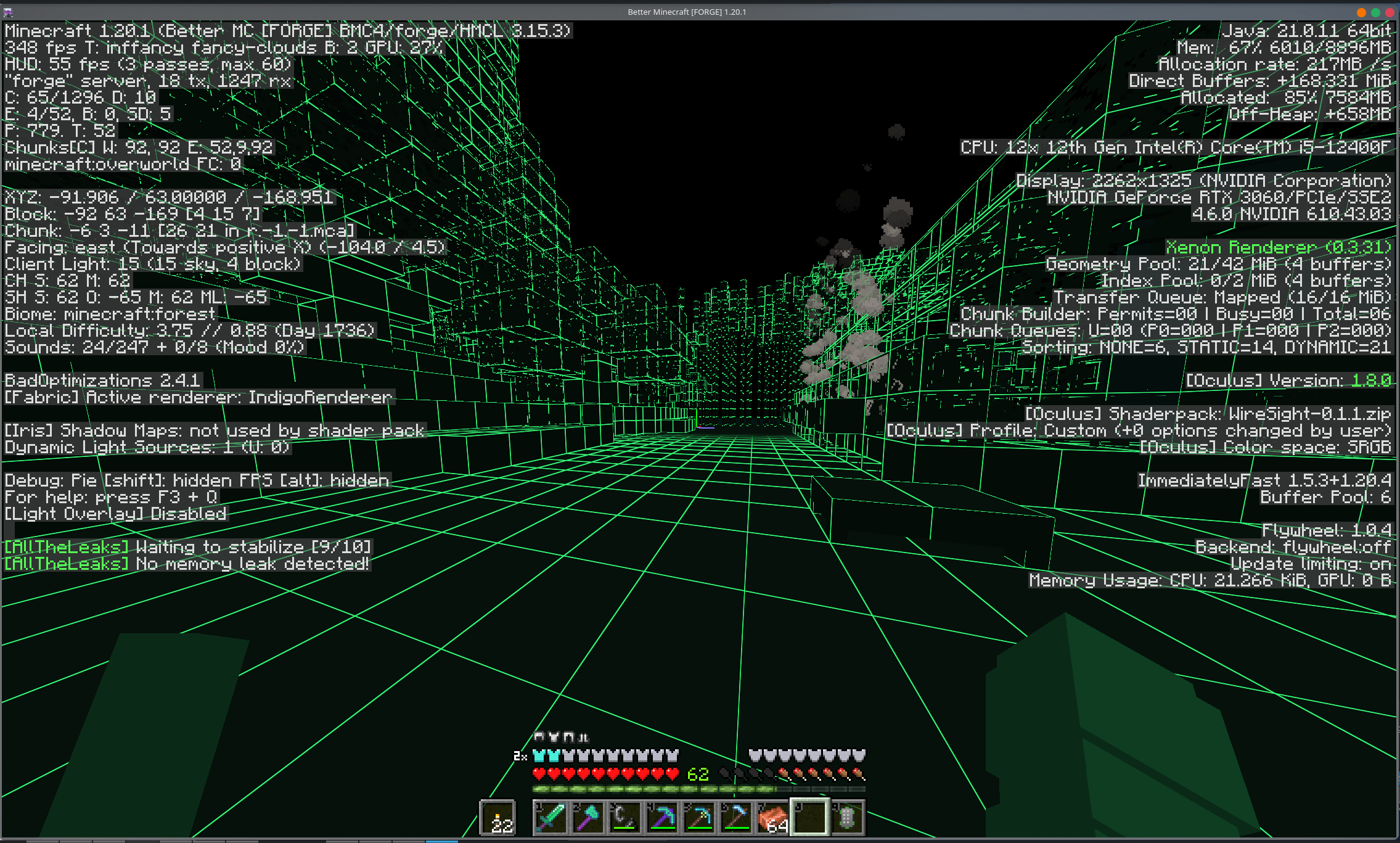
🎨 Default theme colors
🎯 WireSight uses the following base colors by default (RGB and hex denote the same color):
🎯 Render target - RGB - Hex - Appearance
🧱 Regular block faces - RGB(6, 17, 11) - #06110B - Dark green 🌊 Water and translucent terrain - RGB(5, 21, 19) - #051513 - Dark cyan-green ✨ Block edges - RGB(53, 255, 120) - #35FF78 - Fluorescent green 👤 Entities, held items, particles, and weather - RGB(14, 61, 34) - #0E3D22 - Flat green 🌌 Sky, sun, moon, and clouds - RGB(0, 0, 0) - #000000 - Black
💡 These values are base colors; directional face shading further darkens terrain and entity sides and undersides.
🎛️ Shader settings
⚙️ WireSight uses the common OptiFine ShaderPack option format supported by Iris, Oculus, and OptiFine. The loader skin may differ, but the controls and order remain the same.
🧭 Main screen
+--------------------------------+--------------------------------+ | Theme Preset: WireSight Green | Custom Theme Colors... | | Directional Face Shading: On | Edge Width: 1.5 | | Edge Fade Start: 96 blocks | Edge Fade Length: 64 blocks | +--------------------------------+--------------------------------+
- 🌓 Directional Face Shading uses fixed brightness levels for top, side, and underside faces; it is not dynamic lighting.
- 📏 Edge Width controls the approximate on-screen pixel width of block edges.
- 🌫️ Edge Fade Start is the distance where edges begin fading.
- 📐 Edge Fade Length is the distance used to complete that fade, so the defaults end at 96 + 64 = 160 blocks.
🌈 Custom theme colors
+----------------------+----------------------+----------------------+ | Theme Preset: Custom | +----------------------+----------------------+----------------------+ | Block Face R: 6 | Block Face G: 17 | Block Face B: 11 | | Water R: 5 | Water G: 21 | Water B: 19 | | Block Edge R: 53 | Block Edge G: 255 | Block Edge B: 120 | | Entity R: 14 | Entity G: 61 | Entity B: 34 | | Sky R: 0 | Sky G: 0 | Sky B: 0 | +----------------------+----------------------+----------------------+
⚠️ Important: Custom RGB values are applied only when Theme Preset is set to Custom.
🔢 Each channel has full integer precision from 0 to 255. Custom values remain saved when another preset is selected and return unchanged when switching back to Custom.
🧩 Built-in presets
🎨 Surface - WireSight Green - Cyan - Amber - Monochrome
🧱 Block faces - #06110B - #061116 - #171006 - #111111 🌊 Water - #051513 - #051522 - #071417 - #151515 ✨ Block edges - #35FF78 - #35E7FF - #FFC247 - #F2F2F2 👤 Entities - #0E3D22 - #0E3540 - #5E3D10 - #3D3D3D 🌌 Sky and celestials - #000000 - #000000 - #000000 - #000000
🟠 The Amber preset intentionally keeps water cool and dark to distinguish it from warm terrain. Changing an option may briefly recompile the shader.
🔍 Current scope
- 🧱 Visible 1x1 block boundaries on terrain and block entities
- 🌓 Three flat face shades for spatial readability
- ✨ Pixel-stable, antialiased theme-colored edges
- 🌫️ Automatic distant-grid filtering to reduce shimmer
- 🍃 Alpha preservation for cutout geometry such as leaves and plants
- 👤 Flat-color entities, particles, weather, and held items
- 🏷️ Original colors and transparency for name tags and world-space text
- 🌊 Opaque stylized water and a configurable sky
⚠️ Only visible geometry can be outlined. WireSight is not an X-ray shader and does not render faces that Minecraft removes from chunk meshes.
🧪 Compatibility target
🧪 This shaderpack intentionally avoids compute shaders, geometry shaders, and loader-specific extensions.
🔌 Environment - Minecraft - Shader loader - Companion component --- - :---: - --- - --- 🥽 Oculus - 1.20.1 - Oculus 1.8.0 - Embeddium 0.3.31 🌈 Iris - 1.21.8 - Iris 1.9.1 - Sodium 0.6.31 🔭 OptiFine - 1.8.9 - OptiFine HD U M5 - Forge 11.15.1.2318
📚 The OptiFine build targets every stable Minecraft release from 1.8 through 1.21.x. Unlisted combinations rely on compatible interfaces and have not been tested individually.
📦 Install
📥 Place the release zip in the Minecraft instance's shaderpacks directory, then select WireSight from the shader pack menu.
💻 VS Code
🧩 Install Shader languages support for VS Code for GLSL syntax highlighting. The tracked .vscode/settings.json maps .glsl, .fsh, and .vsh files to GLSL, while .vscode/extensions.json recommends the extension automatically.
code --install-extension slevesque.shader
🚀 Build, release, and publish
🐍 Build locally with uv and Python 3.13:
uv venv uv run python ./scripts/build_shaderpack.py uv run python ./scripts/validate_publish.py
📦 Two reproducible ZIPs and their matching SHA-256 files are written to dist/. metadata.toml is the single source of truth for the WireSight version, variant support ranges, platform project IDs, and loaders.
📦 Variant - Artifact - Modrinth loader - Minecraft range
🌈 Iris / Oculus - WireSight-X.Y.Z-iris-oculus.zip - iris - 1.20 through 1.21.x 🔭 OptiFine - WireSight-X.Y.Z-optifine.zip - optifine - 1.8 through 1.21.x
⚙️ GitHub Actions observes these exact commit-subject suffixes on pushes:
🎯 Mode - Commit subject suffix - Actions artifact - GitHub Release - Modrinth / CurseForge
🛠️ Build - (build action) - ✅ - ❌ - ❌ 🏷️ Release - (build release) - ✅ - ✅ - ❌ 🚀 Publish - (build publish) - ✅ - ✅ - ✅
📝 Only the subject line is inspected; matching text in the commit body is ignored.
🔁 Pull requests are always built. Builds, releases, and platform publishing can also be started manually; pushing a v* tag creates only the matching GitHub Release.
📖 See the build, release, and publish guide for the pipeline diagrams, platform project setup, required GitHub Secrets, release metadata, supported Minecraft versions, and release-note format.
🛠️ Build and upload an Actions artifact without creating a Release.
git commit --allow-empty -m "ci: test WireSight package (build action)"
🏷️ Build and publish the version declared in metadata.toml.
git commit -m "release: vX.Y.Z summary (build release)"
🚀 Build, create a GitHub Release, and publish to Modrinth and CurseForge.
git commit -m "release: vX.Y.Z summary (build publish)"
Ako nainštalovať WireSight
With Millida Launcher
Install Millida Launcher
The launcher is free: download it at millida.net/launcher and sign in with any nickname.
Click “Install” on this page
The launcher opens and installs the shaders for Minecraft 1.8–1.21.11 automatically.
Launch the game
A profile with it appears in the launcher: click “Play”.
Manually
Install Iris or OptiFine
Without a shader mod the game cannot see shaders. Install it for the same Minecraft version.
Download the shader archive
Pick the file WireSight-0.2.3-optifine.zip (19 KB) and do not unpack it.
Put it in the shaderpacks folder
“Options”, then “Video Settings”, then “Shader Packs”, then “Open Shader Pack Folder”, and drag the archive there.
Select the shaders
In the same window, click the pack name and “Apply”.
Verzie
So závislosťami
| Minecraft | Loader | Súbor | Dátum | Akcie |
|---|---|---|---|---|
| 1.21.11 | OptiFine | 1.21.1118.7 KB | ||
| 1.21.11 | Iris | 1.21.1130.1 KB | ||
| 1.21.11 | Iris, OptiFine | 1.21.1129.1 KB |
Recenzie
Buď prvý, kto ohodnotí WireSight


