
- stiahnutí
- 1 stiahnutí
- zobrazení
- 16 zobrazení
- Aktualizované
- Aktualizované 17.10.2026
- 1.12.2 — 1.16.5
 Forge
Forge
O mode Woot
NOTE:
1.15/1.16 supports Patchouli for in-game guide book
1.12 supports Guide-API for in game guide book
Changelog
1.16 changelog https://github.com/Ipsis/Woot/blob/1.16.x/CHANGELOG.md
1.15 changelog https://github.com/Ipsis/Woot/blob/1.15.x/CHANGELOG.md
1.12 changelog https://github.com/Ipsis/Woot/wiki/Woot-Changelog-1.12
Mod spotlight by RG_Sha
We have all been there in Minecraft - building the mob farm.
They all come down to the same thing.
- Spawn the mobs
- Kill the mobs
- Collect the XP and loot
- Deal with a ton on entities being spawned
Woot does things a bit differently ..... it doesn't spawn any mobs in the world .... WHAT?!
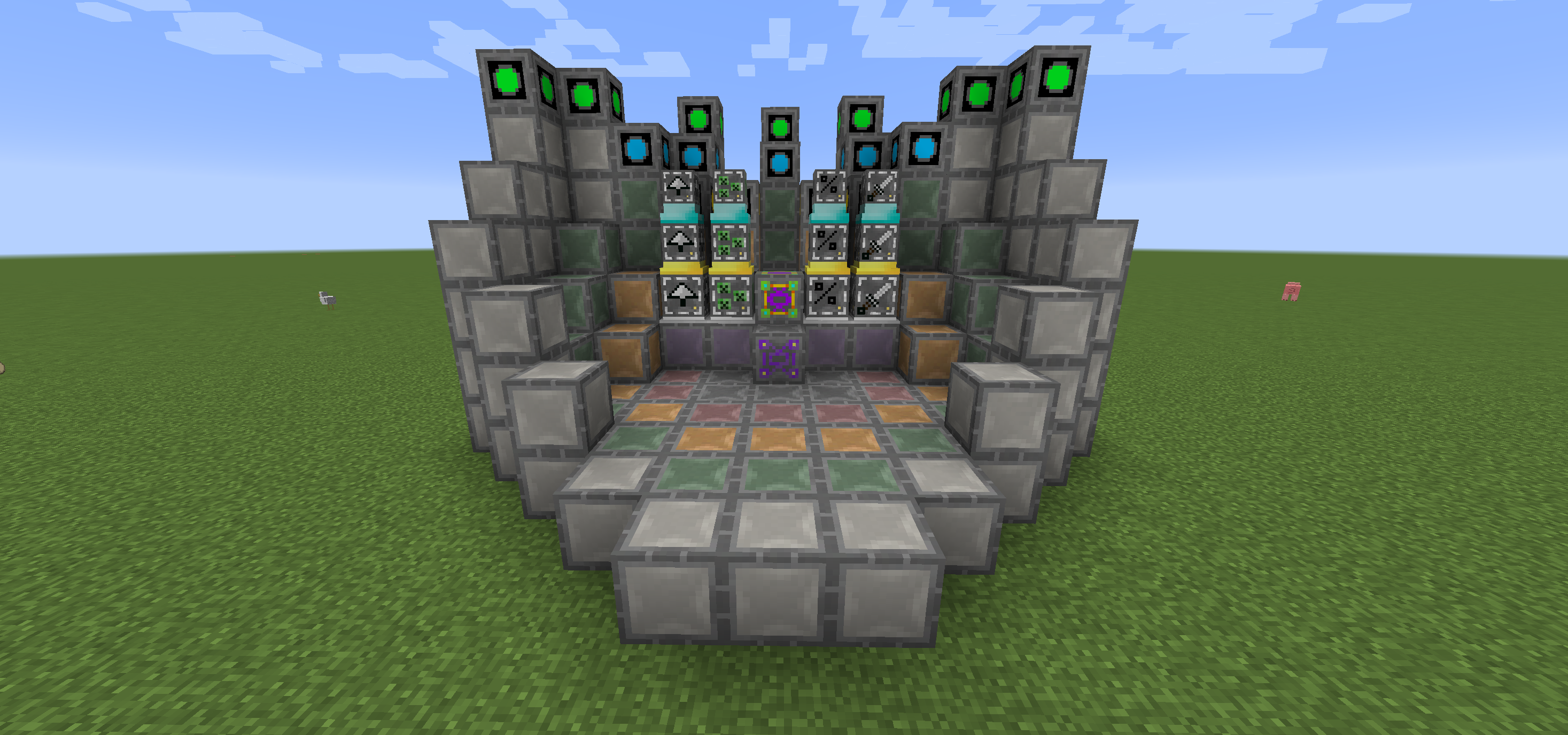
In Woot you build your factory then program it with the mob of your choice. Then you give it some power and an inventory to put all the loot into that the mob would have generated.
There are multiple tiers of factory to handle higher tier mobs. So yes, you need the big factory to spawn the Wither!
To make life a bit easier, there is a layout block to show you where you need to put all the blocks in each tiers multiblock.
You can also upgrade your factory to give extra benefits, all of which cost extra power.
- Looting I/II/III - apply looting to the mob kills
- Rate I/II/III - spawn mobs faster
- Mass I/II/III - spawn more mobs
- Decapitate I/II/III - increased head drop rate
- XP I/II/III - generate XP shards
- Efficiency I/II/III - make your factory a bit cheaper in power terms
- BloodMagic I/II/III - Life Essence generation via a Ritual
https://github.com/Ipsis/Woot/wiki
http://www.minecraftforum.net/forums/mapping-and-modding/minecraft-mods/2659457-woot-the-alternative-mob-factory

Ako nainštalovať Woot
With Millida Launcher
Install Millida Launcher
The launcher is free: download it at millida.net/launcher and sign in with any nickname.
Click “Install” on this page
The launcher opens and installs the mod for Minecraft 1.12.2–1.16.5 on Forge automatically.
Launch the game
A profile with it appears in the launcher: click “Play”.
Manually
Install Forge
The loader must match the game version of the mod file, for example Minecraft 1.16.5. After installing it, a separate profile appears in your launcher.
Download the file for your version
In the version list above, pick the file woot-1.16.5-1.0.8.4.jar (1.1 MB) for your game version.
Put it in the mods folder
The folder is inside .minecraft (Windows: %appdata%\.minecraft\mods). If it does not exist, create it.
Launch the loader profile
Open “Mods” in the main menu: Woot should be in the list.
Minecraft 1.16.5 runs on Java 8: with a different Java version the game may close right after launch.
Verzie
So závislosťami
| Minecraft | Loader | Súbor | Dátum | Akcie |
|---|---|---|---|---|
| 1.16.5 | Forge | woot-1.16.5-1.0.8.4.jar1.1 MB 1 | ||
| 1.16.2 | Forge | woot-1.16.2-1.0.0.0.jar903 KB | ||
| 1.15.2 | — | woot-1.15.2-1.1.1.0.jar888 KB | ||
| 1.12.2 | — | woot-1.12.2-1.4.11.jar859 KB | ||
| 1.12.2 | — | woot-1.12.2-0.0.10.jar741 KB |
FAQ
Which Minecraft versions does Woot work on?
There are files for 1.16.5, 1.16.4, 1.16.2, 1.15.2, 1.12.2. The newest is 1.16.5.
Is Woot for Forge or Fabric?
Only for Forge: 1.16.2–1.16.5. There are no files for Fabric or NeoForge: a mod for another loader will not start.
Does Woot need other mods?
The author lists no required dependencies: the Forge loader is enough.
Which Java does Woot need?
Minecraft 1.16.5 runs on Java 8. If the game closes right after launch, the usual cause is the wrong Java version in the profile settings.
Where can I download Woot safely?
On this page: the file woot-1.16.5-1.0.8.4.jar (1.1 MB) is stored on Millida’s server, with no link shorteners. SHA-1 checksum: 271c86303514ca621fecfe41d1e6688e156738b8.
Recenzie
Buď prvý, kto ohodnotí Woot


