

TslatEntityStatus Mod pre Minecraft 1.20.1, 1.21.1
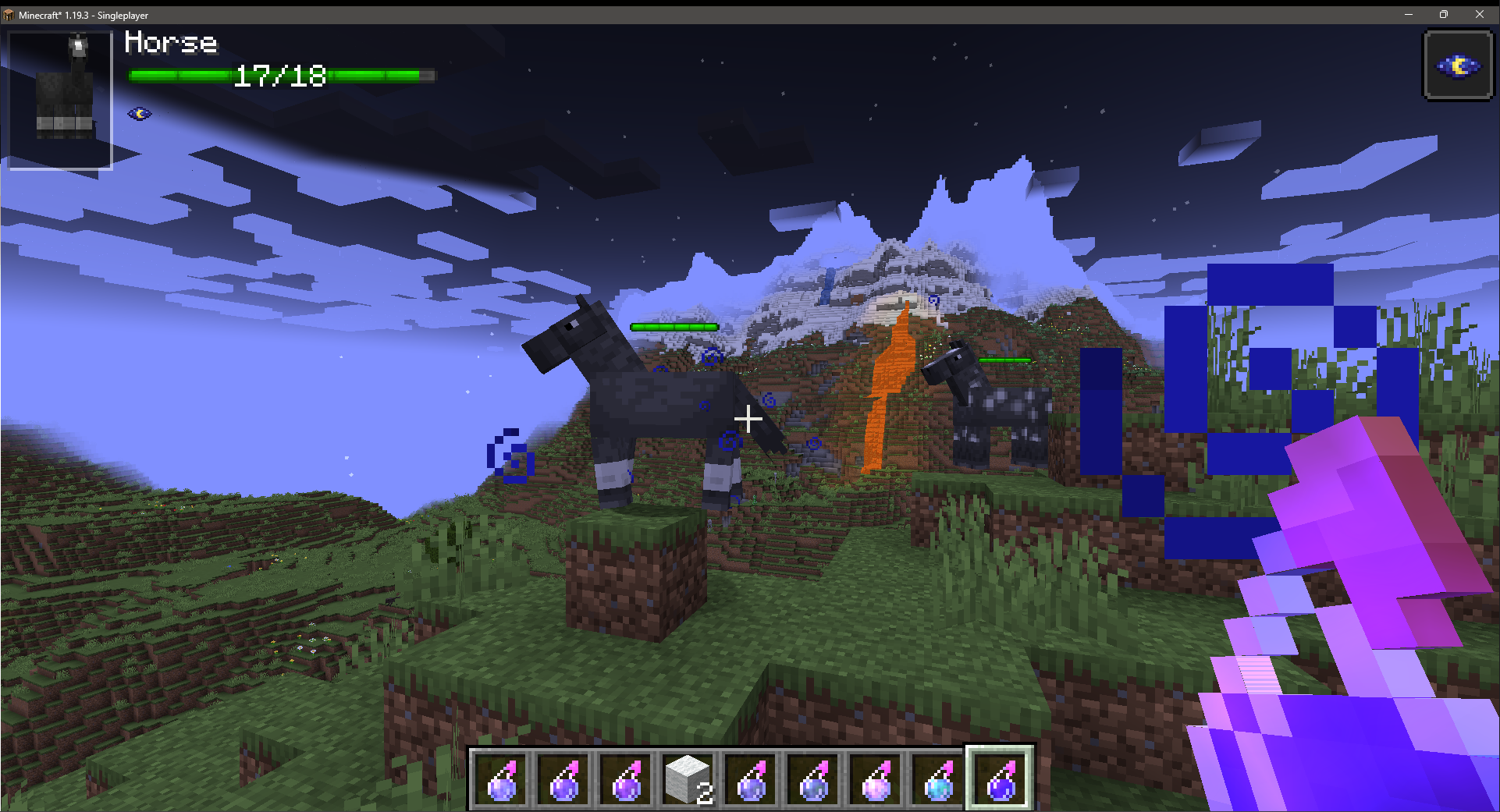
View entity health and other statuses. Make smacking things fun again!
 NeoForge
 Forge
Forge Fabric
TslatEntityStatus (TES)
View entity health and other statuses. Make smacking things fun again!
TES
TES is a 'damage-indicators' style mod designed to add vital information to the world about the entities in it. It aims to encompass as many facets of information as practical, in a fully-configurable manner so that anyone can use it for any information slice they want.
It is also built with third-party integration in mind, allowing for other mods to configure or utilise the systems provided to their fullest extent

Dependencies
1.16.5-1.21.1: Fabric: MidnightLib
1.21.3+: Fabric/Forge: ForgeConfigAPIPort

Features
- HUD-style entity status interface
- In-world overhead entity status interface
- In-world damage and healing 'pop-off' particles
- Team-colour based damage particles (1.20+)
- Multi-facet status elements
- Entity name
- Entity health
- Entity armour & toughness
- Entity type alignments (fire immunity, melee, ranged, etc)
- Entity potion effect icons
- Fully-user configurable
- Toggle on/off any element on an individual basis
- Toggle any feature on/off on an individual basis
- Adjust the automated features to balance performance to your liking
- Choose how and when you want the HUDs to appear
- Configure the render style of the health bar(s)
- Adjust the size of the on-screen and in-world HUDs
- Change the default colours of the damage and healing particles
- Adjust the opacity of the HUDs to your liking
- Public-facing mod API
- Trigger your own in-world particles of any type
- Use the defaults or define your own animation style
- Render as text, numbers, or any other custom rendering style you choose
- Add your own HUD elements
- Render whatever information you choose, in your own free space in the existing hud
- Decide whether you want in-world or just HUD rendering
- Replace/modify/expand/remove on the builtin or other mods' HUD elements
- Dynamically determine your element's visibility and usage
- Custom client-side particle handling from the server-side depending on your own conditions
- Custom particle handling for damage events based on their DamageSource on the client (1.20+)
- Easily retrieve TES' config options from anywhere
- Fully-documented implementation for all dev-facing classes, fields, and methods
- Mutliloader implementation for all-platform support
FAQ
Is this mod server side or client side?
This mod is almost entirely client-side! However, the potion icons will only work if the server has the mod aswell, and has potion icons enabled in the config
Will you support X version?
I only ever really intend to support the following versions: 1.18.2, 1.19.2, 1.19.3+
If someone is willing to port the mod to another version and submit a PR, I can upload it for that version too
Is X feature configurable?
Yes. Almost everything is configurable in this mod, right inside the config.
Can you add X feature?
Maybe! Make a suggestion in the Discord server and if I think it might be useful, there's a decent chance I'll add it
Come Chat!
Want to talk about TES or just ask me more questions? Jump in the Discord and ask away!
Donate
Want to support what I do? Consider becoming a Patron!
Ako nainštalovať TslatEntityStatus
With Millida Launcher
Install Millida Launcher
The launcher is free: download it at millida.net/launcher and sign in with any nickname.
Click “Install” on this page
The launcher opens and installs the mod for Minecraft 1.16.5–26.3 on Fabric, Forge or NeoForge automatically, together with its dependencies: Fabric API, MidnightLib, Forge Config API Port.
Launch the game
A profile with it appears in the launcher: click “Play”.
Manually
Install Fabric, Forge or NeoForge
The loader must match the game version of the mod file, for example Minecraft 26.3. After installing it, a separate profile appears in your launcher.
Download the file for your version
In the version list above, pick the file tslatentitystatus-neoforge-26.3-1.10.2.jar (220 KB) for your game version and loader.
Put it in the mods folder
The folder is inside .minecraft (Windows: %appdata%\.minecraft\mods). If it does not exist, create it. Required dependencies go there too: Fabric API, MidnightLib, Forge Config API Port.
Launch the loader profile
Open “Mods” in the main menu: TslatEntityStatus should be in the list.
On a server
A server on Fabric, Forge or NeoForge
The mod only works on a server with the same loader and game version, for example 26.3.
File goes into the server’s mods folder
Stop the server, put the mod file into the mods folder and start the server again.
Use the “To server” button
On Millida Hosting, the button at the top of the page uploads the file to your server and restarts it for you.
Verzie
So závislosťami
| Minecraft | Loader | Súbor | Dátum | Akcie |
|---|---|---|---|---|
| 1.20.1 | Forge | 1.20.1749 KB 22 | ||
| 1.20.1 | Fabric | 1.20.1177 KB | ||
| 1.21.11 | NeoForge | 1.21.11183 KB | ||
| 1.21.11 | Forge | 1.21.11184 KB | ||
| 1.21.11 | Fabric | 1.21.11184 KB 3 | ||
| 1.20.1 | Forge | 1.20.1749 KB | ||
| 1.20.1 | Fabric | 1.20.1177 KB | ||
| 1.21.1 | NeoForge | 1.21.1152 KB 1 |
Čo potrebuje na spustenie
- Fabric APIpovinné
- MidnightLibpovinné
- Mod Menunepovinné
- Forge Config API Portpovinné
Obsah, ktorý to vyžaduje
Recenzie
Buď prvý, kto ohodnotí TslatEntityStatus


