
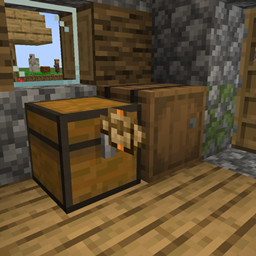
Transfer Labels Mod pre Minecraft 1.21.1
Place labels between blocks to transfer items & fluids
- zobrazení
- 13 zobrazení
- Aktualizované
- Aktualizované 18.10.2026
- 1.21.1
 NeoForge
O mode Transfer Labels
Transfer Labels is a mod that allows you to transfer items/fluids between blocks that are right next to each other.
How it works:
- You can place labels on blocks by sneak right clicking into blocks
- You can interact with the label by holding a label and right-clicking the placed label
- You can remove the placed label by left-clicking the label while holding a label
You can access labels through blocks using the label accessor
Filtering:
When opening the label GUI you can filter with different filter types like regulating, exact count, mod and tag.
For the filter that have an amount, you can change how much while scrolling while holding Shift/Alt/Ctrl and any combination of those keys
Acceleration:
You can accelerate the labels by adding the same item label in the amount or speed slots.
Ako nainštalovať Transfer Labels
With Millida Launcher
Install Millida Launcher
The launcher is free: download it at millida.net/launcher and sign in with any nickname.
Click “Install” on this page
The launcher opens and installs the mod for Minecraft 1.21.1 on NeoForge automatically.
Launch the game
A profile with it appears in the launcher: click “Play”.
Manually
Install NeoForge
The loader must match the game version of the mod file, for example Minecraft 1.21.1. After installing it, a separate profile appears in your launcher.
Download the file for your version
In the version list above, pick the file transfer_labels-0.1.9.jar (151 KB) for your game version.
Put it in the mods folder
The folder is inside .minecraft (Windows: %appdata%\.minecraft\mods). If it does not exist, create it.
Launch the loader profile
Open “Mods” in the main menu: Transfer Labels should be in the list.
Minecraft 1.21.1 runs on Java 21: with a different Java version the game may close right after launch.
Verzie
So závislosťami
| Minecraft | Loader | Súbor | Dátum | Akcie |
|---|---|---|---|---|
| 1.21.1 | NeoForge | transfer_labels-0.1.9.jar151 KB | ||
| 1.21.1 | NeoForge | transfer_labels-0.1.8.jar151 KB |
FAQ
Which Minecraft versions does Transfer Labels work on?
Only Minecraft 1.21.1: there are no files for other versions.
Is Transfer Labels for Forge or Fabric?
Only for NeoForge: 1.21.1. There are no files for Forge or Fabric: a mod for another loader will not start.
Does Transfer Labels need other mods?
The author lists no required dependencies: the NeoForge loader is enough.
Which Java does Transfer Labels need?
Minecraft 1.21.1 runs on Java 21. If the game closes right after launch, the usual cause is the wrong Java version in the profile settings.
Where can I download Transfer Labels safely?
On this page: the file transfer_labels-0.1.9.jar (151 KB) is stored on Millida’s server, with no link shorteners. SHA-1 checksum: b25faa4331f7f3e9f1fa133aa96f1e0a9a14ba52.
Recenzie
Buď prvý, kto ohodnotí Transfer Labels


