

Tool Stats Mod pre Minecraft 1.16.5, 26.3
Provides additional tooltip info for items
 NeoForge
 Fabric
 Forge
ForgeO mode Tool Stats
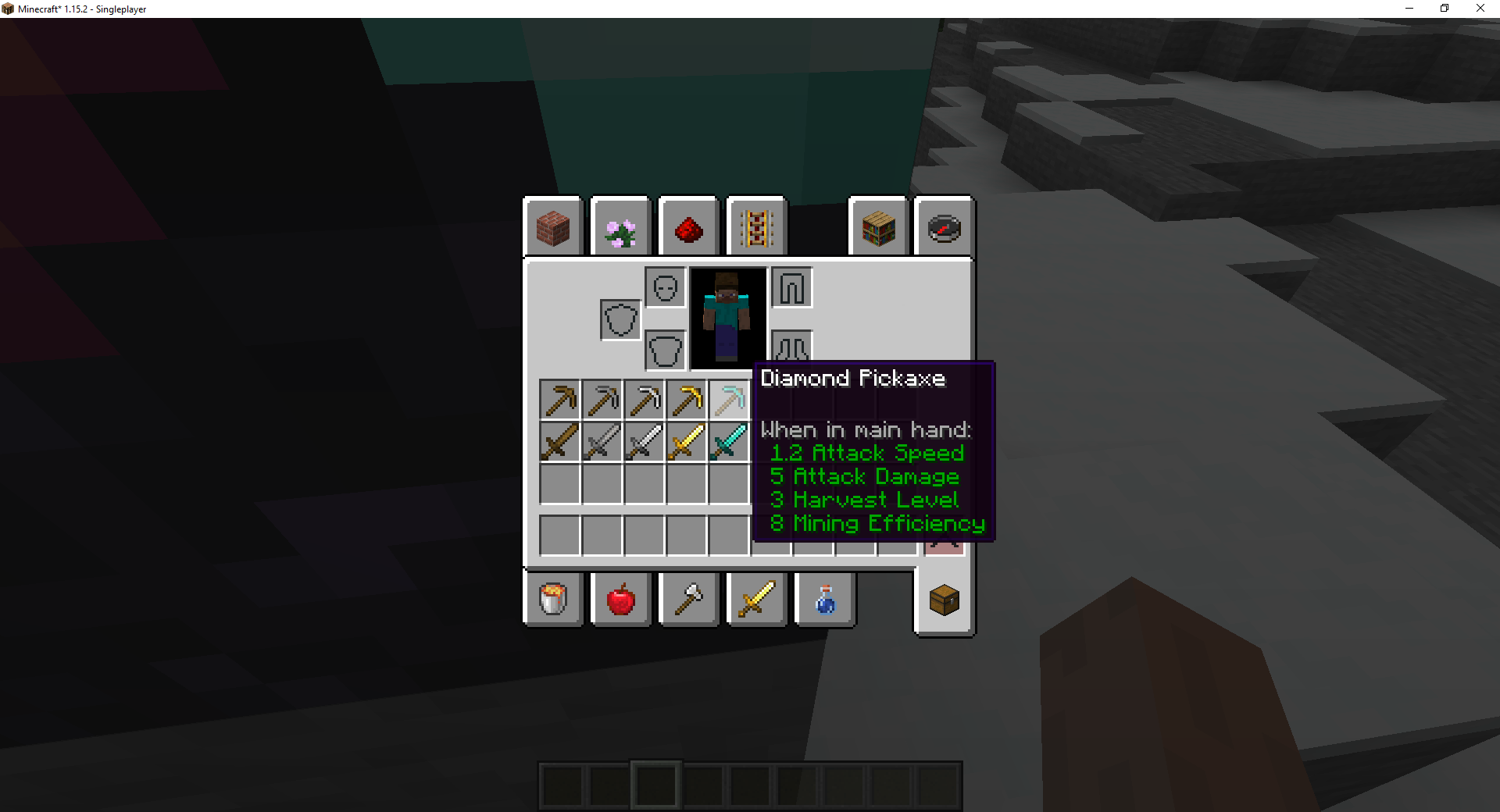
This mod adds additional tool stats to the tooltip for the various equipment in Minecraft. The mod is configurable, allowing certain pieces of information to be disabled.
Current Features
- Harvest Level (Only on tiered items like pickaxe)
- Mining Efficiency (Only on tiered items like pickaxe)
- Enchantability (Shown on all enchantable items when in the enchantment table GUI)
- Tool Durability (Shown on tools when they are damaged)
Like the mod and want to support me?
- Follow me on Twitter
- Join my Discord
- Pledge on Patreon
- Check out my website
Logo by Lorc on Game Icons and licensed under CC By 3.0.
This project is sponsored by Nodecraft. Use code DARKHAX for 30% off your first month of service!
Ako nainštalovať Tool Stats
With Millida Launcher
Install Millida Launcher
The launcher is free: download it at millida.net/launcher and sign in with any nickname.
Click “Install” on this page
The launcher opens and installs the mod for Minecraft 1.16.5–26.3 on Fabric, Forge or NeoForge automatically, together with its dependencies: Fabric API, Prickle, Bookshelf.
Launch the game
A profile with it appears in the launcher: click “Play”.
Manually
Install Fabric, Forge or NeoForge
The loader must match the game version of the mod file, for example Minecraft 26.3. After installing it, a separate profile appears in your launcher.
Download the file for your version
In the version list above, pick the file ToolStats-neoforge-MC26.3-26.3.0.1.jar (23 KB) for your game version and loader.
Put it in the mods folder
The folder is inside .minecraft (Windows: %appdata%\.minecraft\mods). If it does not exist, create it. Required dependencies go there too: Fabric API, Prickle, Bookshelf.
Launch the loader profile
Open “Mods” in the main menu: Tool Stats should be in the list.
On a server
A server on Fabric, Forge or NeoForge
The mod only works on a server with the same loader and game version, for example 26.3.
File goes into the server’s mods folder
Stop the server, put the mod file into the mods folder and start the server again.
Use the “To server” button
On Millida Hosting, the button at the top of the page uploads the file to your server and restarts it for you.
Verzie
So závislosťami
| Minecraft | Loader | Súbor | Dátum | Akcie |
|---|---|---|---|---|
| 26.3 | NeoForge | 26.322.8 KB | ||
| 26.3 | Fabric | 26.323.3 KB 3 | ||
| 26.1 | Fabric | 26.123 KB | — | |
| 1.16.5 | Forge | 1.16.510.4 KB | — |
Čo potrebuje na spustenie
- Fabric APIpovinné
- Pricklepovinné
- Bookshelfpovinné
FAQ
Which Minecraft versions does Tool Stats work on?
There are files for 26.3, 26.1.2, 26.1.1, 26.1, 1.16.5. The newest is 26.3.
Is Tool Stats for Forge or Fabric?
There are files for Fabric: 26.1–26.3, for Forge: 1.16.5 and for NeoForge: 26.3.
What does Tool Stats need to work?
Required: Fabric API, Prickle, Bookshelf. Without them the mod will not start: dependencies go into the same mods folder.
Does Tool Stats work on a server?
Yes. Tool Stats works both in singleplayer and on a server.
Where can I download Tool Stats safely?
On this page: the file ToolStats-neoforge-MC26.3-26.3.0.1.jar (23 KB) is stored on Millida’s server, with no link shorteners. SHA-1 checksum: 5e56b7354fbe9a095ca8daa8b27bb37b69114945.
Recenzie
Buď prvý, kto ohodnotí Tool Stats


