
Sync Mod pre Minecraft 1.12.2
This mod provides clones, or as we like to call it, “shells”. These shells are basically a new individual, with their own inventory, experience level, and even gamemode.
O mode Sync
Winner (Individual) of the third 96 hour modding marathon, ModJam.
Loosely based on the Sync Webseries by CorridorDigital.
Sync provides clones, or as we like to call it, "shells". These shells are basically a new individual, with their own inventory, experience level, and even gamemode.
However, what they lack, is a mind to control them. That’s where the player comes in. Each shell is biometrically tied to the player who’s sample is used to create it, and will allow the player to “sync” their mind to the other shell, essentially creating multiple player instances.
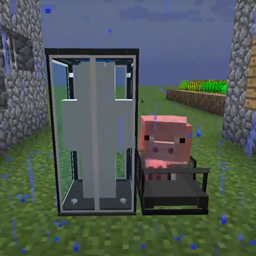
Place a shell constructor down and right click it to provide a sample (warning, this hurts!). The shell constructor cannot work without power, so put a treadmill down next to it and lure a Pig or a Wolf to the center of the treadmill to generate Piggawatts. A lead will help out out with this (you will get it back). The shell constructor will begin building a shell.
Once the shell is constructed, you need to place down a shell storage unit and supply redstone power to it. The indicator will switch to green and you can walk into the storage unit to activate it. You will see a radial menu pop up with the list of available shells and their positions. Select the shell in the constructor (labelled with the “Done” indicator) and watch as you are synced into the new shell.
Shell syncing works cross dimensional too! Get to the nether and back through a shell! However, you cannot enter or leave shells in The End due to.... technical difficulties.
By default, shells provide an “extra life” to the player. When the shell you are using dies, you will immediately resync to the nearest shell available. You can mark a preference shell by right clicking a storage unit with a bed, labelling it as a home storage unit. You can also name storage units with a name tag. This “extra life” feature works in Hardcore mode, so if you have an active backup shell you will not be forced to abandon a hardcore world, but instead resync to another shell.
Items
Sync Core: (Replace Ender Pearl with Beacon for Hard Mode)
Shell Constructor:
Shell Storage:
Treadmill:
Ako nainštalovať Sync
With Millida Launcher
Install Millida Launcher
The launcher is free: download it at millida.net/launcher and sign in with any nickname.
Click “Install” on this page
The launcher opens and installs the mod for Minecraft 1.12–1.12.2 automatically.
Launch the game
A profile with it appears in the launcher: click “Play”.
Manually
Download the file for your version
In the version list above, pick the file Sync-1.12.2-7.1.0.jar (249 KB) for your game version.
Put it in the mods folder
The folder is inside .minecraft (Windows: %appdata%\.minecraft\mods). If it does not exist, create it.
Launch the loader profile
Open “Mods” in the main menu: Sync should be in the list.
Minecraft 1.12.2 runs on Java 8: with a different Java version the game may close right after launch.
Verzie
So závislosťami
| Minecraft | Loader | Súbor | Dátum | Akcie |
|---|---|---|---|---|
| 1.12.1 | — | Sync-1.12.2-7.1.0.jar249 KB |
FAQ
Which Minecraft versions does Sync work on?
There are files for 1.12.2, 1.12.1, 1.12. The newest is 1.12.2.
Which Java does Sync need?
Minecraft 1.12.2 runs on Java 8. If the game closes right after launch, the usual cause is the wrong Java version in the profile settings.
Where can I download Sync safely?
On this page: the file Sync-1.12.2-7.1.0.jar (249 KB) is stored on Millida’s server, with no link shorteners. SHA-1 checksum: 325ccca4a1f2b52161acfcd31224aab3e8e6cf5a.
Recenzie
Buď prvý, kto ohodnotí Sync


