

Sodium Options API Mod pre Minecraft 1.20.1
Config API for adding Sodium options with a better categories menu
- stiahnutí
- 168 stiahnutí
- zobrazení
- 461 zobrazení
- Aktualizované
- Aktualizované 03.09.2026
- 1.20 — 1.20.1
 Forge
Forge- Klient
O mode Sodium Options API

This mod adds cross-platform events for adding Sodium/Embeddium options menu integration. For example, you can add an option page to Embeddium on Forge, Fabric Sodium 0.5 on 1.20.1, and Fabric/NeoForge Sodium 0.6 on 1.21.1 with one event:
OptionGUIConstruction.EVENT.register((pages) -> pages.add(new TestOptionPage()));
If you're an end user, and you don't have this mod installed already as a library for another Sodium addon, you can install it alongside Reese's Options to get improved category menu, with drop-down support so that it's easier to navigate. This will take effect even for mods that don't use this API and inject into Sodium options directly.
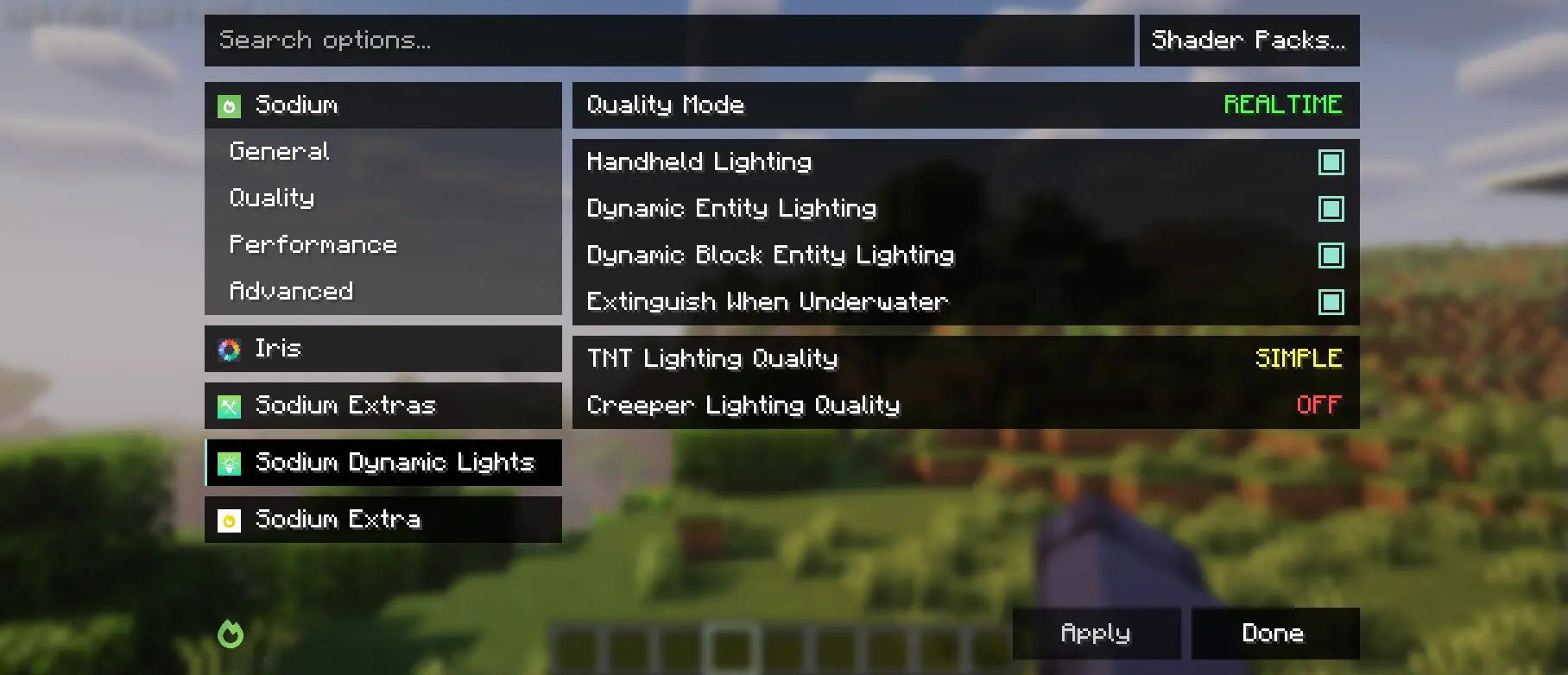
This mod is partially a fork of the Embeddium categories API and options events, with heavy changes to support upstream Sodium. While it makes changes to the Reese's Sodium Options menu, it does so via mixin for compatibility reasons, so you will need to install both.
Using the API
First, you will need to add this mod to your dev environment, using the Maven release for Curseforge or Modrinth.
modImplementation("maven.modrinth:sodium-options-api:version")
Then, this mod provides three events in toni.sodiumoptionsapi.api:
- OptionGUIConstruction.EVENT, called once in the GUI constructor, allows adding entire pages. This is probably the one you want.
- OptionPageConstruction.EVENT, called for each OptionPage. Use this if you want to add a group of toggles to the performance tab or something.
- OptionGroupConstruction.EVENT, called for each group of options. Use this if you want to insert a single option into an existing group, or modify the vanilla ones.
Ako nainštalovať Sodium Options API
With Millida Launcher
Install Millida Launcher
The launcher is free: download it at millida.net/launcher and sign in with any nickname.
Click “Install” on this page
The launcher opens and installs the mod for Minecraft 1.20–1.20.1 on Forge automatically, together with its dependencies: Embeddium.
Launch the game
A profile with it appears in the launcher: click “Play”.
Manually
Install Forge
The loader must match the game version of the mod file, for example Minecraft 1.20.1. After installing it, a separate profile appears in your launcher.
Download the file for your version
In the version list above, pick the file sodiumoptionsapi-forge-1.0.10-1.20.1.jar (434 KB) for your game version.
Put it in the mods folder
The folder is inside .minecraft (Windows: %appdata%\.minecraft\mods). If it does not exist, create it. Required dependencies go there too: Embeddium.
Launch the loader profile
Open “Mods” in the main menu: Sodium Options API should be in the list.
Sodium Options API works on the player’s side only: there is no need to install it on a server.
Minecraft 1.20.1 runs on Java 17: with a different Java version the game may close right after launch.
Verzie
So závislosťami
| Minecraft | Loader | Súbor | Akcie |
|---|---|---|---|
| 1.20.1 | Forge | 1.20.1434 KB 167 |
Čo potrebuje na spustenie
- Embeddiumpovinné
Obsah, ktorý to vyžaduje
FAQ
Which Minecraft versions does Sodium Options API work on?
There are files for 1.20.1, 1.20. The newest is 1.20.1.
Is Sodium Options API for Forge or Fabric?
Only for Forge: 1.20–1.20.1. There are no files for Fabric or NeoForge: a mod for another loader will not start.
What does Sodium Options API need to work?
Required: Embeddium. Without it the mod will not start: dependencies go into the same mods folder.
Do I need to install Sodium Options API on a server?
No. Sodium Options API works on the player’s side only: there is no need to install it on a server.
Which Java does Sodium Options API need?
Minecraft 1.20.1 runs on Java 17. If the game closes right after launch, the usual cause is the wrong Java version in the profile settings.
Where can I download Sodium Options API safely?
On this page: the file sodiumoptionsapi-forge-1.0.10-1.20.1.jar (434 KB) is stored on Millida’s server, with no link shorteners. SHA-1 checksum: 7529fbf938787ed13a251cbf40936f8c29ec4b6c.
Recenzie
Buď prvý, kto ohodnotí Sodium Options API


