
 NeoForge
 Fabric
 Forge
Forge Quilt
QuiltO mode Runelic
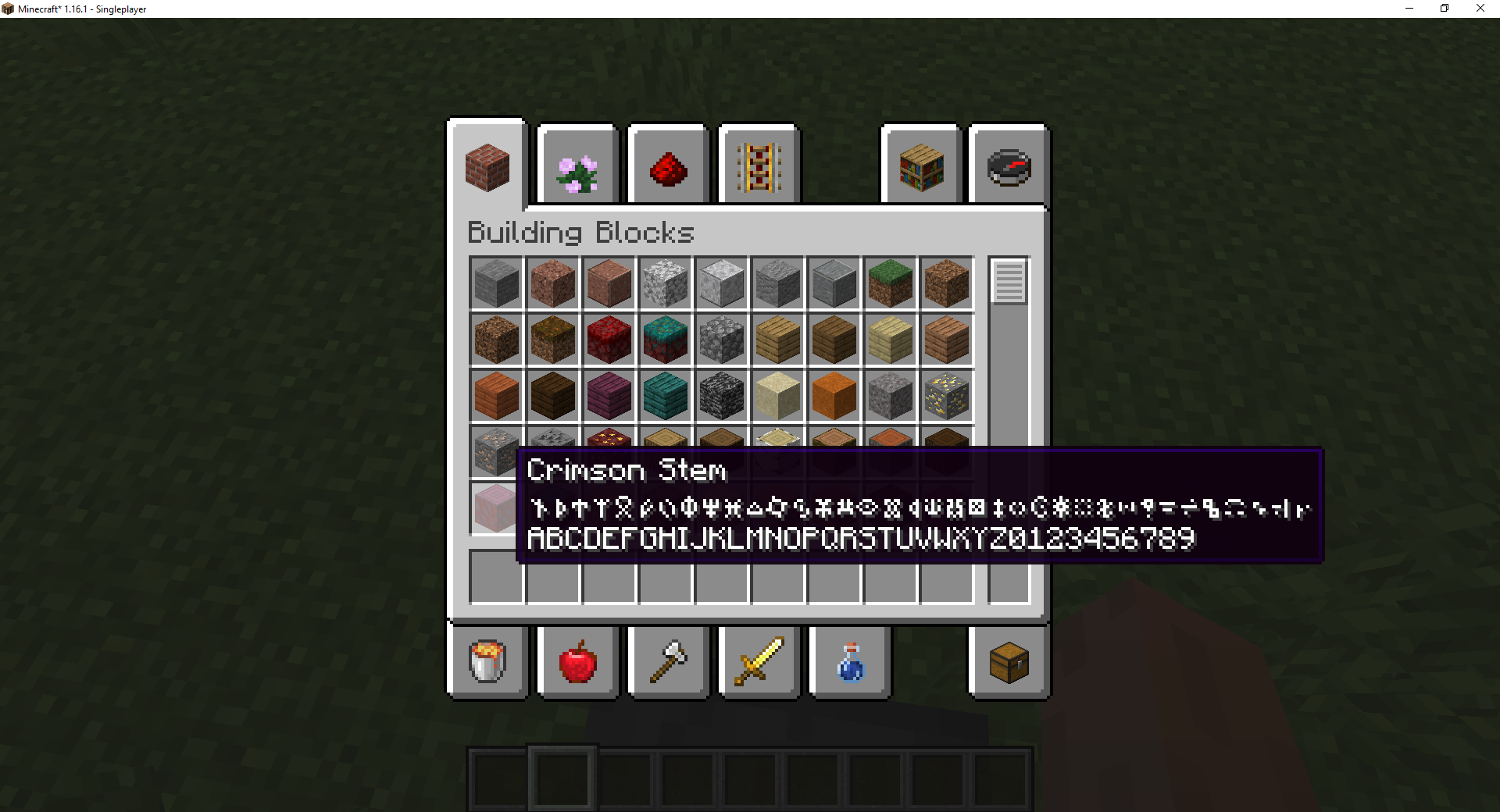
This mod brings the Runelic font to Minecraft! This font is compatible with any text that allows custom styles including signs, books, name tags, and item tooltips. It can also be used with a good number of mods such as the Tips mod.
Overview
The Runelic font substitutes commonly used characters with runic symbols and designs. Runelic text can be consistently translated back into their standard counterparts if you know how characters are substituted. All upper and lower case characters share the same designs. While some designs draw inspiration from real world language and culture any associations or symbolism between the characters are incidental.
The Runelic character set currently supports the following characters.
- Standard 26 Latin alphabet (upper and lower)
- 1234567890
- !"#$%&'()*+,0-./
Banner Patterns
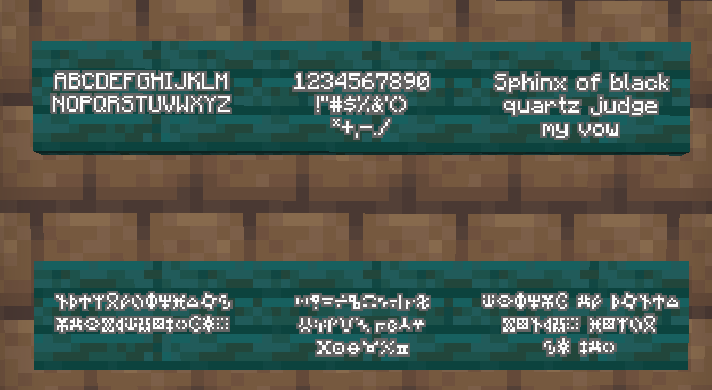
The Runelic mod also includes banner patterns for all 50+ characters added by the font. Players can apply these patterns to their banners by using a Runelic banner stencil item obtained from wandering traders. These patterns provide players with a unique and mystical way to express themselves.
Usage Guide
Vanilla Commands & NBT
Vanilla commands that allow specifying raw text components can use Runelic by specifying the font ID in the properties of the text. The give command and title command are examples of vanilla commands that allow this.
- /give @p stone{display:{Name:"[{\"text\":\"Hello\",\"italic\":false,\"color\":\"gold\",\"font\":\"runelic:runelic\"}]"}} 1
- /title @a title {"text":"Hello","font":"runelic:runelic"}
Bookshelf Commands
This mod has a dependency on Bookshelf which offers servers with a number of useful font related commands. These commands will work for Runelic and all other fonts you have installed.
- /bookshelf font say runelic:runelic - Posts a chat message using the font.
- /bookshelf font item runelic:runelic - Applies the font to the name of the held item.
- /bookshelf font book runelic:runelic - Applies the font to the name of a held book and all of the book pages.
- /bookshelf font block runelic:runelic x y z - Applies the font to a block entity. Works with signs and nameable blocks like chests.
Code / Modding
If you are developing a mod or have access to code/scripting tools you can apply the font to any mutable text component. This is done by setting the font on the style of the component. You can find an example of how I do this in my mods here.
Credits
The Runelic font and character set is provided with all rights reserved. Projects that have a soft or hard dependency on this mod may use Runelic designs in screenshots, custom assets, character designs, and promotional material. Third paty videos, blogs, articles, showcases, and commentary may also use Runelic in their promotional material and coverage of the project.
Like the mod and want to support me?
- Follow me on Twitter
- Join my Discord
- Check out my website
This project is sponsored by Nodecraft. Use code Darkhax for 30% off your first month of service!
Ako nainštalovať Runelic
With Millida Launcher
Install Millida Launcher
The launcher is free: download it at millida.net/launcher and sign in with any nickname.
Click “Install” on this page
The launcher opens and installs the mod for Minecraft 1.16.1–26.3 on Fabric, Forge, NeoForge or Quilt automatically.
Launch the game
A profile with it appears in the launcher: click “Play”.
Manually
Install Fabric, Forge, NeoForge or Quilt
The loader must match the game version of the mod file, for example Minecraft 26.3. After installing it, a separate profile appears in your launcher.
Download the file for your version
In the version list above, pick the file Runelic-neoforge-MC26.3-26.3.0.1.jar (63 KB) for your game version and loader.
Put it in the mods folder
The folder is inside .minecraft (Windows: %appdata%\.minecraft\mods). If it does not exist, create it.
Launch the loader profile
Open “Mods” in the main menu: Runelic should be in the list.
Verzie
So závislosťami
| Minecraft | Loader | Súbor | Dátum | Akcie |
|---|---|---|---|---|
| 26.3 | NeoForge | Runelic-neoforge-MC26.3-26.3.0.1.jar62.6 KB 2 | ||
| 26.3 | Fabric | Runelic-fabric-MC26.3-26.3.0.1.jar66.7 KB 14 | ||
| 1.20.1 | Forge, NeoForge | Runelic-Forge-1.20.1-18.0.4.jar67 KB | ||
| 1.19.2 | Forge | Runelic-Forge-1.19.2-14.1.3.jar95.1 KB 1 | ||
| 1.19.2 | Fabric, Quilt | Runelic-Fabric-1.19.2-14.1.3.jar86.7 KB | ||
| 1.17 | Fabric | Runelic-fabric-1.17-rc2-2.0.4.jar4.1 KB | ||
| 1.16.1 | Forge | Runelic-1.16.1-1.0.3.jar7.5 KB |
FAQ
Which Minecraft versions does Runelic work on?
There are files for 26.3, 1.20.1, 1.19.2, 1.17, 1.16.1. The newest is 26.3.
Is Runelic for Forge or Fabric?
There are files for Fabric: 1.17–26.3, for Forge: 1.16.1–1.20.1, for NeoForge: 1.20.1–26.3 and for Quilt: 1.19.2.
Does Runelic need other mods?
The author lists no required dependencies: the Fabric, Forge, NeoForge or Quilt loader is enough.
Where can I download Runelic safely?
On this page: the file Runelic-neoforge-MC26.3-26.3.0.1.jar (63 KB) is stored on Millida’s server, with no link shorteners. SHA-1 checksum: 8a14898e4d6dd7f65198d70b1e1b4caab235d6ad.
Recenzie
Buď prvý, kto ohodnotí Runelic


