
RFTools Control Mod pre Minecraft 1.20.1, 1.21.1
Automation and logic computer addon for RFTools
 NeoForge
 Forge
ForgeO mode RFTools Control
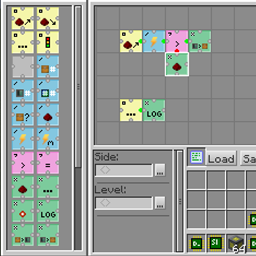
RFTools Control is an addon mod for the RFTools mods which adds automation control using a visual grid based programming language. Using opcodes that you arrange in a grid you can move items around, control redstone, check energy (RF) and so on. You can access regular inventories but this mod also supports direct access to a storage scanner controlled system. In the future it will also provide a way to the storage scanner to autocraft items. This is not yet fully implemented however.
The two main blocks in this mod are the programmer which is used to create programs and the processor that executes those programs. Networking is also provided.
Note! Comments have been disabled because it is hard for me to check for this on too many places. If you want to submit a bug report then go to the 'Issues' tab or here: RFTools Control Issue Tracker. If you want to discuss RFTools in general you can do that here: RFTools Control on MC Forums
Ako nainštalovať RFTools Control
With Millida Launcher
Install Millida Launcher
The launcher is free: download it at millida.net/launcher and sign in with any nickname.
Click “Install” on this page
The launcher opens and installs the mod for Minecraft 1.12–1.21.1 on Forge or NeoForge automatically.
Launch the game
A profile with it appears in the launcher: click “Play”.
Manually
Install Forge or NeoForge
The loader must match the game version of the mod file, for example Minecraft 1.21.1. After installing it, a separate profile appears in your launcher.
Download the file for your version
In the version list above, pick the file rftoolscontrol-1.21-8.0.2.jar (662 KB) for your game version and loader.
Put it in the mods folder
The folder is inside .minecraft (Windows: %appdata%\.minecraft\mods). If it does not exist, create it.
Launch the loader profile
Open “Mods” in the main menu: RFTools Control should be in the list.
Minecraft 1.21.1 runs on Java 21: with a different Java version the game may close right after launch.
Verzie
So závislosťami
| Minecraft | Loader | Súbor | Dátum | Akcie |
|---|---|---|---|---|
| 1.21.1 | NeoForge | RFToolsControl - 1.21-8.0.2662 KB 1 | ||
| 1.20.1 | Forge | RFToolsControl - 1.20-7.0.4587 KB 1 | ||
| 1.20.1 | Forge | RFToolsControl - 1.20-7.0.0576 KB | ||
| 1.12.2 | — | RFToolsControl - 1.12-2.0.2587 KB | ||
| 1.12.2 | — | RFToolsControl - 1.12-1.9.0-alpha577 KB | ||
| 1.12 | — | rftoolsctrl-1.12-1.6.8beta1.jar568 KB |
FAQ
Which Minecraft versions does RFTools Control work on?
There are files for 1.21.1, 1.20.1, 1.12.2, 1.12. The newest is 1.21.1.
Is RFTools Control for Forge or Fabric?
There are files for Forge: 1.20.1 and for NeoForge: 1.21.1. There are no files for Fabric: a mod for another loader will not start.
Does RFTools Control need other mods?
The author lists no required dependencies: the Forge or NeoForge loader is enough.
Which Java does RFTools Control need?
Minecraft 1.21.1 runs on Java 21. If the game closes right after launch, the usual cause is the wrong Java version in the profile settings.
Where can I download RFTools Control safely?
On this page: the file rftoolscontrol-1.21-8.0.2.jar (662 KB) is stored on Millida’s server, with no link shorteners. SHA-1 checksum: ff976f8f58feaf6cc101ab2e51fbfaecac3f27ff.
Recenzie
Buď prvý, kto ohodnotí RFTools Control


