
Raw's Visual keybinder Mod pre Minecraft 1.21.1, 1.19.2
A visual solution for keybinding.
 NeoForge
 Forge
ForgeO mode Raw's Visual keybinder
This mod is a solution for having a big modpack with many keybinds.
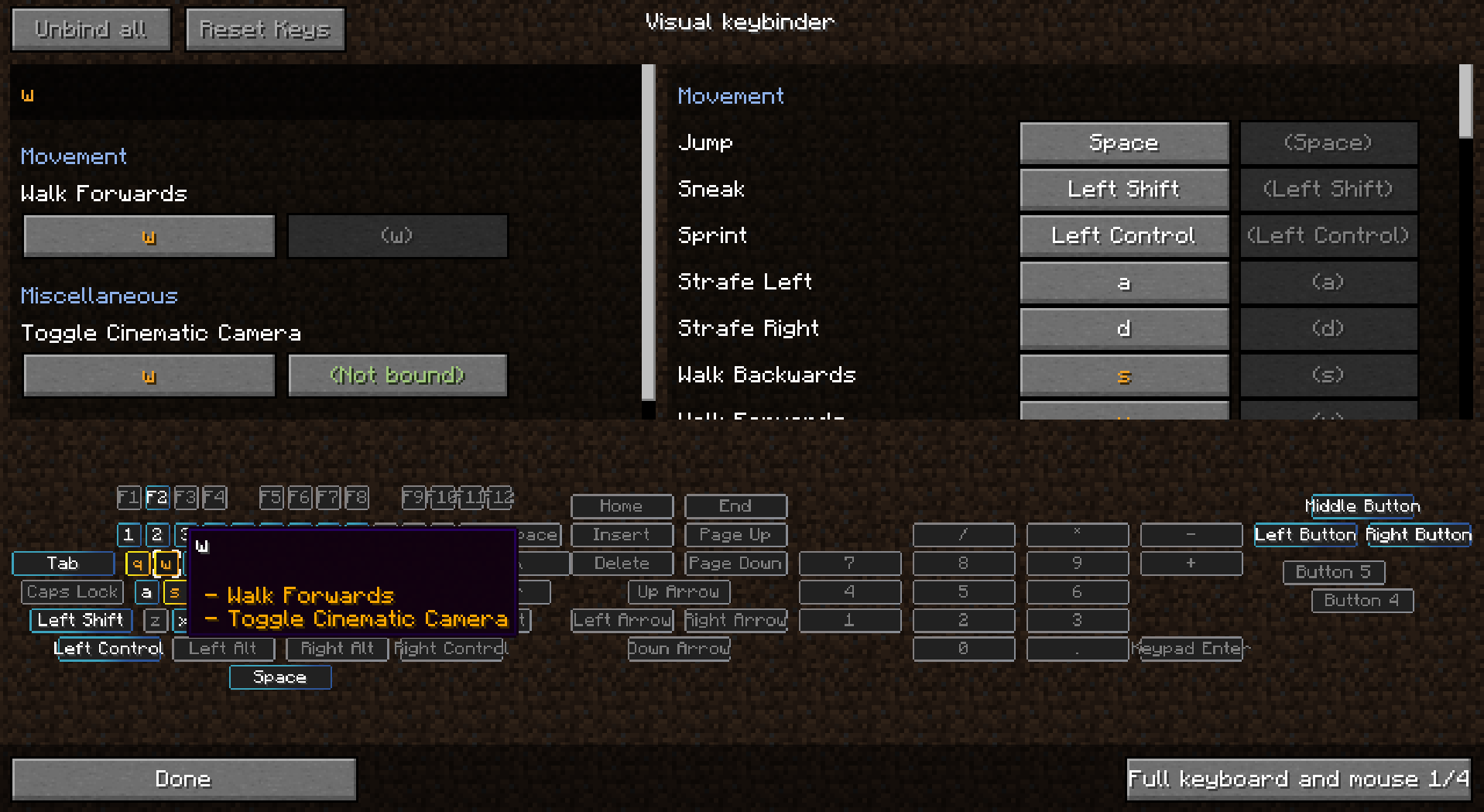
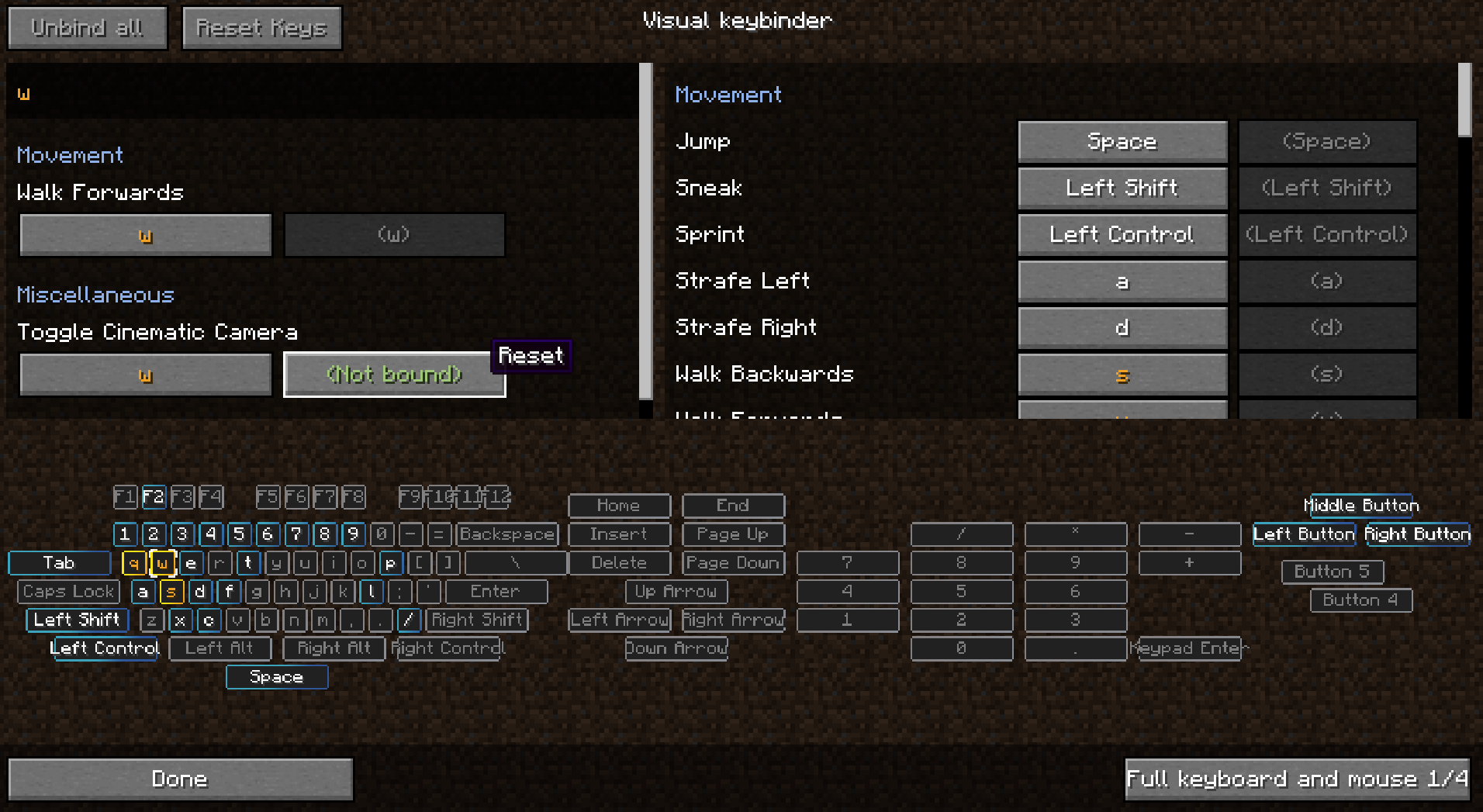
It adds an extra way to manage keybinds. It provides an extra screen which will be accessible by the button next to the default edit 'keybind button' in the options menu.
The screen has a layout like a keyboard with all conflicting and used buttons highlighted. This way players have a great overview of which keys are still available and which ones need attention.
As a side effect of making this mod you can also use modifiers with mouse buttons like Shift+left click. This may or may not be usefull for some situations.
Multiple layouts are available and layouts could be changed or added in the config.
Client mod. Does not have to be on a server.
See images for some screenshots.
Presets
Presets can be loaded and saved. They are stored in the .minecraft folder under 'keybinding presets'.
Switch between presets quickly by setting up a keybind for your favorite presets.
How to make a preset load on first start
Use 'preset_to_load_on_first_startup.txt' to specify a keybind that should load on startup. These bindings will then be loaded on startup. The file initialized.dat will be created when a player has started the game for the first time. When this file is present, the preset in preset_to_load_on_first_startup.txt will not be loaded.
Making a preset readonly
When opening a preset with notepad you can add the text 'readonly' on the first line and then save.
Shipping keybinds with modpack
- make sure you export the folder keybinding preset
- do Not export keybinding presets/initialized.dat
- save a preset in the game
- edit the created file in notepad
- at the start of the file insert a new line with the text: readonly
- nothing more nothing less
- then in the file preset_to_load_on_first_startup.txt, on the second line fill in the name of your preset, which is the filename without the preset.txt which is at the end of the filename.
You can ship your modpack with multiple presets, but only one preset can be loaded on startup. It is possible to use Capital letters in the filename.
Use in modpack is allowed without asking
Thanks to Radimous for backporting to 1.18.2!
Thanks to Bubin7766 for porting to 1.21.1 Neoforge!
Ako nainštalovať Raw's Visual keybinder
With Millida Launcher
Install Millida Launcher
The launcher is free: download it at millida.net/launcher and sign in with any nickname.
Click “Install” on this page
The launcher opens and installs the mod for Minecraft 1.19.2–1.21.1 on Forge or NeoForge automatically.
Launch the game
A profile with it appears in the launcher: click “Play”.
Manually
Install Forge or NeoForge
The loader must match the game version of the mod file, for example Minecraft 1.21.1. After installing it, a separate profile appears in your launcher.
Download the file for your version
In the version list above, pick the file visual_keybinder-1.21.1-0.1.13-neoforge.jar (345 KB) for your game version and loader.
Put it in the mods folder
The folder is inside .minecraft (Windows: %appdata%\.minecraft\mods). If it does not exist, create it.
Launch the loader profile
Open “Mods” in the main menu: Raw's Visual keybinder should be in the list.
Minecraft 1.21.1 runs on Java 21: with a different Java version the game may close right after launch.
Verzie
So závislosťami
| Minecraft | Loader | Súbor | Dátum | Akcie |
|---|---|---|---|---|
| 1.19.2 | Forge | visual_keybinder-1.19.2 - 0.1.12.jar252 KB | ||
| 1.21.1 | NeoForge | visual_keybinder-1.21.1-0.1.13-neoforge.jar345 KB 8 |
FAQ
Which Minecraft versions does Raw's Visual keybinder work on?
There are files for 1.21.1, 1.19.2. The newest is 1.21.1.
Is Raw's Visual keybinder for Forge or Fabric?
There are files for Forge: 1.19.2 and for NeoForge: 1.21.1. There are no files for Fabric: a mod for another loader will not start.
Does Raw's Visual keybinder need other mods?
The author lists no required dependencies: the Forge or NeoForge loader is enough.
Which Java does Raw's Visual keybinder need?
Minecraft 1.21.1 runs on Java 21. If the game closes right after launch, the usual cause is the wrong Java version in the profile settings.
Where can I download Raw's Visual keybinder safely?
On this page: the file visual_keybinder-1.21.1-0.1.13-neoforge.jar (345 KB) is stored on Millida’s server, with no link shorteners. SHA-1 checksum: 58204c60c8f8b983dcb184b6104193ebf488b79f.
Recenzie
Buď prvý, kto ohodnotí Raw's Visual keybinder


