
- stiahnutí
- 3 stiahnutí
- zobrazení
- 23 zobrazení
- Aktualizované
- Aktualizované 24.10.2026
- 1.21.9 — 1.21.11
 Fabric
Quartz Elevator
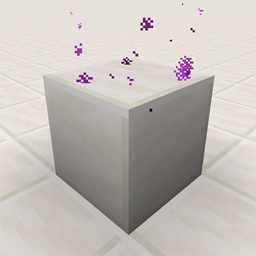
The Quartz Elevator mod is inspired by the OpenBlocks Elevators and the Simple Elevators. Adds Quartz Elevator and Smooth Quartz Elevator.
You can teleport between elevators with the same (x, z) coordinates: jump to go up and crouch to go down.
Requires
The Quartz Elevator mod requires:
- Fabric Loader
- Fabric API
Recipe
Quartz Elevator
- [Crafting] Brock of Quartz x1 + Ender Pearl x1 (shapeless crafting)
- [Crafting] Nether Quartz x4 + Ender Pearl x1 (shaped crafting like the below image)
- can be mined using any pickaxe. If mined without a pickaxe, it drops nothing.
Smooth Quartz Elevator
- [Crafting] Smooth Quartz Block x1 + Ender Pearl x1 (shapeless crafting)
- [Smelting] Quartz Elevator x1 + any fuel
- can be mined using any pickaxe. If mined without a pickaxe, it drops nothing.
Config
Maximum teleport distance
- "Quartz Elevator": 16 blocks
- "Smooth Quartz Elevator": 64 blocks
These are default values and can be configurable.
Mix types (Version 1.2.0+)
You cannot move between different elevator types by default, but can be configurable.
Entity filter
"Player Only" value is false by default. If "Player Only" is true, only player entities can teleport.
Display Particles (Version 2.1.0+/1.3.0+)
"Display Particles" value is true by default. If "Display Particles" is false, the particles of quartz elevator is not displayed.
ModMenu Integration
The above values can be configured with the ModMenu GUI screen.
Ako nainštalovať Quartz Elevator
With Millida Launcher
Install Millida Launcher
The launcher is free: download it at millida.net/launcher and sign in with any nickname.
Click “Install” on this page
The launcher opens and installs the mod for Minecraft 1.21.9–1.21.11 on Fabric automatically.
Launch the game
A profile with it appears in the launcher: click “Play”.
Manually
Install Fabric
The loader must match the game version of the mod file, for example Minecraft 1.21.11. After installing it, a separate profile appears in your launcher.
Download the file for your version
In the version list above, pick the file quartz-elevator-2.3.7+1.21.11.jar (1.0 MB) for your game version.
Put it in the mods folder
The folder is inside .minecraft (Windows: %appdata%\.minecraft\mods). If it does not exist, create it.
Launch the loader profile
Open “Mods” in the main menu: Quartz Elevator should be in the list.
Minecraft 1.21.11 runs on Java 21: with a different Java version the game may close right after launch.
Verzie
So závislosťami
| Minecraft | Loader | Súbor | Dátum | Akcie |
|---|---|---|---|---|
| 1.21.9 | Fabric | Quartz Elevator v2.3.7+1.21.111 MB 3 | ||
| — | Fabric | Quartz Elevator v2.1.2 for 1.19-rc21009 KB | ||
| — | Fabric | Quartz Elevator v1.2.5 for 1.18 Experimental Snapshot 1897 KB |
Recenzie
Buď prvý, kto ohodnotí Quartz Elevator


