

Pack Analytics Mod pre Minecraft 1.20.1, 1.21.1
Collects player count metrics for modpack authors.
 NeoForge
 Fabric
 Forge
ForgeO mode Pack Analytics

Simple mod that collects anonymous player count metrics for modpack authors, sends it to a centralized web server, and stores it in InfluxDB for easy Grafana viewing of historical data.



This mod integrates with Better Compatibility Checker and will use the version number from your BCC config if possible.
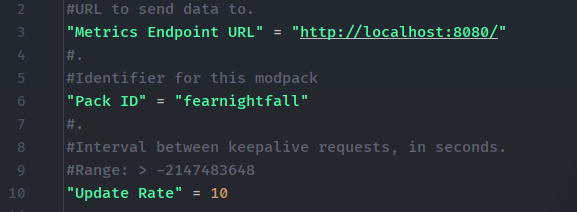
Metrics endpoint URL is configurable, as well as pack ID and the rate at which keepalive requests should be sent.
You can find an example server here on GitHub, which just collects current usage stats for each modpack ID and optionally sends it over to Grafana.
Note: this mod does not send player information, usernames, or IDs. It just makes a simple "I'm playing" request with the modpack version you are on, every so often, to track online players.
Ako nainštalovať Pack Analytics
With Millida Launcher
Install Millida Launcher
The launcher is free: download it at millida.net/launcher and sign in with any nickname.
Click “Install” on this page
The launcher opens and installs the mod for Minecraft 1.20–1.21.1 on Fabric, Forge or NeoForge automatically.
Launch the game
A profile with it appears in the launcher: click “Play”.
Manually
Install Fabric, Forge or NeoForge
The loader must match the game version of the mod file, for example Minecraft 1.21.1. After installing it, a separate profile appears in your launcher.
Download the file for your version
In the version list above, pick the file packanalytics-neoforge-1.0.5-1.21.1.jar (706 KB) for your game version and loader.
Put it in the mods folder
The folder is inside .minecraft (Windows: %appdata%\.minecraft\mods). If it does not exist, create it.
Launch the loader profile
Open “Mods” in the main menu: Pack Analytics should be in the list.
Minecraft 1.21.1 runs on Java 21: with a different Java version the game may close right after launch.
Verzie
So závislosťami
| Minecraft | Loader | Súbor | Dátum | Akcie |
|---|---|---|---|---|
| 1.21.1 | NeoForge | PackAnalytics Neoforge 1.0.5 for 1.21.1706 KB | ||
| 1.21.1 | Fabric | PackAnalytics Fabric 1.0.4 for 1.21.11.3 MB | ||
| 1.20.1 | Forge | PackAnalytics Forge 1.0.4 for 1.20.1706 KB |
FAQ
Which Minecraft versions does Pack Analytics work on?
There are files for 1.21.1, 1.20.1, 1.20. The newest is 1.21.1.
Is Pack Analytics for Forge or Fabric?
There are files for Fabric: 1.21.1, for Forge: 1.20–1.20.1 and for NeoForge: 1.21.1.
Does Pack Analytics need other mods?
The author lists no required dependencies: the Fabric, Forge or NeoForge loader is enough.
Which Java does Pack Analytics need?
Minecraft 1.21.1 runs on Java 21. If the game closes right after launch, the usual cause is the wrong Java version in the profile settings.
Where can I download Pack Analytics safely?
On this page: the file packanalytics-neoforge-1.0.5-1.21.1.jar (706 KB) is stored on Millida’s server, with no link shorteners. SHA-1 checksum: 2bd790f7347c95f6227d0030cfa335a5422f1997.
Recenzie
Buď prvý, kto ohodnotí Pack Analytics


