

- zobrazení
- 13 zobrazení
- Aktualizované
- Aktualizované 18.10.2026
- 1.17.1 — 1.21.1
 Fabric
O mode Oxidized
Oxidized aims to provide more uses for vanilla copper. Each feature is designed so that it could fit with or stay close to vanilla Minecraft.
About:
Copper Pulsar: This item is an electromagnet inspired tool. While in the player's inventory, the pulsar will allow you to pick up experience orbs and items from up to x10 farther than the normal pickup range. It can be toggled on and off using right-click.
Copper Rail: The Copper Rail functions almost identical to the Powered Rail. The difference is that a chain of connected copper rails can stay powered for up to 100 blocks as compared to 8 blocks with the Powered Rail.
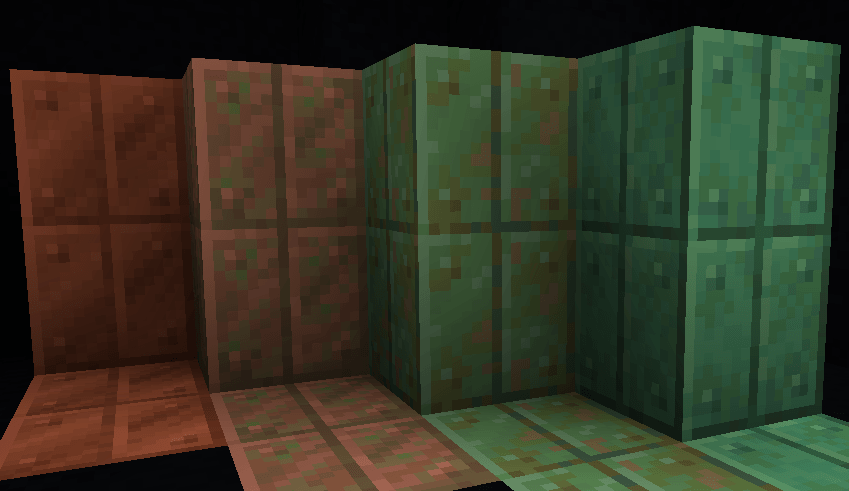
Vertical Cut Copper: Vertical cut copper is a building block that is designed like a copper block with a line through the middle. This is inspired off of the original cut copper design that was later changed in the full release. Vertical cut copper can oxidize like normal copper but waxing it with a honey comb can stop this process.
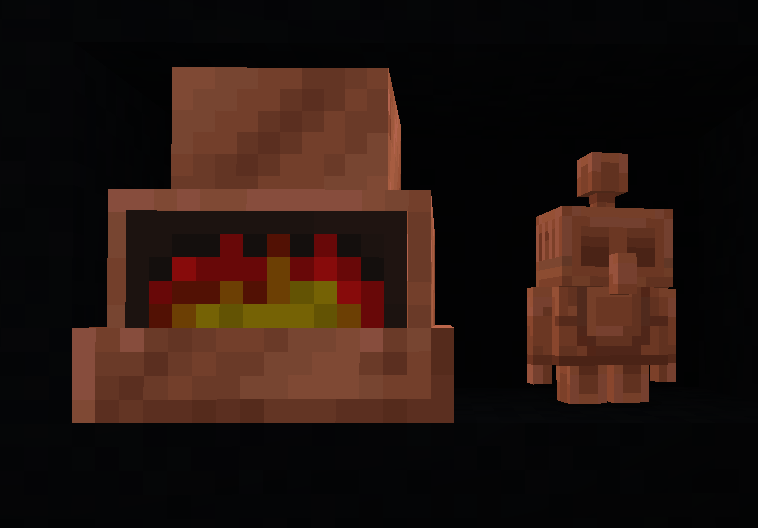
Copper Kiln: The Copper Kiln is a new unique furnace type. This kiln can smelt cobblestone, clay, sand, and logs at extremely fast speeds. The kiln is meant for obtaining terracotta, bricks, stone, charcoal and glass for building quickly. It functions like the smoker and blast furnace.
Copper Lantern: Copper Lanterns are a new lantern type that emit a green flame. They can be crafted with 8 copper nuggets around a single torch. Copper lanterns function the same as normal lanterns. (Copper nuggets are obtained by putting a copper ingot in a crafting table)
Rose Gold Tools: Rose Gold is a new tool material that can be made in a smithing table. There is no rose gold ingot, as it is made by crafting a Rose Gold Upgrade Template, copper ingot, and golden tool in a smithing table. Rose gold tools provide a similar durability and mining level to Iron tools but they are as fast and enchantable as gold tools.
Copper Pan:The Copper Pan is a unique block that allows the player to passively pan for resources such as clay and iron nuggets. The pan will only work if it is placed in water and on a sand or gravel block. Overtime the pan will sift and release items it finds. The current loot pool includes: Iron Nugget (15%), Gold Nugget (15%), Sand (24%), Emerald (2%), Gravel (12%), Clay Ball (32%). The speed at which the pan finds items is relative to the random tick speed.
Copper Golem: The Copper Golem is a mob based off of the Minecraft Mob Vote 2021. It can be created by placing a copper/cut copper block on the bottom, carved pumpkin in the middle, and lightning rod on top. The golem will wander around and can press copper buttons nearby (Copper Buttons have been added but not yet obtainable in survival). Copper Golems will oxidize over a long period of time, but will walk towards lightning rods in thunderstorms, and will un-oxidize when struck.
Copper Trap: The Copper Trap is a bear trap like block that can be placed down. It is crafted with 6 copper ingots and 2 flint. When stepped on, the trap deals 5 damage and stops the victim from moving away. The trap will open back up after closing for 3 seconds. It can be toggled manually by right-clicking or with redstone (levers, buttons, etc).
[1.19.3+] Copper Barometer: The Copper Barometer is a weather prediction tool crafted with copper ingots, redstone, and glass. When right-clicked, the barometer will provide you with information about the upcoming weather or when the current precipitation will end.
Versions
Available on the Fabric modloader for 1.17+
Credits:
Credit to zacthornetv for the rose gold tool textures
Ako nainštalovať Oxidized
With Millida Launcher
Install Millida Launcher
The launcher is free: download it at millida.net/launcher and sign in with any nickname.
Click “Install” on this page
The launcher opens and installs the mod for Minecraft 1.17.1–1.21.1 on Fabric automatically.
Launch the game
A profile with it appears in the launcher: click “Play”.
Manually
Install Fabric
The loader must match the game version of the mod file, for example Minecraft 1.21.1. After installing it, a separate profile appears in your launcher.
Download the file for your version
In the version list above, pick the file oxidized-1.8.4.jar (169 KB) for your game version.
Put it in the mods folder
The folder is inside .minecraft (Windows: %appdata%\.minecraft\mods). If it does not exist, create it.
Launch the loader profile
Open “Mods” in the main menu: Oxidized should be in the list.
Minecraft 1.21.1 runs on Java 21: with a different Java version the game may close right after launch.
Verzie
So závislosťami
| Minecraft | Loader | Súbor | Dátum | Akcie |
|---|---|---|---|---|
| 1.21.1 | Fabric | Oxidized 1.8.4 (1.21.1)169 KB | ||
| 1.17.1 | Fabric | Oxidized 1.5.0-alpha (1.17.1)159 KB |
FAQ
Which Minecraft versions does Oxidized work on?
There are files for 1.21.1, 1.17.1. The newest is 1.21.1.
Is Oxidized for Forge or Fabric?
Only for Fabric: 1.17.1–1.21.1. There are no files for Forge or NeoForge: a mod for another loader will not start.
Does Oxidized need other mods?
The author lists no required dependencies: the Fabric loader is enough.
Which Java does Oxidized need?
Minecraft 1.21.1 runs on Java 21. If the game closes right after launch, the usual cause is the wrong Java version in the profile settings.
Where can I download Oxidized safely?
On this page: the file oxidized-1.8.4.jar (169 KB) is stored on Millida’s server, with no link shorteners. SHA-1 checksum: 230f84079defc3896b561cce6e830e4565f5f839.
Recenzie
Buď prvý, kto ohodnotí Oxidized


