
Multi-Piston Mod pre Minecraft 1.20.1, 1.21.1
Multi-directional Piston Block
 NeoForge
 Forge
ForgeO mode Multi-Piston
Multi-piston is a mod created by the Ldt-team which also creates and maintains minecolonies, structurize, blockout and armory.
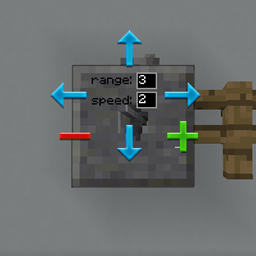
Multi-piston adds a multipiston block to the game which allows you to suck in any block from a defined direction and spit it out into any direction with definable speed and range
Recipe:
Horizontal:
Vertical:
Bridge:
Configuration:
FAQ:
How does the GUI work?
- Right-click the block to open the GUI.
- Right-click the input direction and left-click the output direction
- Edit the range and speed, exit the GUI via the escape button.
How can I increase the range?
- Max range is 10, until it reaches a different type of block
Can I increase the speed?
- Only up to 3, might support more in the future.
Can I change the sound?
- Might be added in the future as well.
Does it work with redstone?
- Yes, it works with buttons, levers and any redstone input as normal pistons.
Ako nainštalovať Multi-Piston
With Millida Launcher
Install Millida Launcher
The launcher is free: download it at millida.net/launcher and sign in with any nickname.
Click “Install” on this page
The launcher opens and installs the mod for Minecraft 1.18.2–1.21.1 on Forge or NeoForge automatically.
Launch the game
A profile with it appears in the launcher: click “Play”.
Manually
Install Forge or NeoForge
The loader must match the game version of the mod file, for example Minecraft 1.21.1. After installing it, a separate profile appears in your launcher.
Download the file for your version
In the version list above, pick the file multipiston-1.2.58-1.21.1.jar (33 KB) for your game version and loader.
Put it in the mods folder
The folder is inside .minecraft (Windows: %appdata%\.minecraft\mods). If it does not exist, create it.
Launch the loader profile
Open “Mods” in the main menu: Multi-Piston should be in the list.
Minecraft 1.21.1 runs on Java 21: with a different Java version the game may close right after launch.
Verzie
So závislosťami
| Minecraft | Loader | Súbor | Dátum | Akcie |
|---|---|---|---|---|
| 1.20.1 | Forge | multipiston-1.20-0.0.47-snapshot.jar38.6 KB 10 | ||
| 1.21 | NeoForge | multipiston-1.2.58-1.21.1.jar33.3 KB 9 | ||
| 1.21 | NeoForge | multipiston-1.2.55-1.21.1-snapshot.jar32.6 KB | ||
| 1.20.1 | NeoForge, Forge | multipiston-1.20-1.2.43-RELEASE.jar37.8 KB | ||
| 1.20.4 | NeoForge | multipiston-1.20.4-1.2.37-ALPHA-universal.jar33 KB | ||
| 1.20.1 | Forge | multipiston-1.20-1.2.32-ALPHA.jar37.8 KB | ||
| 1.18.2 | — | multi-piston-1.18.2-1.2.13-ALPHA.jar50.1 KB |
FAQ
Is Multi-Piston for Forge or Fabric?
There are files for Forge: 1.20–1.20.1 and for NeoForge: 1.20–1.21.1. There are no files for Fabric: a mod for another loader will not start.
Does Multi-Piston need other mods?
The author lists no required dependencies: the Forge or NeoForge loader is enough.
Which Java does Multi-Piston need?
Minecraft 1.21.1 runs on Java 21. If the game closes right after launch, the usual cause is the wrong Java version in the profile settings.
Where can I download Multi-Piston safely?
On this page: the file multipiston-1.2.58-1.21.1.jar (33 KB) is stored on Millida’s server, with no link shorteners. SHA-1 checksum: 2b63be739da24247328e4052ec91c928230d0390.
Recenzie
Buď prvý, kto ohodnotí Multi-Piston


