

Moo Fluids Mod pre Minecraft 1.12.2
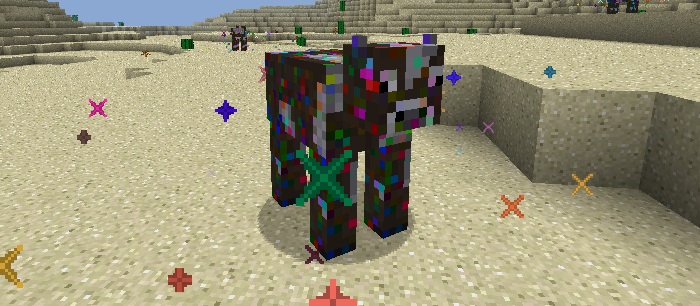
Dynamically adds different Cows that when bucketed give you different fluids.
O mode Moo Fluids

Mod information:
Idea:

- The concept behind the mod is to make Cows that are dynamically generated according to what is in the Forge Fluid Registry.
Cow Features:
- Fluid randomly selected.
- When you right click the cow with an empty fluid container (bucket, cell, etc) it will attempt to give you a filled version of that container.
- When you right click the cow with a full fluid container (bucket, cell, etc) it will attempt to heal the cow and remove the fluid from the container.
- When you right click the cow with an item it will check to see if that is the correct breeding item for the cow and set the cow to "breeding mode"
- Certain cows (if the right mods are installed) will be able to breed with other types of cow with different fluids to produce new Cows with set fluids... (e.g. Cobalt Cow + Ardite Cow = Manyullyn Cow)
- If a Cow's fluid is three times more dense then lava, the Cow will not be able to swim.
- If a Cow's fluid is the same temperature (or hotter) than lava, the Cow will set you on fire when you touch it or punch it with an empty hand (configurable).
- A Cow may only be bucketed when it is an adult, and there is a cooldown (configurable) between when you can interact with it (with right click).
Recipes:
- 3 Leather + 2 String + 2 Iron ingots = Saddle (can enable/disable in configs, off by default)
Config options:
- The individual Cow breeding item (item ID followed by item metadata).
- The individual Cow dropped item, on death (item ID followed by item metadata).
- The individual Cow grow up time (The time taken for the Cow to become an adult, in ticks).
- The individual Cow interaction cooldown time (The time between when you can attempt to right click the Cow to interact with it).
- Whether the Cow can spawn or not.
- The global spawn rarity of ALL Cows.
- The individual spawn rarity of a Cow.
- Whether saddles can be made or not.
Ako nainštalovať Moo Fluids
With Millida Launcher
Install Millida Launcher
The launcher is free: download it at millida.net/launcher and sign in with any nickname.
Click “Install” on this page
The launcher opens and installs the mod for Minecraft 1.12.1–1.12.2 automatically.
Launch the game
A profile with it appears in the launcher: click “Play”.
Manually
Download the file for your version
In the version list above, pick the file MooFluids-1.12.2-1.8.12.02a.jar (88 KB) for your game version.
Put it in the mods folder
The folder is inside .minecraft (Windows: %appdata%\.minecraft\mods). If it does not exist, create it.
Launch the loader profile
Open “Mods” in the main menu: Moo Fluids should be in the list.
Minecraft 1.12.2 runs on Java 8: with a different Java version the game may close right after launch.
Verzie
So závislosťami
| Minecraft | Loader | Súbor | Dátum | Akcie |
|---|---|---|---|---|
| 1.12.1 | — | MooFluids-1.12.2-1.8.12.02a.jar87.6 KB | ||
| 1.12.1 | — | MooFluids-1.12.2-1.7.11.02a.jar84.7 KB |
FAQ
Which Minecraft versions does Moo Fluids work on?
There are files for 1.12.2, 1.12.1. The newest is 1.12.2.
Which Java does Moo Fluids need?
Minecraft 1.12.2 runs on Java 8. If the game closes right after launch, the usual cause is the wrong Java version in the profile settings.
Where can I download Moo Fluids safely?
On this page: the file MooFluids-1.12.2-1.8.12.02a.jar (88 KB) is stored on Millida’s server, with no link shorteners. SHA-1 checksum: 163085fe352f0ddbae01a6514ef7c49bb3e910f0.
Recenzie
Buď prvý, kto ohodnotí Moo Fluids


