
 NeoForge
 Fabric
 Forge
O mode Long NBT Killer
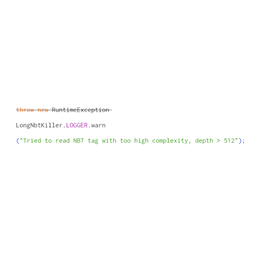
When Minecraft is encountering any compound / list nbt tag with a depth greater than 512, it throws an exception and refuses to load the save.
This mod replaced the annoying mechanism with a harmless log warning, and let the game go ahead.
Unfortunately, the erroneous behavior of certain mods can cause the NBT depth to increase continuously, eventually leading to a StackOverflowError. Consequently, users may need to identify the specific mods responsible and take appropriate action. According to a report by the user "ABadHaiku," such issues are relatively common in some MCreator mods. He has already contacted the developers of MCreator, who have since fixed this problem in the latest version. If users can determine the source of the glitch, they should report it to the mod's author. Additionally, "ABadHaiku" has provided a method for repairing affected save files here.
ATTENTION:
A compound / list nbt tag with a depth greater than 512 itself is abnormal, and you may check your save via NBT editor after receiving the warning in the log;
You DEFINITELY CAN add the mod to your modpack.
Ako nainštalovať Long NBT Killer
With Millida Launcher
Install Millida Launcher
The launcher is free: download it at millida.net/launcher and sign in with any nickname.
Click “Install” on this page
The launcher opens and installs the mod for Minecraft 1.21.3–1.21.8 on Fabric, Forge or NeoForge automatically.
Launch the game
A profile with it appears in the launcher: click “Play”.
Manually
Install Fabric, Forge or NeoForge
The loader must match the game version of the mod file, for example Minecraft 1.21.8. After installing it, a separate profile appears in your launcher.
Download the file for your version
In the version list above, pick the file LongNBTKiller-NeoForge-1.21.8-1.0.0.jar (4 KB) for your game version and loader.
Put it in the mods folder
The folder is inside .minecraft (Windows: %appdata%\.minecraft\mods). If it does not exist, create it.
Launch the loader profile
Open “Mods” in the main menu: Long NBT Killer should be in the list.
Minecraft 1.21.8 runs on Java 21: with a different Java version the game may close right after launch.
Verzie
So závislosťami
| Minecraft | Loader | Súbor | Dátum | Akcie |
|---|---|---|---|---|
| 1.21.8 | NeoForge | LongNBTKiller-NeoForge-1.21.8-1.0.0.jar4 KB | ||
| 1.21.8 | Fabric | LongNbtKiller-Fabric-1.21.8-1.0.0.jar3.6 KB | ||
| 1.21.3 | Forge | LongNBTKiller-Forge-1.21.3-1.0.0.jar5.3 KB |
FAQ
Which Minecraft versions does Long NBT Killer work on?
There are files for 1.21.8, 1.21.3. The newest is 1.21.8.
Is Long NBT Killer for Forge or Fabric?
There are files for Fabric: 1.21.8, for Forge: 1.21.3 and for NeoForge: 1.21.8.
Does Long NBT Killer need other mods?
The author lists no required dependencies: the Fabric, Forge or NeoForge loader is enough.
Which Java does Long NBT Killer need?
Minecraft 1.21.8 runs on Java 21. If the game closes right after launch, the usual cause is the wrong Java version in the profile settings.
Where can I download Long NBT Killer safely?
On this page: the file LongNBTKiller-NeoForge-1.21.8-1.0.0.jar (4 KB) is stored on Millida’s server, with no link shorteners. SHA-1 checksum: 42f6036a4d238640c5190407a0a975aef705b0bb.
Recenzie
Buď prvý, kto ohodnotí Long NBT Killer


