

Just Enough Calculation Mod pre Minecraft 1.12.2, 1.19.2
A simple mod help you calculate the cost for recipes
 Quilt
Quilt Forge
Forge Fabric
What it does
It is a simple calculator to help you calculate how many of resources you need to gather for certain items. You can manage tons of crafting procedures with the help of it. Actually it is designed for some mega packs to help you manage the crafting things manually without drove mad by the crazy steps. You must have JEI installed for it to work.
How to use
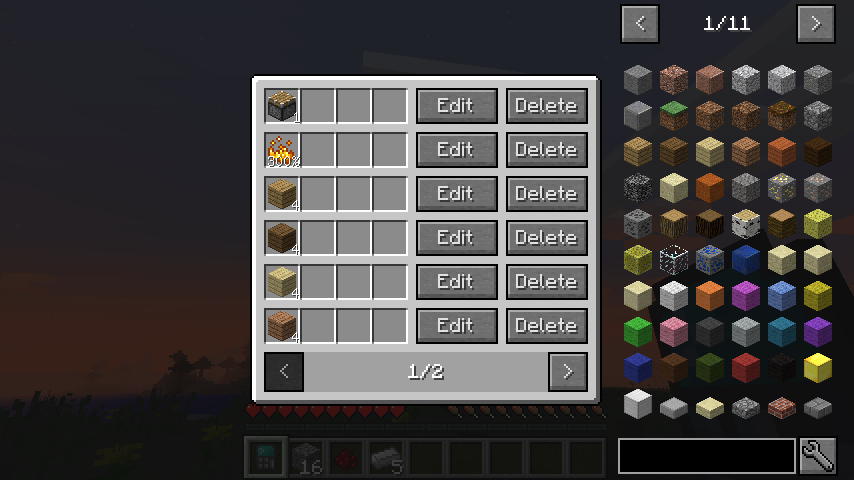
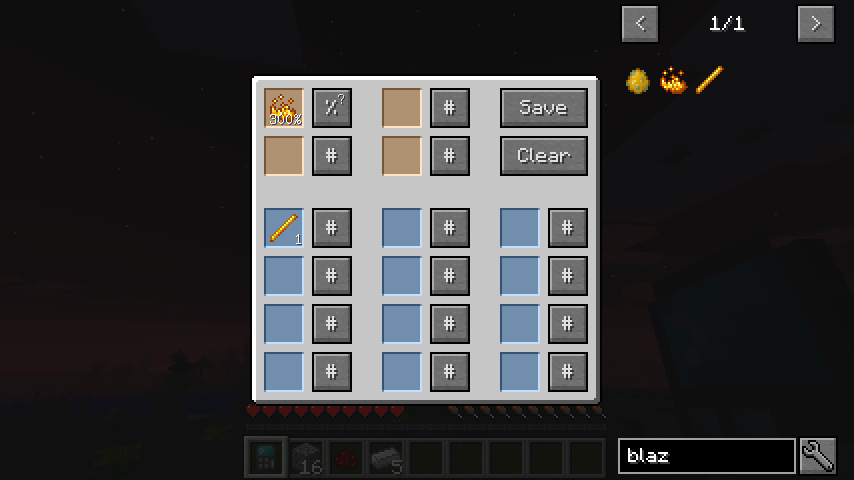
The mod adds an item called Crafting Calculator, right click with it in hand to open the GUI. Putting any item into the upper-left slot will let the calculator to calculate the cost. One thing to notice: You need to input the recipes needed for it to work since there might be many recipes for one item, automatically loading the recipe may lead to a mess. Please find a video introduction at section of your version.
Features
- JEI "+"-click supported
- Percentage supported
- Liquid supported (since 1.9)
- Check Player's inventory for missing ingredients (can be disabled)
- Recursive computation, it will find if the ingredients can be crafted in other recipes.
Modpack
Since curse is sometimes buggy with comment, so I would reply here. Definitely you can use it in your modpack and distribute. That's my pleasure. I would highly suggest you to include the mod openeye in your pack, since this mod can help every mod author to track crashes easily.
You are welcomed to join the discord server => https://discord.gg/M3fNfTW
1.18 & 1.19 & 1.20 Version (4.0.0+)
What's new:
- REI support
- Fabric & Quilt version
1.16 & 1.18 Version (3.9.0+)
What's new:
- Calculator widget (You can use calculator in any UI now!)
1.14 & 1.15 & 1.16 Version
What's new:
- Tag labels (for both item and fluids) as replacement of OreDict
- Recipes with infinite size
1.12.2 Version
You can use mouse scroll to edit amount.
What's new:
- Option for client mode
- Full OreDict support
- Powerful and smart label system
- Import / export / default recipes
- Better help document
1.9.4 & 1.10.2 Version
This version is a totally rewrite of the old work, adding many exciting features. Actually I have to say it might be kind of confusing the first time you use it, but it will become easy when you get to know it. You can refer to the video introduction if you need help.
What's new
- A new math calculator! Convert to math calculator using shift-right click.
- Easy calculation for items as a group. Try use the "Label" item in your recipes!
- Recipes can be sorted into groups.
- A strengthened search tool to help you manage records better.
- Fully fluid support
- Configurable oreDict entry
- Better inventory scanning
- Tons of optimization
Video introduction
Spotlight by whizzball1 (youtube: minecraftinchocolate) :
Introduction from myself:
1.8.9 Version
This is the first version I start to work on. It doesn't have new features and will not be updated.
Honestly speaking, it is not very convenient to use, but it's stable and the result is reliable as in every version.
Video introduction
1.7.10 Version
Version 3.X
Thanks to Discreater for bringing most of 1.16+ features back to 1.7.10. This version is client only, which means there is no calculator item. The only way to use it is key bindings. The key bindings are not set by default, so you need to set the key bindings first. Check this page for full description.
What's new
- Infinite inputs, outputs and catalysts of recipe
- Fast recipe trasfer support for several 3rd party mods
- Math calculation
- Other features from 1.16+ version
Version 0.X
- Need NEI installed to work!
- Use NEI's drag and drop interaction to choose items.
- NEI's "?"-click is also supported. Use shift-click-"?" in recipe GUI for auto complete.
- Works not perfect in cheat mode since NEI often want to insert items to the GUI.
- The key "R" to show recipe doesn't work in the Calculator GUI, use left click instead.
- All the recipe type will be loaded once you open the Calculator GUI.
- Other things just work similarly as in 1.8.9 version.
What's new
- Calculation is done automatically, no need to hit the calculate button
- It now records the 6 latest calculated item. Click the item in the recent list will put it to the top slot.
- Click the items in the result slot will show the recipes for it, the same as given by NEI.
- It provides the procedure to get the item crafted
Credits
jhhgiyv for port to 1.20
6LeoY for port to 1.18, 1.19, 1.20 and Fabric & Quilt
ekgame for most work on calculator widget
MorningSage for porting the mod to 1.16.x
- kellixon, xMrVizzy for ru_RU.lang
- ACGaming for de_DE.lang
- sesess's modding tutorial (Chinese)
- Pahimar's Let's mod reboot
- MrCrayfish's modding tutorial
- BedrockMiner's modding tutorial
I'm not a native English speaker, so forgive my awkward English.
Have fun!
Ako nainštalovať Just Enough Calculation
With Millida Launcher
Install Millida Launcher
The launcher is free: download it at millida.net/launcher and sign in with any nickname.
Click “Install” on this page
The launcher opens and installs the mod for Minecraft 1.12.2–1.19.2 on Fabric, Forge or Quilt automatically.
Launch the game
A profile with it appears in the launcher: click “Play”.
Manually
Install Fabric, Forge or Quilt
The loader must match the game version of the mod file, for example Minecraft 1.19.2. After installing it, a separate profile appears in your launcher.
Download the file for your version
In the version list above, pick the file jecalculation-quilt-1.19.2-4.0.3.jar (351 KB) for your game version and loader.
Put it in the mods folder
The folder is inside .minecraft (Windows: %appdata%\.minecraft\mods). If it does not exist, create it.
Launch the loader profile
Open “Mods” in the main menu: Just Enough Calculation should be in the list.
Minecraft 1.19.2 runs on Java 17: with a different Java version the game may close right after launch.
Verzie
So závislosťami
| Minecraft | Loader | Súbor | Dátum | Akcie |
|---|---|---|---|---|
| 1.18.2 | Quilt | jecalculation-quilt-1.18.2-4.0.4.jar360 KB | ||
| 1.18.2 | Fabric | jecalculation-fabric-1.18.2-4.0.4.jar360 KB | ||
| 1.18.2 | Forge | jecalculation-forge-1.18.2-4.0.4.jar362 KB | ||
| 1.19.2 | Quilt | jecalculation-quilt-1.19.2-4.0.3.jar351 KB | ||
| 1.19.2 | Forge | jecalculation-forge-1.19.2-4.0.3.jar351 KB | ||
| 1.19.2 | Fabric | jecalculation-fabric-1.19.2-4.0.3.jar351 KB | ||
| 1.19.2 | Forge | jecalculation-forge-1.19.2-4.0.2.jar350 KB | ||
| 1.19.2 | Quilt | jecalculation-quilt-1.19.2-4.0.2.jar351 KB |
FAQ
Is Just Enough Calculation for Forge or Fabric?
There are files for Fabric: 1.18.2–1.19.2, for Forge: 1.18.2–1.19.2 and for Quilt: 1.18.2–1.19.2. There are no files for NeoForge: a mod for another loader will not start.
Does Just Enough Calculation need other mods?
The author lists no required dependencies: the Fabric, Forge or Quilt loader is enough.
Which Java does Just Enough Calculation need?
Minecraft 1.19.2 runs on Java 17. If the game closes right after launch, the usual cause is the wrong Java version in the profile settings.
How do I download Just Enough Calculation?
With Millida Launcher: it installs Just Enough Calculation into a modpack by itself, for the right game version and loader. The launcher is free.
Recenzie
Buď prvý, kto ohodnotí Just Enough Calculation


