

Jade 🔍 Mod pre Minecraft 1.20.1, 1.21.1
Shows information about what you are looking at. (Hwyla/Waila fork for Minecraft 1.16+)
 NeoForge
 Fabric
 Quilt
Quilt Forge
ForgeJade 🔍
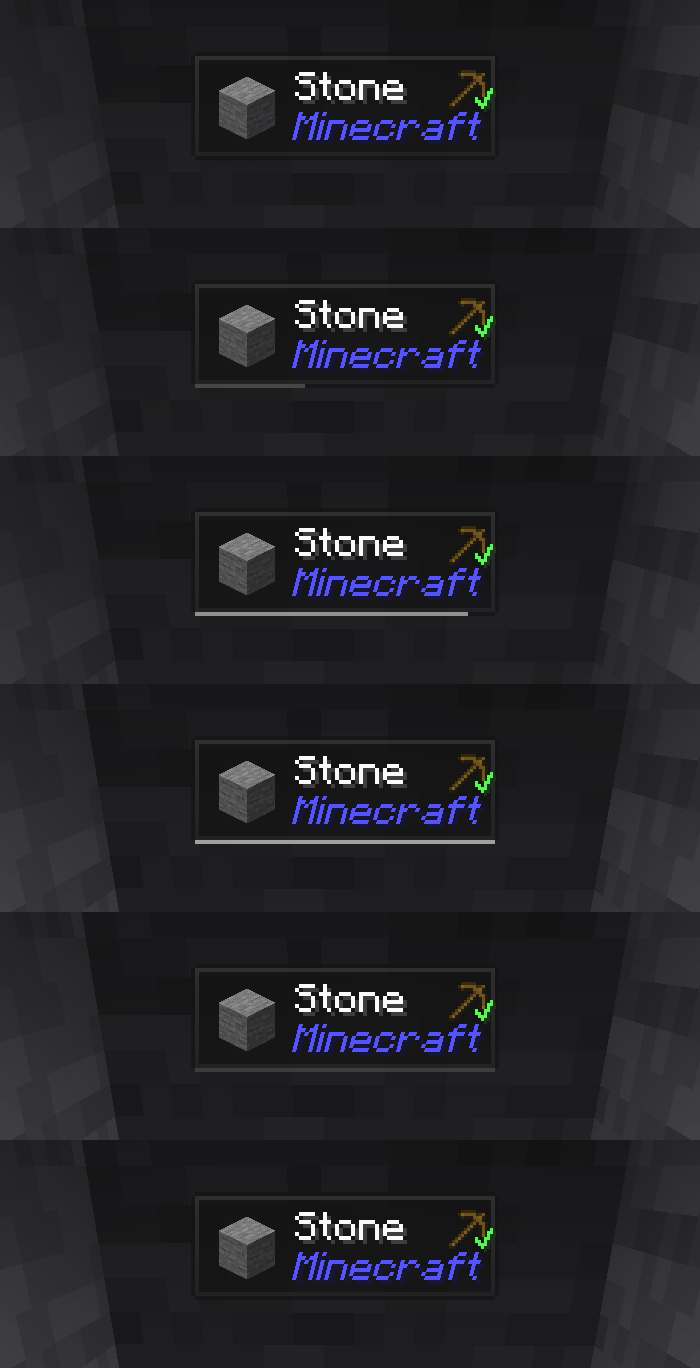
Jade is the information HUD mod - Hwyla/Waila for modern Minecraft versions. Designed for better user experience and API.
Jade can be installed only on the client side. But many features require Jade on the server side. (item storage, brewing stand fuel amount, bees in beehive...)
For mod integration, try Jade Addons: NeoForge Fabric

Keys (default):
- Keypad 0: Open configuration screen
- Keypad 1: Toggle overlay
- Keypad 2: Toggle liquid display
- Keypad 3: Show recipes (Requires JEI)
- Keypad 4: Show uses (Requires JEI)
- Keypad 5: Narrate target

Notable changes compared to Hwyla:
- API re-design
- More vanilla addons
- Higher configurability
- Better accessibility
As required by the original project Hwyla, Jade utilizes the Creative Commons Attribution-NonCommercial-ShareAlike 4.0 International (CC BY-NC-SA 4.0) license.
Ako nainštalovať Jade 🔍
With Millida Launcher
Install Millida Launcher
The launcher is free: download it at millida.net/launcher and sign in with any nickname.
Click “Install” on this page
The launcher opens and installs the mod for Minecraft 1.16–26.3 on Fabric, Forge, NeoForge or Quilt automatically, together with its dependencies: Fabric API.
Launch the game
A profile with it appears in the launcher: click “Play”.
Manually
Install Fabric, Forge, NeoForge or Quilt
The loader must match the game version of the mod file, for example Minecraft 26.3. After installing it, a separate profile appears in your launcher.
Download the file for your version
In the version list above, pick the file Jade-mc26.3-NeoForge-26.3.5.jar (1.0 MB) for your game version and loader.
Put it in the mods folder
The folder is inside .minecraft (Windows: %appdata%\.minecraft\mods). If it does not exist, create it. Required dependencies go there too: Fabric API.
Launch the loader profile
Open “Mods” in the main menu: Jade 🔍 should be in the list.
On a server
A server on Fabric, Forge, NeoForge or Quilt
The mod only works on a server with the same loader and game version, for example 26.3.
File goes into the server’s mods folder
Stop the server, put the mod file into the mods folder and start the server again.
Use the “To server” button
On Millida Hosting, the button at the top of the page uploads the file to your server and restarts it for you.
Verzie
So závislosťami
| Minecraft | Loader | Súbor | Dátum | Akcie |
|---|---|---|---|---|
| 26.1.2 | NeoForge | 26.1.21005 KB 7 | ||
| 26.3 | NeoForge | 26.31 MB 21 | ||
| 26.3 | Fabric, Quilt | 26.31 MB 626 | ||
| 26.3 | NeoForge | 26.31 MB 1 | ||
| 26.3 | Fabric, Quilt | 26.31 MB | ||
| 26.3 | Fabric, Quilt | 26.31 MB | ||
| 26.3 | Fabric, Quilt | 26.31 MB | ||
| 26.3 | NeoForge | 26.31007 KB |
Čo potrebuje na spustenie
- Fabric APIpovinné
- Just Enough Items (JEI)nepovinné
Obsah, ktorý to vyžaduje
Recenzie
Buď prvý, kto ohodnotí Jade 🔍


