

 Fabric
 NeoForge
 Forge
ForgeChipped
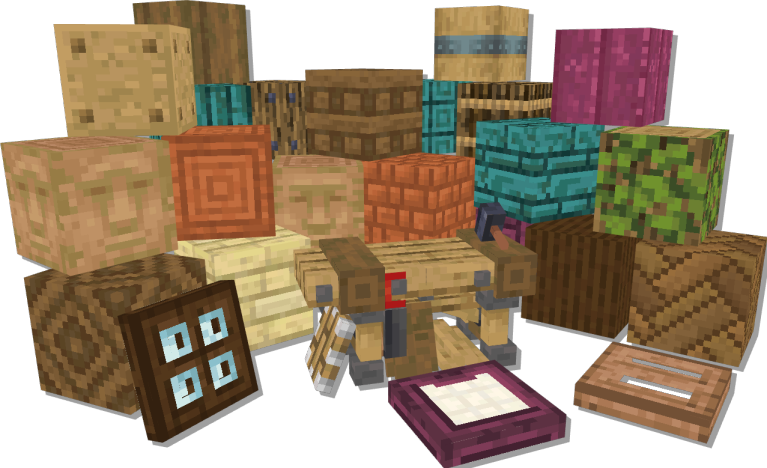
Have you ever wanted to build an epic castle with sandstone big bricks? Or maybe a nether fortress made out of pure magna? Perhaps you are just here to build a house out of dirt or a totem pole with the infamous dioritefaces? Either way we got you covered!
Chipped is a 1.16+ building mod that expands on the variety of blocks you can use in-game. The mod offers over 11,000 unique building blocks, from stained glass variations all the way to conerete, prismarine and even gilded blackstone! Not only are all the textures hand-made in the vanilla style, but they also include many connected textures, powered by Athena!
Inspired by the popular Chisel mod, Chipped allous builders to have their full range of creativity because every bock deserves a friend!
To start out all you have to do is craft one of the seven tables that allow you to change various vanilla blocks into their chipped variants. All tables look different, but work the same, so you can pick whichever looks best in your build, or make a few different ones and spread them out in your home. Whatever you want to do, Chipped can help you bring it to life!

Developers:
Alex Nijjar, Grim, MsRandom1, CodexAdrian, ThatGravyBoat

Artists:
Kekie6, Marc-IceBlade, Shrimp, Facu, Frogipher, SunsetSoup, Valilla, Brother Earth, Joosh, ArtistMonster, Zilver
Ako nainštalovať Chipped
With Millida Launcher
Install Millida Launcher
The launcher is free: download it at millida.net/launcher and sign in with any nickname.
Click “Install” on this page
The launcher opens and installs the mod for Minecraft 1.20.1–1.21.1 on Fabric, Forge or NeoForge automatically, together with its dependencies: Resourceful Lib, Fabric API, Athena.
Launch the game
A profile with it appears in the launcher: click “Play”.
Manually
Install Fabric, Forge or NeoForge
The loader must match the game version of the mod file, for example Minecraft 1.21.1. After installing it, a separate profile appears in your launcher.
Download the file for your version
In the version list above, pick the file chipped-fabric-1.21.1-4.0.2.jar (14 MB) for your game version and loader.
Put it in the mods folder
The folder is inside .minecraft (Windows: %appdata%\.minecraft\mods). If it does not exist, create it. Required dependencies go there too: Resourceful Lib, Fabric API, Athena.
Launch the loader profile
Open “Mods” in the main menu: Chipped should be in the list.
On a server
A server on Fabric, Forge or NeoForge
The mod only works on a server with the same loader and game version, for example 1.21.1.
File goes into the server’s mods folder
Stop the server, put the mod file into the mods folder and start the server again.
Use the “To server” button
On Millida Hosting, the button at the top of the page uploads the file to your server and restarts it for you.
Minecraft 1.21.1 runs on Java 21: with a different Java version the game may close right after launch.
Verzie
So závislosťami
| Minecraft | Loader | Súbor | Dátum | Akcie |
|---|---|---|---|---|
| 1.20.1 | Fabric | 1.20.114.4 MB 8 | ||
| 1.20.1 | Forge | 1.20.114.4 MB 68 | ||
| 1.20.4 | Fabric | 1.20.414.3 MB | ||
| 1.20.4 | NeoForge | 1.20.414.3 MB | ||
| 1.21.1 | Fabric | 1.21.114.3 MB 26 | ||
| 1.21.1 | NeoForge | 1.21.114.3 MB 55 | ||
| 1.21.1 | Fabric | 1.21.114.3 MB | ||
| 1.21.1 | NeoForge | 1.21.114.3 MB |
Čo potrebuje na spustenie
- Resourceful Libpovinné
- Fabric APIpovinné
- Athenapovinné
Recenzie
Buď prvý, kto ohodnotí Chipped


