
 NeoForge
 Forge
Bonsai Trees 4
You can find documentation for older versions of the mod here:
- 1.20.1
- 1.19.2
- 1.18.1
- 1.15.2
- 1.14.4
- 1.12.2
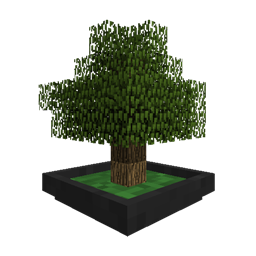
A Minecraft mod adding a block that grows small trees in a single block space.
How to get started
- Craft a Bonsai Pot and place it somewhere nice.
- Find some soil to use in your pot. Dirt will do for now. Right-click it on the Bonsai Pot.
- Get a tree sapling and right-click it on the Bonsai Pot. Or open the GUI and insert it into the sapling slot.
- Watch it grow.
- Open the GUI and insert an axe to automatically harvest the tree when it's ready.
- Try to enchant the tool or the pot for better harvests
A particular soil might be needed for some of the trees. And the different types of soil may provide different boosts to the growth of your Bonsai. It is recommended to use JEI to look up compatible saplings and available soils.
Changes from Bonsai Trees 3
- The mod has been mostly rewritten from scratch. Old libnonymous code has been integrated into the mod itself.
- The mod customization options have been changed.
- Upgrades like Bee Hives have been replaced by switching the drops of bonsais to Loot Tables. This allows for better tool compatibility checks and more flexibility for drops in general.
- Pots are now enchantable and apply their enchantments to the tool used to harvest the tree.
- The rendering system is now using VBOs to render the trees. This improves performance dramatically.
- A new auto-generation system in a separate mod. This allows for easier integration of new trees from other mods.
- There is now a small pot variant that grows smaller trees. Cute! Convert between the two in a crafting table.
- You can paint the pots with any other solid block. A good one is putting the logs or planks of the tree you're growing on the pot.
- And finally and most importantly: Pots can now be worn as a hat.
- Bonsai Trees 4 is visible source, but all rights reserved. Sorry. There was one too many "You made this? I made this!" interactions.
Ako nainštalovať Bonsai Trees 4
With Millida Launcher
Install Millida Launcher
The launcher is free: download it at millida.net/launcher and sign in with any nickname.
Click “Install” on this page
The launcher opens and installs the mod for Minecraft 1.12–1.21.1 on Forge or NeoForge automatically.
Launch the game
A profile with it appears in the launcher: click “Play”.
Manually
Install Forge or NeoForge
The loader must match the game version of the mod file, for example Minecraft 1.21.1. After installing it, a separate profile appears in your launcher.
Download the file for your version
In the version list above, pick the file bonsaitrees4-4.0.9.jar (3.6 MB) for your game version and loader.
Put it in the mods folder
The folder is inside .minecraft (Windows: %appdata%\.minecraft\mods). If it does not exist, create it.
Launch the loader profile
Open “Mods” in the main menu: Bonsai Trees 4 should be in the list.
Minecraft 1.21.1 runs on Java 21: with a different Java version the game may close right after launch.
Verzie
So závislosťami
| Minecraft | Loader | Súbor | Dátum | Akcie |
|---|---|---|---|---|
| 1.21.1 | NeoForge | bonsaitrees4-4.0.9.jar3.6 MB 22 | ||
| 1.21.1 | NeoForge | bonsaitrees4-4.0.1.jar3.3 MB | ||
| 1.20.1 | Forge | BonsaiTrees3-1.20.1-3.3.2.jar1.4 MB 17 | ||
| 1.18.1 | Forge | Bonsai Trees 3 v3.0.0389 KB | ||
| 1.15.2 | — | BonsaiTrees-2.1.1.4.jar179 KB 1 | ||
| 1.12.1 | — | bonsaitrees-1.1.4-b170.jar643 KB 1 |
Recenzie
Buď prvý, kto ohodnotí Bonsai Trees 4


