

O mode AE2 Stuff
This mods adds various bits and machines to Applied Energistics 2.
Requirements:
- Minecraft 1.7.10
- Reasonably recent version of MinecraftForge (Tested with 10.13.4.1448)
- Applied Energistics 2 rv2.stable
- BdLib 1.9.0
Warning: This mod is in beta state. Back up your worlds if you like them. I am not responsible for corrupted saves, reset chunks, stolen pizza and dead kitten.
Files with "-rv3" tag are intended for use with AE2 rv3 alpha. They will not work with rv2.
Added Blocks:
Added Blocks
- Crystal Growth Chamber
- Allows pure crystals to grow without dropping them into water
- Can also form Fluix Crystals
- Crystal seeds, and materials for Fluix crystals can be piped from any side
- Finished results can be extracted from any side
- Consumes 100 AE/t when active, will automatically switch off
- Crystals will fully grow within 600 ticks (~30 seconds)
- Accepts up to 3 speed upgrades
- Advanced Inscriber
- Has smarter sidedness than the normal version - thinks can be inserted and pulled out from all sides
- Items can stack in input/output slots
- Supports up to 5 speed upgrades
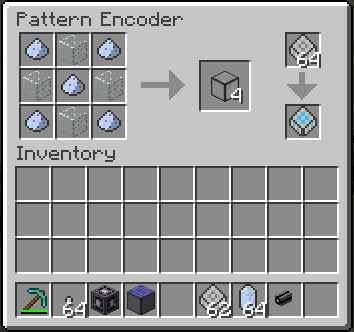
- Pattern Encoder
- Allows encoding patterns using NEI [?] button (a-la AE1 Pattern Encoder + NEI Addons)
- Requires network connection to function
- Consumes 1 AE/t constantly
Open Source
The mod is licensed under the MMPL-1.0, the source code is available on GitHub. Yes this means you have permission to add it to any public or private mod pack without asking.
Ako nainštalovať AE2 Stuff
With Millida Launcher
Install Millida Launcher
The launcher is free: download it at millida.net/launcher and sign in with any nickname.
Click “Install” on this page
The launcher opens and installs the mod for Minecraft 1.7.10–1.12.2 automatically.
Launch the game
A profile with it appears in the launcher: click “Play”.
Manually
Download the file for your version
In the version list above, pick the file ae2stuff-0.7.0.4-mc1.12.2.jar (501 KB) for your game version.
Put it in the mods folder
The folder is inside .minecraft (Windows: %appdata%\.minecraft\mods). If it does not exist, create it.
Launch the loader profile
Open “Mods” in the main menu: AE2 Stuff should be in the list.
Minecraft 1.12.2 runs on Java 8: with a different Java version the game may close right after launch.
Verzie
So závislosťami
| Minecraft | Loader | Súbor | Dátum | Akcie |
|---|---|---|---|---|
| 1.12.1 | — | AE2Stuff 0.7.0.4 (MC 1.12.2)501 KB 2 | ||
| 1.12 | — | AE2Stuff 0.7.0.3 (MC 1.12.2)501 KB | ||
| 1.7.10 | — | ae2stuff-0.5.0.56-mc1.7.10.jar489 KB |
FAQ
Which Minecraft versions does AE2 Stuff work on?
There are files for 1.12.2, 1.12.1, 1.12, 1.7.10. The newest is 1.12.2.
Which Java does AE2 Stuff need?
Minecraft 1.12.2 runs on Java 8. If the game closes right after launch, the usual cause is the wrong Java version in the profile settings.
Where can I download AE2 Stuff safely?
On this page: the file ae2stuff-0.7.0.4-mc1.12.2.jar (501 KB) is stored on Millida’s server, with no link shorteners. SHA-1 checksum: 8edee35416790dca35f39911c3b0aaf4d6609a73.
Recenzie
Buď prvý, kto ohodnotí AE2 Stuff


