

Minecraft 1.20.1, 1.21.1用SSRE Shader
バランスの取れた寒色系のトロピカルシェーダー。鮮やかな色彩とセミリアルな環境を優れたFPSで提供。
- 閲覧
- 40 閲覧
- 更新日
- 更新日 11.10.2026
- 1.20 — 26.1.2
 Fabric
- クライアント

Scripty Shader: Re-coded Edition (SSRE)
Balanced performance and visuals for low-end devices.

💥 Key Features
Terrains
- Half Lambert & Dot Shading [T] [D]
- Cloud Shadows [T] [H]
- Procedural Stars [T] [L] (currently unavailble)
- Enchanced water with sun specular [L]
- Selectable water type [C] [D]
- Selectable fog type [C] [D]

Post Processings
- Grain [T] [L]
- Dithering [T] [L]
- Bloom (5 taps cross blur) [T] [H]
- Sun glow with 0 performance impact [T] [L]
[T] Toggleble in shaderpack setting.
[C] Choosable/Selectable in shaderpack setting.
[L] Low impact.
[M] Medium impact.
[H] High impact.
[D] Depend on your ajustments.
🌄 Performance-to-Visual Balance
SSRE is optimized by:
- Using cheap functions, logic & calculation: Avoids harmful calculation techniques like heavy if-statements, complex loops, and high-sample composites.
- FPS: Experience smooth gameplay without sacrificing the shaders signature vibrant color cycles.
🛠️ Hardware Compatibility
You can confidently run this shader across a wide variety of hardware with following requirements:
Platforms - GL version - A Must
Android - GLES 3.2+ - 1.1+ Vulkan PC - OpenGl 2.1+ - AMD graphics cards and up (Low end - High end)
Tested devices list
- Samsung a06 (work) MediaTek Helio G85
- Samsung A10 (failed to run) Exynos 7884
- PC (Window) (work) Intel Core i5 10400
Example comparison for androids. (Based on tested devices)
Feature - Samsung Galaxy A10 (2019) - Samsung Galaxy A06 (2024) - Status
GPU - Mali-G71 MP2 - Mali-G52 MC2 - A10 Incompatible / A06 Compatible Architecture - Bifrost (1st Gen) - Bifrost (2nd Gen) - A10 Incompatible / A06 Compatible Vulkan Version - Vulkan 1.0 / 1.1 - Vulkan 1.1+ - A10 Incompatible / A06 Compatible Android OS - Android 9 (Upgradable to 11) - Android 14 - A10 Incompatible / A06 Compatible
☕ Platforms Compatibility
Current compatibility status. Platforms - Driver - Status
Every Pc - Any - ✓ Full Support Pojav/Zalith & Other Mobile Launcher /w Iris & Sodium - Zink - ✓ Full Support Pojav/Zalith & Other Mobile Launcher /w Iris & Sodium - Virgl - ✓ Stable Pojav/Zalith & Other Mobile Launcher /w Iris & Sodium - MobileGlues - ✓ WIP/Testing RC0.1
📌Future plans
- Distant Horizon support
- Improvement on water (in progress)
- Improve the look, feels and atmosphere of shader. (Always will)
- Dimensions shader.
- Biome specific atmosphere.
📈 Project Status
[I] In progress [R] Ready but did not release yet [B] Im on the break [D] Done (Released)
[T] Temporary discontinued
Spoiler
Notes
- More customizable
Progress - 30/Sat/May/2026
- Added new settings (atmos)
- Sky changed
- Maybe moon will be back
Progress - 3/Wed/June/2026
- Decided to restart my progress on this shader to version 0.1 due to performance issues.
- More functions = more performance overload.
Progress - 21/Sun/June/2026
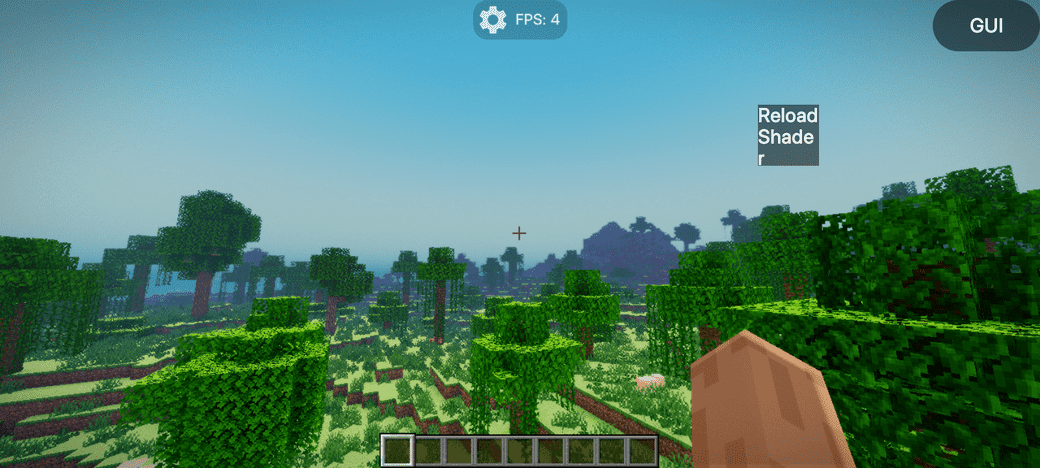
- Atmosphere improvements
📝 Author's Note
For optifine: Is currently untested. (and appear to be very broken on old versions of minecraft). It is best to use mc versions with official support of Iris & Sodium for best compatibility and stability.
Shader is still in alpha stage. Bugs can be reported via SSRE Telegram
See progress (Via GitHub)
SSRE Shaderのインストール方法
With Millida Launcher
Install Millida Launcher
The launcher is free: download it at millida.net/launcher and sign in with any nickname.
Click “Install” on this page
The launcher opens and installs the shaders for Minecraft 1.20–26.1.2 automatically.
Launch the game
A profile with it appears in the launcher: click “Play”.
Manually
Install Iris
Without a shader mod the game cannot see shaders. Install it for the same Minecraft version.
Download the shader archive
Pick the file Ssre-RC-0.3.zip (61 KB) and do not unpack it.
Put it in the shaderpacks folder
“Options”, then “Video Settings”, then “Shader Packs”, then “Open Shader Pack Folder”, and drag the archive there.
Select the shaders
In the same window, click the pack name and “Apply”.
バージョン
依存関係あり
| Minecraft | ローダー | ファイル | 日付 | 操作 |
|---|---|---|---|---|
| 1.21 | Iris | 1.2160.7 KB | ||
| 1.20.1 | Iris | 1.20.160.7 KB | ||
| 26.1 | Iris | 26.160.7 KB | — | |
| 1.21.11 | Iris | 1.21.1160.7 KB | — |
FAQ
Which Minecraft versions does SSRE Shader work on?
There are files for 1.20–26.1.2, 22 versions in total. The newest is 26.1.2.
What do I need to run SSRE Shader?
Shaders are loaded through Iris: without it the game cannot see them.
レビュー
SSRE Shaderの最初の評価を書きませんか


