

Minecraft 1.20.1, 1.21.1用Sodium MOD
Minecraft向けの高性能レンダリングエンジン代替で、フレームレートを大幅に向上させ、マイクロスタッターを軽減します。
 Fabric
 NeoForge
 Quilt
Sodium MODについて
このMODは何千時間もの開発の成果であり、あなたのようなプレイヤーのおかげで実現しています。私の仕事への感謝の気持ちを示し、その過程でSodiumの開発を支援したいと思ったら、コーヒーをご馳走することを検討してみてください。
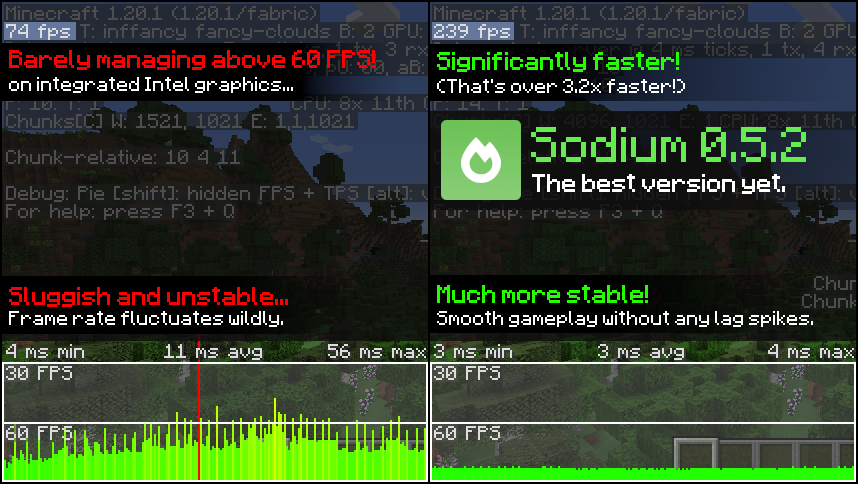
SodiumはMinecraftクライアント向けの強力な最適化MODで、フレームレートとマイクロスタッターを大幅に改善し、Minecraftの多くのグラフィック問題を修正します。
他のレンダリング重視のMODとは異なり、幅広いMODエコシステムとの互換性を誇ります。しかも、ゲームの見た目を損なうことなく実現し、あの本物のブロックゲームの感触を提供します。

📥 インストールガイド
Sodiumは複数のMODローダーで利用可能ですが、最もシンプルで軽量な体験のためにFabric Loaderの使用をお勧めします。サードパーティのランチャーを使用している場合、おそらくMODローダーを自動的にインストールする機能が組み込まれています。MODローダーをインストールしたら、他のものと同様にSodiumをmodsフォルダに入れるだけです。
MODを正しくインストールしたかわからない?Minecraftのビデオ設定画面を確認してください。設定を変更するための新しい改良されたユーザーインターフェースが表示されるはずです。

MODの設定方法がわからない?心配しないでください、おそらく必要ありません。デフォルトで、Sodiumはあなたのシステムでサポートされているすべての最適化を有効にし、可能な限り最高の体験を提供します。問題が発生している場合を除き、通常はパフォーマンスやその他の高度な機能に関連するビデオ設定のみを変更すべきです。
さらにパフォーマンスが必要ですか?設計上、SodiumはMinecraftのレンダリングコードのみを最適化します。Lithium(MC 1.15+用)やPhosphor(MC用)など、他のMODもインストールするべきです。ハードウェア構成: Intel Core i7-1165G7(4c/8t、最大4.70 GHz)、Intel Xe Graphics(96 EUs、最大1.30 GHz)、2x16 GB DDR4-3200。ソフトウェア構成: Fedora 41、Linux 6.12.4、Mesa 24.3.4、Prism Launcher 9.1、OpenJDK 21.0.7ランタイム(ディストリビューションによるパッケージ)、Fabric Loader 0.16.10。

Sodiumのインストール方法
With Millida Launcher
Install Millida Launcher
The launcher is free: download it at millida.net/launcher and sign in with any nickname.
Click “Install” on this page
The launcher opens and installs the mod for Minecraft 1.16–26.3 on Fabric, NeoForge or Quilt automatically.
Launch the game
A profile with it appears in the launcher: click “Play”.
Manually
Install Fabric, NeoForge or Quilt
The loader must match the game version of the mod file, for example Minecraft 26.3. After installing it, a separate profile appears in your launcher.
Download the file for your version
In the version list above, pick the file sodium-fabric-0.9.3-beta.1+mc26.3.jar (1.8 MB) for your game version and loader.
Put it in the mods folder
The folder is inside .minecraft (Windows: %appdata%\.minecraft\mods). If it does not exist, create it.
Launch the loader profile
Open “Mods” in the main menu: Sodium should be in the list.
Sodium works on the player’s side only: there is no need to install it on a server.
バージョン
依存関係あり
| Minecraft | ローダー | ファイル | 日付 | 操作 |
|---|---|---|---|---|
| 26.3 | Fabric | 26.31.8 MB 947 | ||
| 26.3 | NeoForge | 26.31.2 MB 47 | ||
| 26.3 | NeoForge | 26.31.2 MB 231 | ||
| 26.3 | Fabric | 26.31.8 MB 331 | ||
| 1.21.11 | NeoForge | 1.21.111.1 MB 724 | ||
| 1.21.11 | Fabric | 1.21.111.8 MB 1,846 | ||
| 26.3 | NeoForge | 26.31.2 MB 10 | ||
| 26.3 | Fabric | 26.31.8 MB 102 |
FAQ
Which Minecraft versions does Sodium work on?
There are files for 1.16–26.3, 20 versions in total. The newest is 26.3.
Is Sodium for Forge or Fabric?
There are files for Fabric: 1.16–26.3, for NeoForge: 1.21–26.3 and for Quilt: 1.18–1.20.4. There are no files for Forge: a mod for another loader will not start.
Does Sodium need other mods?
The author lists no required dependencies: the Fabric, NeoForge or Quilt loader is enough.
Do I need to install Sodium on a server?
No. Sodium works on the player’s side only: there is no need to install it on a server.
How do I download Sodium?
With Millida Launcher: it installs Sodium into a modpack by itself, for the right game version and loader. The launcher is free.
レビュー
Sodiumの最初の評価を書きませんか


