

Minecraft 1.20.1, 1.21.1用Particle Core MOD
パーティクル最適化:カリング、レンダリング最適化、パーティクルタイプ別の発生量削減設定、ポーションパーティクルの無効化。Sodiumと互換性があり、Sodium単体より性能が向上します。
 Fabric
 NeoForge
 Quilt
QuiltParticle Core MODについて

Particle Coreは1つのことに焦点を当てています。それはパーティクルの最適化です。バニラのMinecraftは様々な点でパーティクルの扱いがかなり非効率です。Particle Coreはこれを改善することを目指しています。
何をするのか?
カリング
全体的に最大のパフォーマンス改善となるのが、Particle Coreが見えないパーティクルを描画しないことです。当然ですよね!標準的なFOVではライトボックスの約12分の1しか見えていないのに、見えない11/12のパーティクルを描画する必要があるでしょうか?
描画の最適化
描画されるパーティクルは最適化されます。頂点変換とライトマップのポーリングが最適化されます。頂点の最適化はSodiumに委ねられます。
タイプ別の削減または無効化
特定のパーティクルタイプのスポーンを完全に無効化するか削減するための3つの方法が提供されています。/particleコマンドで追加できるパーティクルはすべて対象になります。
- particletypeタグ。particlecore:excludedparticlesにパーティクルタイプを追加すると、それらのパーティクルタイプが完全に無効化されます。サーバー管理者の皆さん:これはサーバーに参加するすべてのクライアントでそれらのパーティクルを無効化するので、慎重に使用してください!
- コンフィグベースのタイプ別削減マップ。particle coreのコンフィグ(下記参照)で、ユーザーはパーティクルタイプの識別子と確率のdouble値のマッピングを追加できます。
- ポーションパーティクルを完全にオフにする。画面上のポーションパーティクルが煩わしいと感じる場合は、コンフィグでオフにしてください!
invis-particleリソースパックとは異なり、これは実際にパーティクルのスポーン自体を防ぎ、パフォーマンスを改善します。
バニラ設定の調整
ALL、DECREASED、MINIMALという標準のバニラオプションを微調整できる2つのコンフィグオプションが提供されています。1つは実質的にALLとDECREASEDの間のダイヤル、もう1つはDECREASEDとMINIMALの間のダイヤルです。パーティクルのスポーンを少しだけ調整したい場合、例えばコンピューターはDECREASEDで問題なく動作するけれど、画面上にまだ残るパーティクルの多さが個人的に気に入らない場合は、MINIMALまで下げずにDECREASEDを抑えることができます。
コンフィグ
Particle Coreは追加されたすべての機能を網羅するコンフィグを提供しています。コンフィグは標準の.minecraftコンフィグフォルダにあります。コンフィグ名はparticlecoreconfigv[x].jsonで、[x]は現在のバージョン番号です。
コンフィグのファイル先頭には包括的な「comment」セクションがあります。コンフィグの使用方法についてはそれを読んでください。
turnOffPotionParticles
人によっては、ポーションパーティクルは非常に煩わしいものです。この設定を使ってオフにしてください。
reduceParticlesAllChance
MinecraftのALL設定とDECREASED設定の間でパーティクルのスポーンを微調整するダイヤルです。
reduceParticlesDecreasedChance
MinecraftのDECREASED設定とMINIMAL設定の間でパーティクルのスポーンを微調整するダイヤルです。
disableParticles
クライアント側のすべてのパーティクルスポーンを完全に無効化します。
reduceParticlesByType
特定のパーティクルのスポーンを削減するマップです。
- key: パーティクルタイプの識別子、例:minecraft:smoke。
- value: 0.0から1.0の間のdouble値。0.0はパーティクルを完全に無効化し、1.0は通常のスポーンです。その間の値は、パーティクルがスポーンに成功するその割合の確率になります。
disableOptimizations
Particle Coreのいずれかの機能が競合を引き起こしている場合、または単に不要な場合は、その文字列キーをこのリストに追加することで各機能を個別に無効化できます。手順についてはコメントを参照してください。
導入前
Particle Coreがない場合、ワールドの描画はCPU時間の41%を占め、その大部分はrenderParticlesでCPU時間の25%に達します。
導入後
Particle Coreを使用すると、描画はCPU時間のわずか16%になり、パーティクル描画はほぼ無視できる存在です。
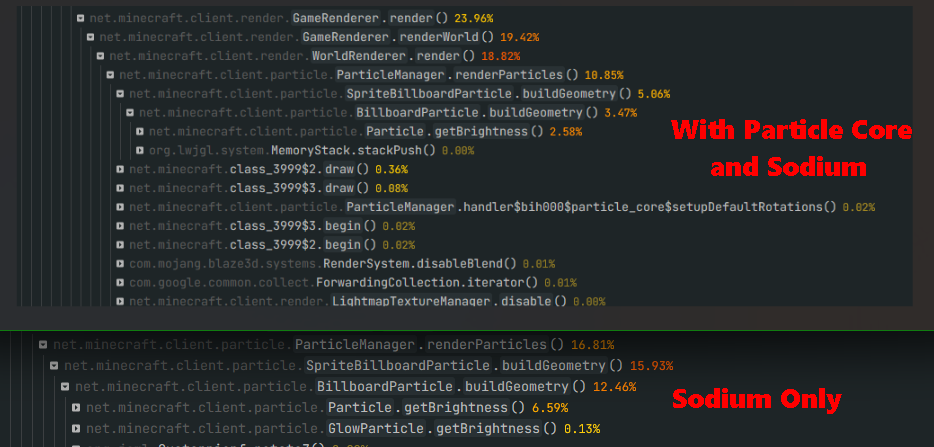
Sodiumとの併用
Sodium単体よりもパフォーマンスが向上します。スクリーンショットの上部がParticle Coreあり、下部がなしです。CPU時間が約5%改善、つまり相対的に50%の改善です。
Particle Coreのインストール方法
With Millida Launcher
Install Millida Launcher
The launcher is free: download it at millida.net/launcher and sign in with any nickname.
Click “Install” on this page
The launcher opens and installs the mod for Minecraft 1.20.1–26.3 on Fabric, NeoForge or Quilt automatically, together with its dependencies: KotlinLangForge, Fabric Language Kotlin, Fabric API, Fzzy Config, Kotlin for Forge.
Launch the game
A profile with it appears in the launcher: click “Play”.
Manually
Install Fabric, NeoForge or Quilt
The loader must match the game version of the mod file, for example Minecraft 26.3. After installing it, a separate profile appears in your launcher.
Download the file for your version
In the version list above, pick the file particle_core-0.3.3+fix1+26.2.jar (138 KB) for your game version and loader.
Put it in the mods folder
The folder is inside .minecraft (Windows: %appdata%\.minecraft\mods). If it does not exist, create it. Required dependencies go there too: KotlinLangForge, Fabric Language Kotlin, Fabric API, Fzzy Config, Kotlin for Forge.
Launch the loader profile
Open “Mods” in the main menu: Particle Core should be in the list.
Particle Core works on the player’s side only: there is no need to install it on a server.
バージョン
依存関係あり
| Minecraft | ローダー | ファイル | 日付 | 操作 |
|---|---|---|---|---|
| 26.3 | Fabric | 26.3138 KB 78 | ||
| 26.3 | NeoForge | 26.3127 KB 1 | ||
| 26.2 | Fabric, Quilt | 26.2138 KB 14 | — | |
| 26.1 | NeoForge | 26.1127 KB 2 | — | |
| 1.21.11 | Fabric, Quilt | 1.21.11138 KB 116 | — | |
| 1.21 | Fabric, Quilt | 1.21144 KB 11 | — | |
| 1.20.1 | Fabric, Quilt | 1.20.1145 KB 7 | — |
FAQ
Which Minecraft versions does Particle Core work on?
There are files for 1.20.1–26.3, 9 versions in total. The newest is 26.3.
Is Particle Core for Forge or Fabric?
There are files for Fabric: 1.20.1–26.3, for NeoForge: 26.1–26.3 and for Quilt: 1.20.1–26.2. There are no files for Forge: a mod for another loader will not start.
What does Particle Core need to work?
Required: KotlinLangForge, Fabric Language Kotlin, Fabric API, Fzzy Config, Kotlin for Forge. Without them the mod will not start: dependencies go into the same mods folder.
Do I need to install Particle Core on a server?
No. Particle Core works on the player’s side only: there is no need to install it on a server.
Where can I download Particle Core safely?
On this page: the file particle_core-0.3.3+fix1+26.2.jar (138 KB) is stored on Millida’s server, with no link shorteners. SHA-1 checksum: 1e04e1a40ea29c704c5ce008a8e737938a53a7f5.
レビュー
Particle Coreの最初の評価を書きませんか


