
 Fabric
 NeoForge
 Forge
HT's TreeChop MODについて
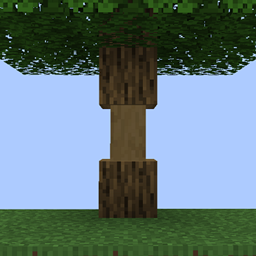
Allows trees to be chopped down by repeatedly breaking a single block. The whole tree will only break after a certain number of chops, and bigger trees require more chops. Inspired by mods like Treecapitator.
Fabric versions require Forge Config API Port!
Also check out:
- HT's TreePlant: makes saplings plant themselves
- (1.18.2 only) Jade plugin
- (1.18.2 only) WTHIT plugin
Things to consider when lumberjacking:
- Chopping trees doesn't require an axe, but will take a while without one
- Chopping different blocks of the same tree will all contribute to bringing down the tree
- Players can work together to chop down those big trees
- Bigger trees require more total chops, but fewer chops per block*
- Hold "sneak" when breaking a log block to break it normally
*By default, the number of chops required to fell a tree is computed logarithmically. Some example numbers are below. The number of chops can also be configured to scale linearly with the number of blocks to, for example, require one chop per block, or one chop per tree. More information can be found here.
Tree blocks 
  Chops required
1 1
3 3
5 4
10 7
20 12
50 19
100 25
 
Cool features:
- Doesn't feel like cheating
- Doesn't get too loud when breaking big trees
- Works on mushrooms and fungi
- Intelligently breaks leaves
- Compatible with most modded trees
Let's chop down a redwood from Biomes O' Plenty:
 
 
Compatibility:
Special support for the following mods:
- (1.18.2) Tinker's Construct: broad axes perform extra chops. All axes perform more chops with "expanded" upgrades.
- (1.18.2+) Silent Gear: saws perform extra chops
- (1.18.2+) Project MMO: chopping grants woodcutting XP
- (1.18.2+) Jade, WTHIT, TheOneProbe: show number of log blocks in trees and the number of chops needed to fell.
- And added compatibility with various other mods.
Known issues:
- (1.18.2 and earlier) Multi Mine: choppable blocks need to be added to Multi Mine's blacklist. This should be fixed for 1.19+ versions. See #106
- Some modded trees leave floating blocks when felled. See #44. Some cases can be fixed using the config files.
Doesn't affect Dynamic Trees.
Want to make your mod compatible with TreeChop? See the wiki.
FAQ:
- How do I turn off chopping?
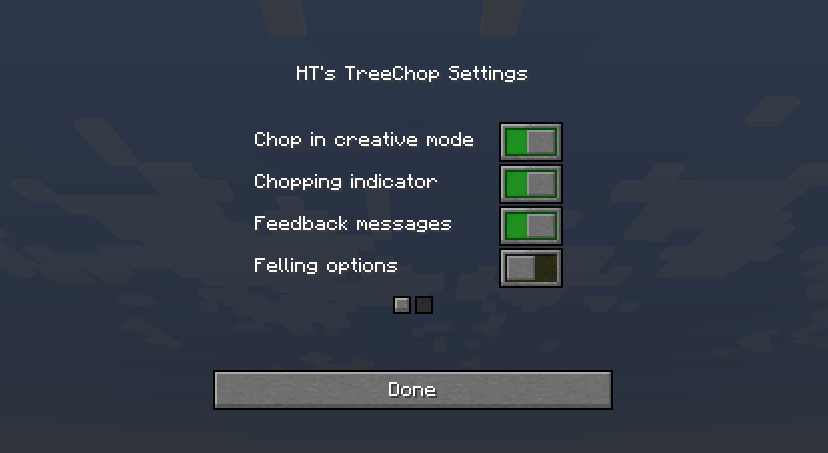
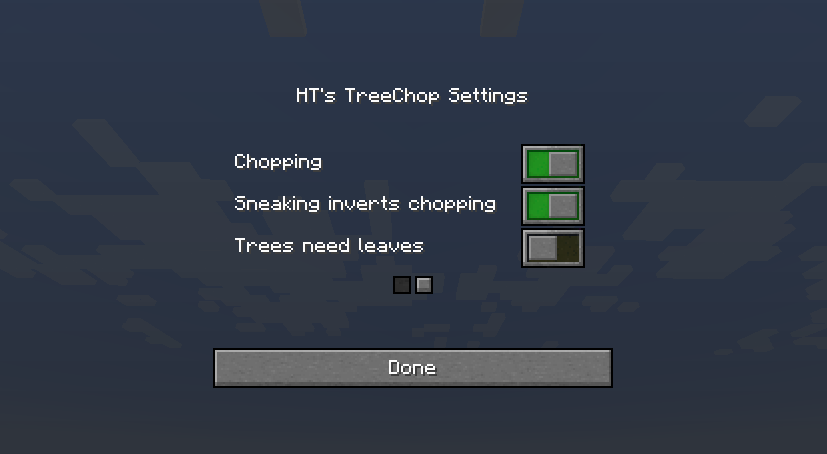
Press n to open TreeChop's in-game settings, then toggle off the "chopping" setting. A key can also be bound to toggle chopping without opening the settings screen; go to Options > Controls and find the section labeled "HT's TreeChop".
- How do I keep chopping off and only turn it on while sneaking?
By default, sneaking inverts your current chop setting, so just toggle chopping off (press n to access the settings screen) so that chopping will be enabled by sneaking.
- How do I keep chopping even when sneaking?
Press n to open TreeChop's in-game settings, then toggle off the "Sneaking inverts chopping" setting.
- How do I keep from chopping my house down?
There's a setting to disable chopping if the "tree" is not connected to leaves. Press n to open TreeChop's in-game settings, then toggle "trees must have leaves".
- I started chopping my house down. How do I stop?
If you find yourself chopping a block when you just wanted to break it normally, try breaking the block while sneaking, or toggle off chopping (press n to access the settings screen).
- I was chopping something and the game crashed! What's up with that?
Probably the item you used to chop the tree doesn't play nice with TreeChop. Go to [your minecraft folder]/config/treechop-common.toml and add the item's registry name to choppingToolsBlacklist, or ask the server owner to, and then maybe let me know about the conflict and I'll try to fix it.
- Why can't I chop anymore?
Maybe chopping is turned off; press n to open TreeChop's in-game settings, then toggle on the "chopping" setting. If chopping is enabled and changing tools doesn't help, then there might be a conflict with another mod. If you send me a recent log, I'll try to fix it.
- Why do some trees leave behind floating leaves when felled?
Either a) it's a modded tree and its leaves are not set up properly. Let me know what type of tree is misbehaving, and I'll politely inform the mod owners. b) there are too many leaves! You can increase the max number of leaves by going to [your minecraft folder]/config/treechop-common.toml and increasing maxLeavesBlocks.
- Why do some trees leave behind floating logs when felled?
Either a) it's a modded tree and is weirdly shaped. Let me know, and I'll try to make TreeChop do a better job of detecting that type of tree. b) the tree is too big! You can increase the max tree size by going to [your minecraft folder]/config/treechop-common.toml and increasing maxTreeBlocks.
- How do I disable mushroom and fungus chopping?
Go to [your minecraft folder]/config/treechop-common.toml and change     blockTagForDetectingLogs = "treechop:choppables" to     blockTagForDetectingLogs = "treechop:choppables_except_mushrooms" If you want more control over which blocks can be chopped, you have to make your own datapack and fiddle with the block tags (see https://minecraft.gamepedia.com/Tag for more info).
- Why am I not seeing the [fill in the blank] feature?
Only the newest version of Minecraft 1.16 is fully supported. Some older versions, especially 1.12.2, lack some of the fancier features.
- Can I include this in a modpack?
Yes!
Changelog:
0.19.1
- Minor visual improvements
- Better Multi Mine compat (disabled Multi Mine when chopping)
0.19.0
- Added console commands treechop:chop and treechop:fell
- Added datapack support (see wiki)
- Minor optimizations and changes to tree block breaking
- Fixed compatibility issues with Majrusz's Enchantments, Spectrum, and others
- Fixed rendering issues
- (Forge) Fixed missing textures with Physics Mod and others
0.18.8
- Various visual fixes
0.18.7
- Added a thwack
- Fixed flickering
- Fixed invisible blocks when using Cobblemon
- Fixed conflict with Twilight Forest's giant pickaxe
- Fixed chopped log visuals not updating when using /data commands
- Various minor improvements
0.18.6
- Significantly optimized tree detection
- Added compatibility with Apotheosis chainsaw enchantment
- Fixed tree blocks not showing with Jade
- (Via configs) Fixed Biomes o' Plenty's palm tree leaving floating leaves
0.18.5
- Fixed occasional crashes
- Fixed Jade compatibility
- Fixed floating leaves for Regions Unexplored's brimwood trees (via config/treechop-common.toml defaults)
- "problematicLeavesTrees" (set in config/treechop-common.toml) now break persistent blocks
- Expanded API
0.18.4
- Fixed conflicts with AOE tools from various mods
0.18.3
- Fixed conflicts with MultiMine
- Fixed shroomlights etc. being mistaken for leaves
- Added configurable detection of modded trees, fixing many cases of floating leaves
- Added API support for different tree shapes
- In configs, allow blocks and items to be specified using regular expressions
- Allow leaves to be detected more than 7 blocks away
- Various optimizations and fixes
0.18.2
- Fix mixin errors
0.18.1
- Fix crash for some users
0.18.0
- Fix some chopped block desyncs
- Fix & limit block break effects
- Optimized tree detection, especially on server side
- Fix error messages in Jade popups
- Various small fixes and tweaks
- (Forge) Fix "missing chop settings" errors on respawn
0.17.9
- Added Simplified Chinese localization
- Minor fixes for Jade, WTHIT, TheOneProbe plugins
- Moved TheOneProbe logic to the client
- Improvements to chop counting
0.17.8
- (Forge) Fix chop indicator performance issue
0.17.7
- Fix some API functions
- (Forge) Fix crashes in Tinker's Construct compatibility on remote servers
- (Forge) Add Silent Gear compatibility
0.17.6
- (Forge 1.18.2) Added Tinker's Construct compat
- (Fabric) Fix crashes with updated Fabric API + Sodium
- (Fabric) Disabled bark removal visual when using Sodium without Indium
- (Forge) Fix compatibility issues with Optifine
- (Forge) Fix Tetra tools not getting honed when chopping
- Fix lighting when smooth shading is disabled
- Decay leaves instead of breaking them (to play nicer with mods like Immersive Weathering)
- Various minor fixes and optimizations
0.17.4:
- (Forge) Fix crash for some users upgrading from 0.16.3
- (Forge) Restore Project MMO compatibility
0.17.3:
- Print fewer log messages
- Move chop indicator for left-handed players
- Add config to disable log messages
- Various compatibility and API fixes
- Various rendering fixes
- [Forge] Disable Project MMO compat due to crashes - will be restored soon
0.17.2:
- (Forge) Fix conflict with CarryOn causing crashes
0.17.1:
- (Forge) Fixed startup crash (yikes)
0.17.0:
- Add The One Probe support
- (Forge 1.19) Restore Jade & WTHIT support
- Better configuration for tree blocks and chopping tools
- Expanded API
- Fix spillover chops not getting visualized
- Fix textures for chopped mushroom stems
- Fix textures for bark removal on mismatched blocks
- Fix chop detector appearing for spectators
- Fix client-side rendering-related crashes due to mod conflicts
- Fix WTHIT widget for trees with multiple log types
- Fix conflicts with William Wythers' Overhauled Overworld
- Fix conflicts with trees from TerraformersMC mods
- Fix chopping XP awards for Project MMO
0.16.3:
- Fix server crash
- Fix logger not mentioning "TreeChop"
- [Fabric] Fix lighting issues with Starlight (https://modrinth.com/mod/starlight)
- [Fabric] Better rendering with Sodium (https://modrinth.com/mod/sodium)
- [Fabric 1.18.2] Add support for Jade (https://www.curseforge.com/minecraft/mc-mods/jade)
- [Fabric 1.18.2] Add support for WTHIT (https://www.curseforge.com/minecraft/mc-mods/wthit)
0.16.2:
- Fix minor visual issues
- Remove unnecessary config settings
0.16.1:
HT's TreeChopのインストール方法
With Millida Launcher
Install Millida Launcher
The launcher is free: download it at millida.net/launcher and sign in with any nickname.
Click “Install” on this page
The launcher opens and installs the mod for Minecraft 1.17.1–1.21.4 on Fabric, Forge or NeoForge automatically.
Launch the game
A profile with it appears in the launcher: click “Play”.
Manually
Install Fabric, Forge or NeoForge
The loader must match the game version of the mod file, for example Minecraft 1.21.4. After installing it, a separate profile appears in your launcher.
Download the file for your version
In the version list above, pick the file TreeChop-1.21.4-fabric-0.19.4.jar (572 KB) for your game version and loader.
Put it in the mods folder
The folder is inside .minecraft (Windows: %appdata%\.minecraft\mods). If it does not exist, create it.
Launch the loader profile
Open “Mods” in the main menu: HT's TreeChop should be in the list.
Minecraft 1.21.4 runs on Java 21: with a different Java version the game may close right after launch.
バージョン
依存関係あり
| Minecraft | ローダー | ファイル | 日付 | 操作 |
|---|---|---|---|---|
| 1.21.4 | Fabric | TreeChop-1.21.4-fabric-0.19.4.jar572 KB 55 | ||
| 1.21.4 | NeoForge | TreeChop-1.21.4-neoforge-0.19.4.jar587 KB 3 | ||
| 1.19.2 | Forge | TreeChop-1.19.2-forge-0.19.1.jar506 KB 13 | ||
| 1.19.2 | Forge | TreeChop-1.19.2-forge-0.18.4.jar424 KB 1 | ||
| 1.19.2 | Forge | TreeChop-1.19.2-forge-0.18.3.jar425 KB | ||
| 1.19.2 | Fabric | TreeChop-1.19.2-fabric-0.18.3.jar418 KB 5 | ||
| 1.17.1 | — | TreeChop-1.17.1-0.15.7.jar257 KB |
FAQ
Which Minecraft versions does HT's TreeChop work on?
There are files for 1.21.4, 1.19.2, 1.17.1. The newest is 1.21.4.
Is HT's TreeChop for Forge or Fabric?
There are files for Fabric: 1.19.2–1.21.4, for Forge: 1.19.2 and for NeoForge: 1.21.4.
Does HT's TreeChop need other mods?
The author lists no required dependencies: the Fabric, Forge or NeoForge loader is enough.
Which Java does HT's TreeChop need?
Minecraft 1.21.4 runs on Java 21. If the game closes right after launch, the usual cause is the wrong Java version in the profile settings.
Where can I download HT's TreeChop safely?
On this page: the file TreeChop-1.21.4-fabric-0.19.4.jar (572 KB) is stored on Millida’s server, with no link shorteners. SHA-1 checksum: 3532725bc67f5d9be24158be89a96bb474deab71.
レビュー
HT's TreeChopの最初の評価を書きませんか


