

 Fabric
 NeoForge
 Forge
ForgeAccessories MODについて
AccessoriesはNeoForgeとFabric向けのデータ駆動型アクセサリMODで、可能な限り両プラットフォームで共通のAPIを使用することに重点を置いています。
このライブラリのAPIのスタイルはCuriosとTrinketsの作品に基づいており、Minecraft向けアクセサリMODへの貢献に対してTheIllusiveC4とemilyploszajの両氏にクレジットが与えられます。
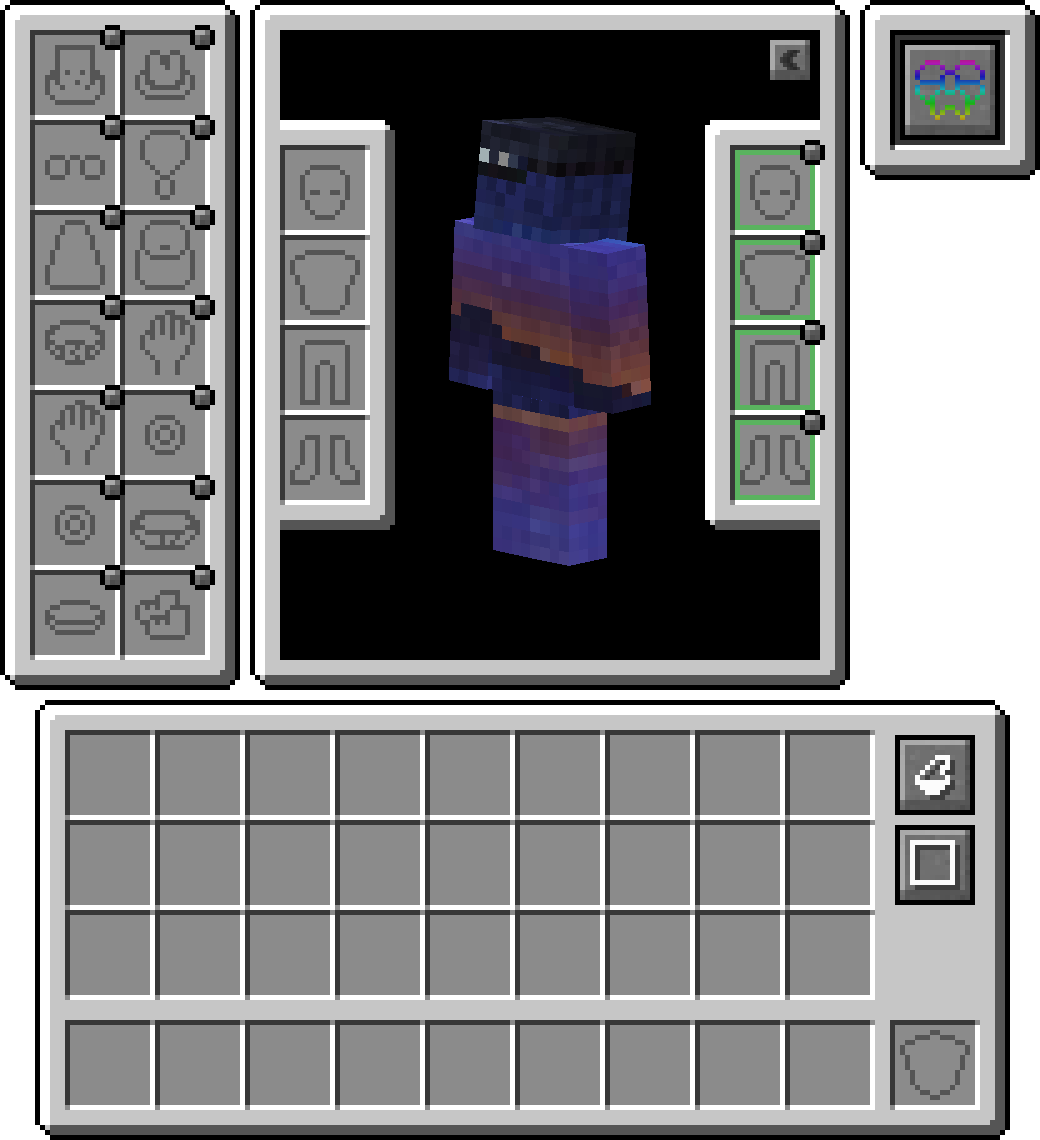
機能
エリトラ、トーテム、バナーのサポートを搭載
デフォルトでは、頭またはケープ(WIP)スロットにバナーを装備してカスタムバナーを表示できます。エリトラやトーテムについては、デフォルトでは無効になっているため、コンフィグ内で有効にする必要があります。

互換レイヤー
TrinketやCuriosのような既存のAPIが主に使用されているため、Accessories互換レイヤーをインストールすると、それらがAccessoriesの下で動作し、統一された体験が得られます。

モデル変換API
開発者向けに、ネイティブのAccessoriesをレンダリングする際に使用される適切な変換APIが含まれており、特定のエンティティモデルのパーツへの適切なリンクを可能にし、Fresh AnimationsのようなEMFリソースパックを適切にサポートできます。また、Figuraのような他のレンダリングMODを将来的にサポートする計画もあります。
装備中のアクセサリの管理
他のテイムされたエンティティにアクセスできる機能により、他のMODがペットや乗騎用のアクセサリアイテムを持てるようになります。さらに、サーバーオーナーが必要に応じて他のプレイヤーのアクセサリを直接管理コマンドを使わずに管理するのにも役立ちます。任意のエンティティ(所有されている場合は所有者である必要があります)に対してShiftを押しながら「Accessories Open Screen」を使用して画面を開くか、OP権限がある場合はコマンド /accessories edit を実行するだけです。
APIの追加機能
以下はAccessoriesに実装されているAPIの例で、MOD開発の助けになるかもしれません:
- NBTベースのアクセサリの完全サポート: Wiki
- Piglin中立アイテム、エンダーマンマスク、ドロップ調整、幸運調整、雪上歩行能力に関する既存のAPIイベント: Wiki
- MOD固有のアクセサリ用のユニークスロットAPI: Wiki
Accessoriesのインストール方法
With Millida Launcher
Install Millida Launcher
The launcher is free: download it at millida.net/launcher and sign in with any nickname.
Click “Install” on this page
The launcher opens and installs the mod for Minecraft 1.20–1.21.1 on Fabric, Forge or NeoForge automatically, together with its dependencies: Cloth Config API, Fabric API, oωo (owo-lib).
Launch the game
A profile with it appears in the launcher: click “Play”.
Manually
Install Fabric, Forge or NeoForge
The loader must match the game version of the mod file, for example Minecraft 1.21.1. After installing it, a separate profile appears in your launcher.
Download the file for your version
In the version list above, pick the file accessories-fabric-1.1.0-beta.54+1.21.1.jar (1.1 MB) for your game version and loader.
Put it in the mods folder
The folder is inside .minecraft (Windows: %appdata%\.minecraft\mods). If it does not exist, create it. Required dependencies go there too: Cloth Config API, Fabric API, oωo (owo-lib).
Launch the loader profile
Open “Mods” in the main menu: Accessories should be in the list.
On a server
A server on Fabric, Forge or NeoForge
The mod only works on a server with the same loader and game version, for example 1.21.1.
File goes into the server’s mods folder
Stop the server, put the mod file into the mods folder and start the server again.
Use the “To server” button
On Millida Hosting, the button at the top of the page uploads the file to your server and restarts it for you.
Minecraft 1.21.1 runs on Java 21: with a different Java version the game may close right after launch.
バージョン
依存関係あり
| Minecraft | ローダー | ファイル | 日付 | 操作 |
|---|---|---|---|---|
| 1.20.1 | Fabric | 1.20.1751 KB 3 | ||
| 1.20.1 | Forge | 1.20.11 MB 35 | ||
| 1.21.1 | Fabric | 1.21.11.1 MB 12 | ||
| 1.21.1 | NeoForge | 1.21.11 MB 26 | ||
| 1.21 | NeoForge | 1.2110.3 MB 14 | — | |
| 1.20.1 | Fabric | 1.20.1751 KB 3 | — |
動作に必要なもの
これを必要とするコンテンツ
FAQ
Which Minecraft versions does Accessories work on?
There are files for 1.21.1, 1.21, 1.20.1, 1.20. The newest is 1.21.1.
Is Accessories for Forge or Fabric?
There are files for Fabric: 1.20–1.21.1, for Forge: 1.20–1.20.1 and for NeoForge: 1.21–1.21.1.
What does Accessories need to work?
Required: Cloth Config API, Fabric API, oωo (owo-lib). Without them the mod will not start: dependencies go into the same mods folder.
Does Accessories work on a server?
Yes. Accessories works both in singleplayer and on a server.
Which Java does Accessories need?
Minecraft 1.21.1 runs on Java 21. If the game closes right after launch, the usual cause is the wrong Java version in the profile settings.
Where can I download Accessories safely?
On this page: the file accessories-fabric-1.1.0-beta.54+1.21.1.jar (1.1 MB) is stored on Millida’s server, with no link shorteners. SHA-1 checksum: e1165f3d5b31d4296f932ec1bc428f2a832c5def.
レビュー
Accessoriesの最初の評価を書きませんか


