

- 閲覧
- 22 閲覧
- 更新日
- 更新日 03.09.2026
- 1.21
 Fabric
- クライアント
Fabric Maxed is a combination of mods to make FPS as high as possible
🔥Performace
Benchmark was made on GamerPotion's FPS Tester with build-in config
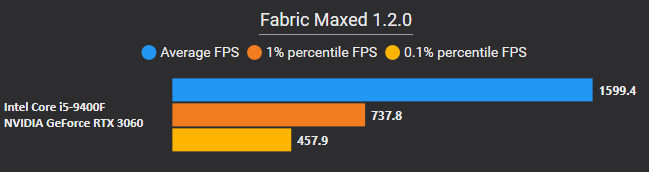

⚙️ Also try Fabric Boosted if you also want Quality of Life Mods
📚Versions
🟡 Final - Definitive Version (no longer updated)
🟢 Realese - Stable Versions with all listed mods
🟠 Beta - Unstable Versions with some missing mods
🔴 Alpha - Test Builds with many missing mods
MC Version - Fabric Boosted Version - Stage
1.21.5 - 2.4.0-Beta2 - 🟠 Beta 1.21.4 - 2.3.1 - 🟢Release 1.21.1 - 2.1.5 - 🟢Release

⚠️ Final Versions
MC Version - Fabric Boosted Version - Stage
1.21.3 - 2.2.0-Beta2 - 🟡 Final 1.21 - 2.0.4 - 🟡Final 1.20.6 - 1.3.6 - 🟡Final 1.20.4 - 1.2.8 - 🟡Final 1.20.2 - 1.1.3 - 🟡Final 1.20.1 - 1.0.5 - 🟡Final

❓FAQ
Q: What is so special about Fabric Maxed?
A: Fabric Boosted provides the best possible performance and optimalization
Q: My game crashed what should I do?
A: Join Discord and write about it on support channel.
🧾Mod List
🚀Performance Mods
Mod Name - Desription
Sodium - Main performance mod Sodium Extra - More settings to Sodium Lithium - Optimization to game physics, mob AI FerriteCore - Reduces RAM usage Entity Culling - Stops rendering invisible entities More Culling - Stops rendering invisible things ImmediatelyFast - Optimizes rendering various things Memory Leak Fix - Fixes multiple memory leaks Enhanced Block Entities - Renders certain things as models instead of entities Exordium - Render the GUI and screens at a lower framerate Nvidium - Provides Nvidia rendering engine Krypton - Optimizes networking stack FastAnim - Speeds up entity animation calculations ThreadTweak - Improves and tweaks thread scheduling Concurrent Chunk Management Engine - Improves chunk performance Noisium - Optimises world generation performance Very Many Players - Improves game performance at high playercounts BadOptimizations - Collection of mostly micro optimizations
📚Libraries
Mod Name
Fabric API Cloth Config API
⭐Exclusive Mods
Mod Name - Versions
FastAnim - 1.20.1 - 1.20.2 Starlight - 1.20.1 - 1.20.4 LazyDFU - 1.20.1 - 1.20.6
Fabric Maxedのインストール方法
With Millida Launcher
Install Millida Launcher
The launcher is free: download it at millida.net/launcher and sign in with any nickname.
Click “Install” on this page
The launcher opens and installs the modpack for Minecraft 1.21 on Fabric automatically.
Launch the game
A profile with it appears in the launcher: click “Play”.
Manually
Download the modpack archive
In the version list above, pick the file Fabric Maxed 2.0.4.mrpack (18 KB).
Import it into a launcher
A launcher that supports modpacks (Millida Launcher, Prism) takes the archive via “Add modpack”, then “From file”. No need to unpack it yourself.
Allocate memory
Modpacks need more memory than the plain game: set 4–6 GB in the profile settings.
Minecraft 1.21 runs on Java 21: with a different Java version the game may close right after launch.
バージョン
依存関係あり
| Minecraft | ローダー | ファイル | 操作 |
|---|---|---|---|
| 1.21 | Fabric | 1.2118.3 KB |
動作に必要なもの
- More Culling導入済み
- Cloth Config API導入済み
- Sodium導入済み
- Dependency導入済み
- Entity Culling導入済み
- Memory Leak Fix導入済み
- Fabric API導入済み
- Concurrent Chunk Management Engine (Fabric)導入済み
- BadOptimizations導入済み
- Lithium導入済み
- ModernFix導入済み
- FerriteCore導入済み
FAQ
Which Java does Fabric Maxed need?
Minecraft 1.21 runs on Java 21. If the game closes right after launch, the usual cause is the wrong Java version in the profile settings.
Where can I download Fabric Maxed safely?
On this page: the file Fabric Maxed 2.0.4.mrpack (18 KB) is stored on Millida’s server, with no link shorteners. SHA-1 checksum: 9475973ad66f650d4eabd13e3387c1c20476fc17.
レビュー
Fabric Maxedの最初の評価を書きませんか


