

Hexalia Mod pour Minecraft 1.20.1, 1.21.1
Pratiquez la sorcellerie folklorique à travers l'herboristerie, les rituels, la préparation de potions, la flore enchantée, les outils magiques et les forces vivantes de la nature.
 NeoForge
 Fabric
 Forge
Forge

About
Hexalia is a folk-witchcraft and nature magic mod centered on herbalism, rituals, enchanted flora, and living magic.
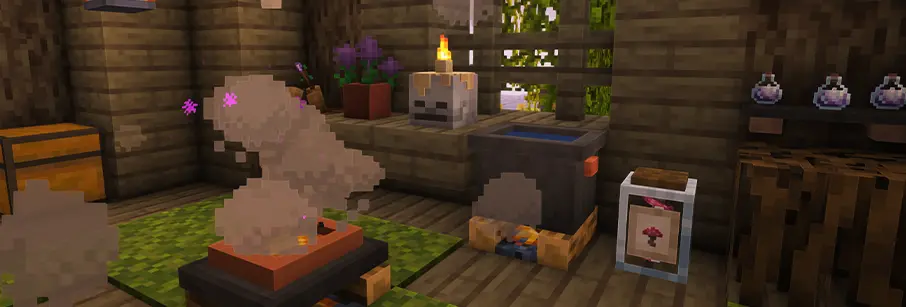
Gather herbs and crops, refine them with the Mortar & Pestle, brew mystical mixtures, burn herbal combinations in the Censer, awaken enchanted plants, and perform Nature's Rituals using offerings, salt, and elemental forces.

Discover magical tools such as the Kelpweave Blade, Rootshaper, and Cinderhew, along with idols, protective equipment, supernatural creatures, and other forms of magic designed to blend naturally into survival and exploration.
Progression is driven by discovery and understanding rather than a skill tree, allowing Hexalia's systems to gradually become part of your home, garden, and ritual practice.
Showcases
Watch Showcases
Add-ons & Suggested Mods

Hexforged by DefinitelyNotADoctor
Expands Hexalia with new rituals, relics, brews, elemental magic, and combat-focused abilities, building naturally on its herbal and ritual systems.
📖 Patchouli Highly recommended for Hexalia's in-game documentation through the Verdant Grimoire, which covers the mod's major systems, ingredients, rituals, brewing, equipment, creatures, and more.
🔎 Recipe Viewers Hexalia supports major recipe-viewing mods such as EMI, JEI, and REI where available.
For the best experience, EMI is especially recommended, offering a clean way to browse Hexalia's custom recipes and processing systems alongside standard crafting recipes.
💍 Accessory Mods Hexalia supports accessory slots through the appropriate loader integration:
- Accessories on 1.21.1
- Trinkets on Fabric 1.20.1
- Curios on Forge 1.20.1
These integrations allow items such as rings, pendants, charms, and Earplugs to be equipped without occupying normal armor slots.
For Developers
Hexalia is designed to be expandable through addons, datapacks, integrations, and modpack-specific content.
It makes extensive use of:
- tags for expandable item and block behavior
- data-driven recipes
- custom recipe types
- standard loader inventories and capabilities where applicable
You are welcome to build addons or integrations around Hexalia's existing systems and magical themes.
Additional Information
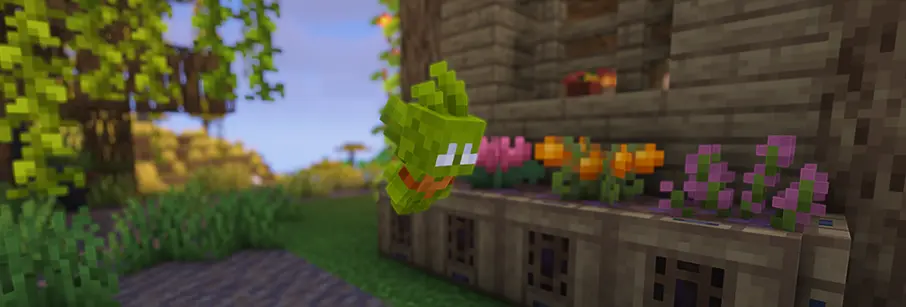
🛠️ Development Hexalia is actively developed, with future updates continuing to expand and refine its rituals, herbalism, enchanted plants, creatures, and world interactions.
📦 Modpack / Addon Usage You are welcome to include Hexalia in modpacks and create addons for it.
💬 Feedback & Community Suggestions, bug reports, and feedback are always welcome through the Hexalia community.

Comment installer Hexalia
With Millida Launcher
Install Millida Launcher
The launcher is free: download it at millida.net/launcher and sign in with any nickname.
Click “Install” on this page
The launcher opens and installs the mod for Minecraft 1.20.1–1.21.1 on Fabric, Forge or NeoForge automatically, together with its dependencies: Geckolib, Architectury API.
Launch the game
A profile with it appears in the launcher: click “Play”.
Manually
Install Fabric, Forge or NeoForge
The loader must match the game version of the mod file, for example Minecraft 1.21.1. After installing it, a separate profile appears in your launcher.
Download the file for your version
In the version list above, pick the file hexalia-1.3.8.2-1.21.1+neoforge.jar (3.1 MB) for your game version and loader.
Put it in the mods folder
The folder is inside .minecraft (Windows: %appdata%\.minecraft\mods). If it does not exist, create it. Required dependencies go there too: Geckolib, Architectury API.
Launch the loader profile
Open “Mods” in the main menu: Hexalia should be in the list.
On a server
A server on Fabric, Forge or NeoForge
The mod only works on a server with the same loader and game version, for example 1.21.1.
File goes into the server’s mods folder
Stop the server, put the mod file into the mods folder and start the server again.
Use the “To server” button
On Millida Hosting, the button at the top of the page uploads the file to your server and restarts it for you.
Minecraft 1.21.1 runs on Java 21: with a different Java version the game may close right after launch.
Versions
Avec dépendances
| Minecraft | Loader | Fichier | Date | Actions |
|---|---|---|---|---|
| 1.21.1 | NeoForge | 1.21.13.1 Mo | ||
| 1.21.1 | Fabric | 1.21.13 Mo | ||
| 1.20.1 | Forge | 1.20.13.8 Mo | ||
| 1.20.1 | Fabric | 1.20.13.9 Mo | ||
| 1.20.1 | Forge | 1.20.13.2 Mo 1 | ||
| 1.20.1 | Fabric | 1.20.13.3 Mo | ||
| 1.20.1 | Forge | 1.20.13.2 Mo | ||
| 1.21.1 | Fabric | 1.21.13 Mo |
Ce qu'il faut pour l'exécuter
- Trinketsfacultatif
- Geckolibobligatoire
- EMIfacultatif
- Accessoriesfacultatif
- Architectury APIobligatoire
- Patchoulifacultatif
- Roughly Enough Items (REI)facultatif
- Just Enough Items (JEI)facultatif
- Curios APIfacultatif
FAQ
Which Minecraft versions does Hexalia work on?
There are files for 1.21.1, 1.20.1. The newest is 1.21.1.
Is Hexalia for Forge or Fabric?
There are files for Fabric: 1.20.1–1.21.1, for Forge: 1.20.1 and for NeoForge: 1.21.1.
What does Hexalia need to work?
Required: Geckolib, Architectury API. Without them the mod will not start: dependencies go into the same mods folder. Optional: Trinkets, EMI, Accessories, Patchouli and 3 more.
Does Hexalia work on a server?
Yes. Hexalia works both in singleplayer and on a server.
Which Java does Hexalia need?
Minecraft 1.21.1 runs on Java 21. If the game closes right after launch, the usual cause is the wrong Java version in the profile settings.
Where can I download Hexalia safely?
On this page: the file hexalia-1.3.8.2-1.21.1+neoforge.jar (3.1 MB) is stored on Millida’s server, with no link shorteners. SHA-1 checksum: b4611d12ca776172f3a2b862f5088a8c1a8330eb.
Avis
Soyez le premier à noter Hexalia


