

xNICEx Mod para Minecraft 1.20.1, 1.21.1
Agradables mejoras creativas innovadoras
 NeoForge
 Forge
ForgeAcerca del mod xNICEx
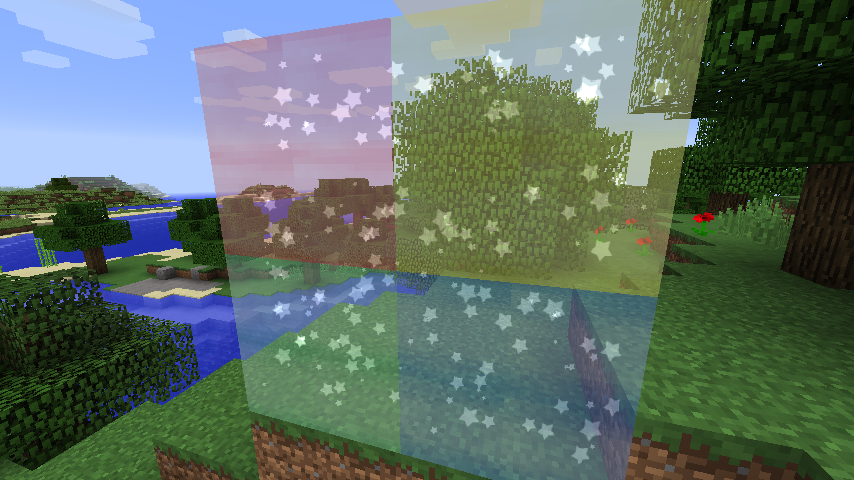
NICE is a mod about decoration. It adds a number of fancy glass like blocks (cylinders and cube for now) that can be filled with four types of particle systems. This is the first version of the mod. More decorations are planned in the future. This mod is a cooperation between McJty and xVipstarx who does the artistic design.
Currently the mod has two blocks: a particle cylinder and a particle block. Each of those has two variants. A green and a blue one. You can craft these and place them in the world. To assign particles you can use wool (for smoke), diamond (for sparkles), water bucket (for bubbles), and fish (for fish).
As said before, many more effects are planned.
Cómo instalar xNICEx
With Millida Launcher
Install Millida Launcher
The launcher is free: download it at millida.net/launcher and sign in with any nickname.
Click “Install” on this page
The launcher opens and installs the mod for Minecraft 1.12.2–1.21.1 on Forge or NeoForge automatically.
Launch the game
A profile with it appears in the launcher: click “Play”.
Manually
Install Forge or NeoForge
The loader must match the game version of the mod file, for example Minecraft 1.21.1. After installing it, a separate profile appears in your launcher.
Download the file for your version
In the version list above, pick the file nice-1.21-5.0.0.jar (345 KB) for your game version and loader.
Put it in the mods folder
The folder is inside .minecraft (Windows: %appdata%\.minecraft\mods). If it does not exist, create it.
Launch the loader profile
Open “Mods” in the main menu: xNICEx should be in the list.
Minecraft 1.21.1 runs on Java 21: with a different Java version the game may close right after launch.
Versiones
Con dependencias
| Minecraft | Cargador | Archivo | Fecha | Acciones |
|---|---|---|---|---|
| 1.21.1 | NeoForge | Nice - 1.21-5.0.0345 KB | ||
| 1.20.1 | Forge | Nice - 1.20-4.0.2322 KB | ||
| 1.19.3 | Forge | Nice - 1.19-3.1.2322 KB | ||
| 1.12.2 | — | Nice - 1.12-0.4.081.6 KB | ||
| 1.12.2 | — | Nice - 1.12-0.3.0-alpha58.6 KB |
FAQ
Which Minecraft versions does xNICEx work on?
There are files for 1.21.1, 1.20.1, 1.19.4, 1.19.3, 1.19.2, 1.12.2. The newest is 1.21.1.
Is xNICEx for Forge or Fabric?
There are files for Forge: 1.19.2–1.20.1 and for NeoForge: 1.21.1. There are no files for Fabric: a mod for another loader will not start.
Does xNICEx need other mods?
The author lists no required dependencies: the Forge or NeoForge loader is enough.
Which Java does xNICEx need?
Minecraft 1.21.1 runs on Java 21. If the game closes right after launch, the usual cause is the wrong Java version in the profile settings.
Where can I download xNICEx safely?
On this page: the file nice-1.21-5.0.0.jar (345 KB) is stored on Millida’s server, with no link shorteners. SHA-1 checksum: 97e9cb10a736856fe16a655c75b2e7ab9d964188.
Reseñas
Sé el primero en valorar xNICEx


