

Wireless-Redstone Mod para Minecraft 26.2
Añade un sistema de redstone inalámbrico de alto rendimiento
 NeoForge
 Fabric
 Forge
Acerca del mod Wireless-Redstone
Wireless-Redstone is a simple mod to transmit a redstone signal wirelessly. This is especially convenient for large redstone techniques or long distances. The signal is also transmitted in non-loaded chunks!
- transmit a wireless redstone signal
- works also in non-loaded chunks
- with remote activator you can toggle redstone output from everywhere
- with multiemitter you can transmit a wireless signal to multiple acceptors
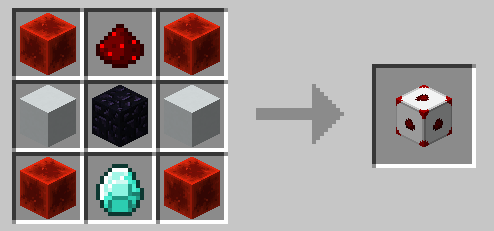
How to use
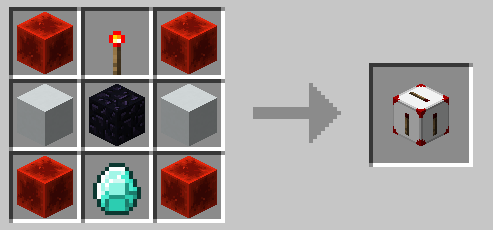
With the WLR Linker you can link a WLR Acceptor with a WLR Emitter. To do this, first right-click on the WLR Acceptor and then on the corresponding WLR Emitter. The emitter is used to send an incoming Redstone signal to the acceptor, which then outputs the signal.
Acceptor
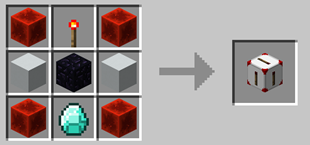
Emitter
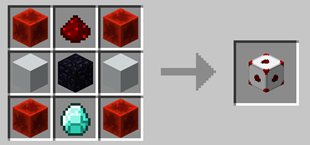
Multiemitter
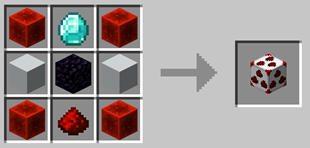
Linker

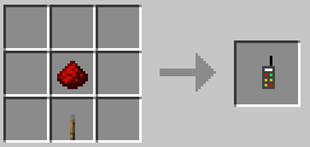
Remote Control
Have a look at our Discord. undefined
Also have a look at our other mods.
Invisible Lights Mod - This mod adds invisible light blocks to help you better illuminate your world.
Open Signal Mod - Open Signals is a Minecraft mod that adds German railroad signals. The signals are compatible with all train mods.
MrTroble – Developer
Jeronimo – Models, textures and development
TimeJudge – Jun. Dev
Cómo instalar Wireless-Redstone
With Millida Launcher
Install Millida Launcher
The launcher is free: download it at millida.net/launcher and sign in with any nickname.
Click “Install” on this page
The launcher opens and installs the mod for Minecraft 1.17.1–26.2 on Fabric, Forge or NeoForge automatically.
Launch the game
A profile with it appears in the launcher: click “Play”.
Manually
Install Fabric, Forge or NeoForge
The loader must match the game version of the mod file, for example Minecraft 26.2. After installing it, a separate profile appears in your launcher.
Download the file for your version
In the version list above, pick the file TC-Redstone-26.2-Neoforge-3.2.5.jar (58 KB) for your game version and loader.
Put it in the mods folder
The folder is inside .minecraft (Windows: %appdata%\.minecraft\mods). If it does not exist, create it.
Launch the loader profile
Open “Mods” in the main menu: Wireless-Redstone should be in the list.
Versiones
Con dependencias
| Minecraft | Cargador | Archivo | Fecha | Acciones |
|---|---|---|---|---|
| 1.20.4 | Forge | TC-Redstone-1.20.4-3.2.5.2.jar54.6 KB | ||
| 26.2 | NeoForge | TC-Redstone-26.2-Neoforge-3.2.5.jar57.9 KB | ||
| 26.2 | Fabric | TC-Redstone-26.2-Fabric-3.2.5.jar52.5 KB | ||
| 1.20.6 | — | TC-Redstone-1.20.6-Fabric-3.2.4-dev.jar43 KB | ||
| 1.17.1 | Forge | GIRC-Redstone-1.0.71.jar20.1 KB |
FAQ
Which Minecraft versions does Wireless-Redstone work on?
There are files for 26.2, 1.20.6, 1.20.4, 1.17.1. The newest is 26.2.
Is Wireless-Redstone for Forge or Fabric?
There are files for Fabric: 26.2, for Forge: 1.17.1–1.20.4 and for NeoForge: 26.2.
Does Wireless-Redstone need other mods?
The author lists no required dependencies: the Fabric, Forge or NeoForge loader is enough.
How do I download Wireless-Redstone?
With Millida Launcher: it installs Wireless-Redstone into a modpack by itself, for the right game version and loader. The launcher is free.
Reseñas
Sé el primero en valorar Wireless-Redstone


