

Vanilla Notebook Mod para Minecraft 26.2
Un pequeño mod con estilo vanilla que añade un cuaderno a tu GUI.
 Fabric
 Quilt
 NeoForge
About
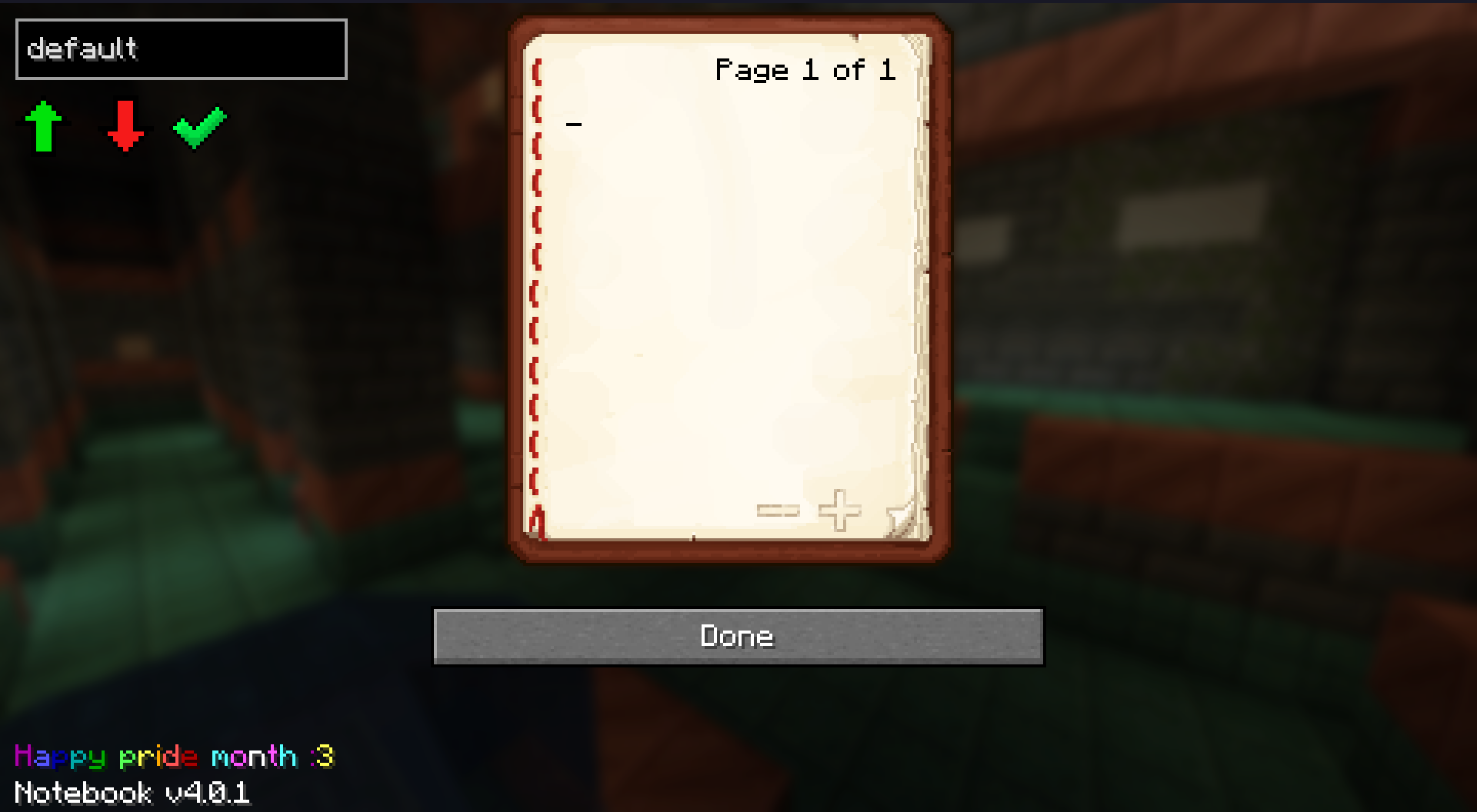
This is a small, vanilla-styled mod that adds a notebook to your GUI. You can use it to note down coordinates, or write notes.
It is simply just a book in your menus - with a couple added features. This mod is client side; you do not need to install this on the server to use it - It is usable anywhere and supports NeoForge, Fabric and Quilt.
Note for version v5.1.0 and newer - The mod now depends on MLEM API which must be installed alongside Notebook. You can get it on modrinth or forgejo. (Coming soon, waiting on Modrinth review)
Links
Bug reports
Discord server
Other info
The best official place to download this mod is here (modrinth), Forgejo and tangled.sh
You may use this mod in your own modpacks; with credit preferably, but not required (It'd also be awesome to see the modpacks you create! Feel free to send them to me).
If you want to suggest any features - or report bugs, check the issues page or you can come chat with me and other community members on my discord server
If you're after a Minecraft server, you can use my promotional link for a discount with Bisect Hosting.
Other Projects

Cómo instalar Vanilla Notebook
With Millida Launcher
Install Millida Launcher
The launcher is free: download it at millida.net/launcher and sign in with any nickname.
Click “Install” on this page
The launcher opens and installs the mod for Minecraft 1.21.9–26.2 on Fabric, NeoForge or Quilt automatically, together with its dependencies: Fabric API, Dependency.
Launch the game
A profile with it appears in the launcher: click “Play”.
Manually
Install Fabric, NeoForge or Quilt
The loader must match the game version of the mod file, for example Minecraft 26.2. After installing it, a separate profile appears in your launcher.
Download the file for your version
In the version list above, pick the file notebook-5.0.1.jar (53 KB) for your game version and loader.
Put it in the mods folder
The folder is inside .minecraft (Windows: %appdata%\.minecraft\mods). If it does not exist, create it. Required dependencies go there too: Fabric API, Dependency.
Launch the loader profile
Open “Mods” in the main menu: Vanilla Notebook should be in the list.
Vanilla Notebook works on the player’s side only: there is no need to install it on a server.
Versiones
Con dependencias
| Minecraft | Cargador | Archivo | Fecha | Acciones |
|---|---|---|---|---|
| 26.1.2 | NeoForge | 26.1.260.3 KB | ||
| 26.1.2 | Fabric | 26.1.260.3 KB | ||
| 26.2 | Fabric, Quilt | 26.253.5 KB 1 | ||
| 26.1.1 | Fabric, Quilt | 26.1.153.4 KB | ||
| 26.1 | Fabric, Quilt | 26.153.4 KB | ||
| 1.21.11 | Fabric, Quilt | 1.21.1153.7 KB 4 | ||
| 1.21.10 | Fabric, Quilt | 1.21.1054.1 KB | ||
| 1.21.10 | Fabric, Quilt | 1.21.1054 KB |
Qué necesita para funcionar
- Fabric APIobligatorio
- Dependencyobligatorio
FAQ
Which Minecraft versions does Vanilla Notebook work on?
There are files for 1.21.9–26.2, 7 versions in total. The newest is 26.2.
Is Vanilla Notebook for Forge or Fabric?
There are files for Fabric: 1.21.9–26.2, for NeoForge: 26.1–26.1.2 and for Quilt: 1.21.9–26.2. There are no files for Forge: a mod for another loader will not start.
What does Vanilla Notebook need to work?
Required: Fabric API, Dependency. Without them the mod will not start: dependencies go into the same mods folder.
Do I need to install Vanilla Notebook on a server?
No. Vanilla Notebook works on the player’s side only: there is no need to install it on a server.
Where can I download Vanilla Notebook safely?
On this page: the file notebook-5.0.1.jar (53 KB) is stored on Millida’s server, with no link shorteners. SHA-1 checksum: 44f42dcc092de96cc0d81dbf3e867a2be7e97920.
Reseñas
Sé el primero en valorar Vanilla Notebook


