
Transparent Mod para Minecraft 1.20.1, 1.21.5
Permite que los paquetes de recursos hagan que ciertas entidades admitan transparencia.
 Fabric
 Quilt
Quilt NeoForge
 Forge
ForgeAcerca del mod Transparent
Transparent permite que los paquetes de recursos den a ciertas entidades texturas con píxeles transparentes (o translúcidos). Para usarlo, simplemente instala el mod y usa o crea un paquete de recursos que dé a una de las entidades compatibles una textura transparente.
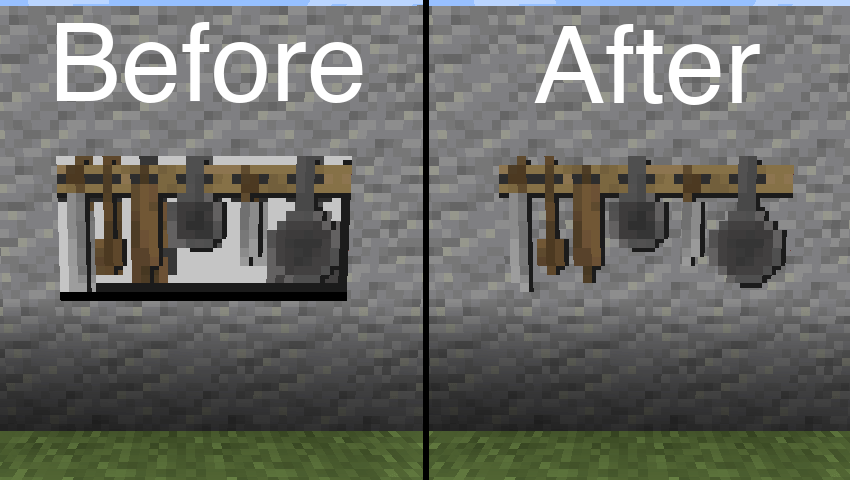
Paquete de recursos usado en la imagen de arriba: BwW Texturepack.
¡Compatible oficialmente con el mod Paintings++!
Entidades compatibles
- Armor Stand (1.19.4+)
- End Crystal
- End Crystal Beam (1.21+)
- Item Frame
- Painting
- Player Cape (1.21+)
- Player Armor (1.21+)
- Beacon Beam (desactivado por defecto)
Si quieres que otra entidad sea compatible con este mod, házmelo saber en Discord o en GitHub Issues.
Configuración
Para cambiar la configuración por defecto, pega el siguiente contenido del archivo json en un archivo de tu paquete de recursos ubicado en /assets/transparent/transparent.json.
{ "armorstand": true, "beaconbeam": false, "endcrystal": true, "endcrystalbeam": true, "itemframe": true, "painting": true, "playercape": true, "playerarmor": true }
Reporta cualquier problema en GitHub. Chatea en Discord en el canal transparent.
Apoya el desarrollo de mis mods en Ko-fi.
Cómo instalar Transparent
With Millida Launcher
Install Millida Launcher
The launcher is free: download it at millida.net/launcher and sign in with any nickname.
Click “Install” on this page
The launcher opens and installs the mod for Minecraft 1.20.1–1.21.5 on Fabric, Forge, NeoForge or Quilt automatically.
Launch the game
A profile with it appears in the launcher: click “Play”.
Manually
Install Fabric, Forge, NeoForge or Quilt
The loader must match the game version of the mod file, for example Minecraft 1.21.5. After installing it, a separate profile appears in your launcher.
Download the file for your version
In the version list above, pick the file transparent-fabric-21.5.0.jar (35 KB) for your game version and loader.
Put it in the mods folder
The folder is inside .minecraft (Windows: %appdata%\.minecraft\mods). If it does not exist, create it.
Launch the loader profile
Open “Mods” in the main menu: Transparent should be in the list.
Minecraft 1.21.5 runs on Java 21: with a different Java version the game may close right after launch.
Versiones
Con dependencias
| Minecraft | Cargador | Archivo | Fecha | Acciones |
|---|---|---|---|---|
| 1.21.5 | Fabric, Quilt | [Fabric 1.21.5] v21.5.035.3 KB | ||
| 1.21.5 | NeoForge | [NeoForge 1.21.5] v21.5.033.6 KB | ||
| 1.20.6 | Forge | [Forge 1.20.6] v20.6.125.8 KB | ||
| 1.20.1 | Quilt | [Quilt 1.20.1] v8.0.129.4 KB |
FAQ
Which Minecraft versions does Transparent work on?
There are files for 1.21.5, 1.20.6, 1.20.1. The newest is 1.21.5.
Is Transparent for Forge or Fabric?
There are files for Fabric: 1.21.5, for Forge: 1.20.6, for NeoForge: 1.21.5 and for Quilt: 1.20.1–1.21.5.
Does Transparent need other mods?
The author lists no required dependencies: the Fabric, Forge, NeoForge or Quilt loader is enough.
Which Java does Transparent need?
Minecraft 1.21.5 runs on Java 21. If the game closes right after launch, the usual cause is the wrong Java version in the profile settings.
Where can I download Transparent safely?
On this page: the file transparent-fabric-21.5.0.jar (35 KB) is stored on Millida’s server, with no link shorteners. SHA-1 checksum: b1ad3807de859e41029047644e38377a0f023716.
Reseñas
Sé el primero en valorar Transparent


