
 Fabric
 Quilt
QuiltAcerca del mod TelePistons
(All demonstration GIFs are at half speed for better visualisation)
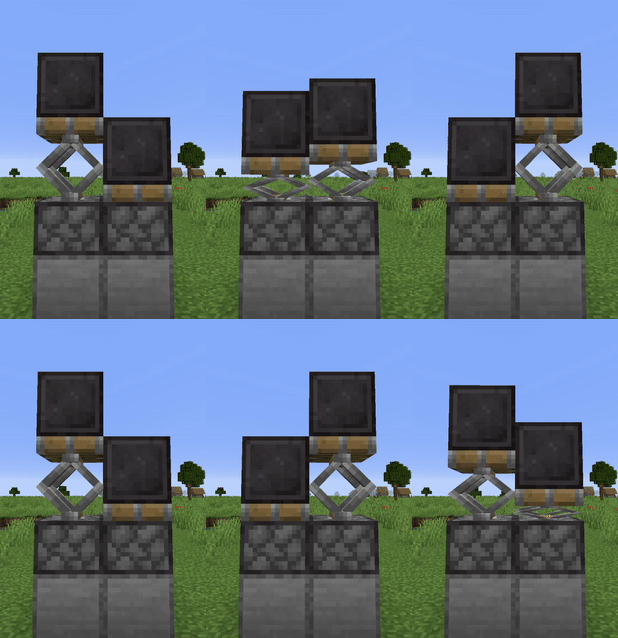
This tiny mod adds the telescopic piston arm animation seen in Bedrock Edition to Java, as well as the option for a squishier alternative animation and particle emission.

It's also compatible with the G4mespeed mod for smoother piston animations over all.
This mod requires the Fabric API to run! Grab it here -> https://www.curseforge.com/minecraft/mc-mods/fabric-api
Included are a few add-on Resource Packs which offer:
- Sticky Piston sides
- Squishing Bellows
- Scissors/Springs
(all of these support PBR)
Quick guide for Resource Pack developers:
- Model the piston arm around the vanilla piston_head models and put those in your pack as normal
- Split those models such that everything you want to not squish and to move at regular speed is in the piston_head_short models, and the arm parts are in a piston_arm model in the assets/telepistons/models/block/ directory
- Add the following to your piston_arm.json:
"telepistons": { "squish":"false", "particles":"4", "squishedScale": [ 1, 1, 0 ] }
- "squish" and "particles" determine whether the arm model gets squished and whether pistons emit steam particles respectively
- "squishedScale" determines the scale of the arm model once fully squished, i.e. the piston has fully retracted. Z points forward, so a vector of [1, 1, 0] will squish the arm just in that direction, while a vector of [2,2,0] will also make it get twice as wide and tall as it is squished.
Cómo instalar TelePistons
With Millida Launcher
Install Millida Launcher
The launcher is free: download it at millida.net/launcher and sign in with any nickname.
Click “Install” on this page
The launcher opens and installs the mod for Minecraft 1.16.5–26.3 on Fabric or Quilt automatically.
Launch the game
A profile with it appears in the launcher: click “Play”.
Manually
Install Fabric or Quilt
The loader must match the game version of the mod file, for example Minecraft 26.3. After installing it, a separate profile appears in your launcher.
Download the file for your version
In the version list above, pick the file Telepistons-1.1.4-26.3.jar (81 KB) for your game version and loader.
Put it in the mods folder
The folder is inside .minecraft (Windows: %appdata%\.minecraft\mods). If it does not exist, create it.
Launch the loader profile
Open “Mods” in the main menu: TelePistons should be in the list.
Versiones
Con dependencias
| Minecraft | Cargador | Archivo | Fecha | Acciones |
|---|---|---|---|---|
| 26.3 | Fabric, Quilt | Telepistons-1.1.4-26.3.jar81.1 KB 1 | ||
| 1.16.5 | — | telepistons-1.0.2.jar43.3 KB |
FAQ
Which Minecraft versions does TelePistons work on?
There are files for 26.3, 1.16.5. The newest is 26.3.
Is TelePistons for Forge or Fabric?
There are files for Fabric: 26.3 and for Quilt: 26.3. There are no files for Forge or NeoForge: a mod for another loader will not start.
Does TelePistons need other mods?
The author lists no required dependencies: the Fabric or Quilt loader is enough.
Where can I download TelePistons safely?
On this page: the file Telepistons-1.1.4-26.3.jar (81 KB) is stored on Millida’s server, with no link shorteners. SHA-1 checksum: 5ddd3c33d5bd8a8512b6405b770211d3ae4b7f07.
Reseñas
Sé el primero en valorar TelePistons


