
Space's Simple Graves Mod para Minecraft 1.21.1, 1.21
Vanilla Graves guarda automáticamente tu inventario en un cofre en el lugar donde mueres y te envía las coordenadas exactas para que puedas equiparte y volver a salir.
 Fabric
 Forge
Forge NeoForge
 Quilt
QuiltAcerca del mod Space's Simple Graves
Losing hours of progress to a surprise creeper or a long fall is frustrating-but "tombstone" mods often feel out of place in a blocky world. Vanilla Graves offers a lightweight, lore-friendly solution that uses Minecraft's existing mechanics to protect your hard-earned gear.
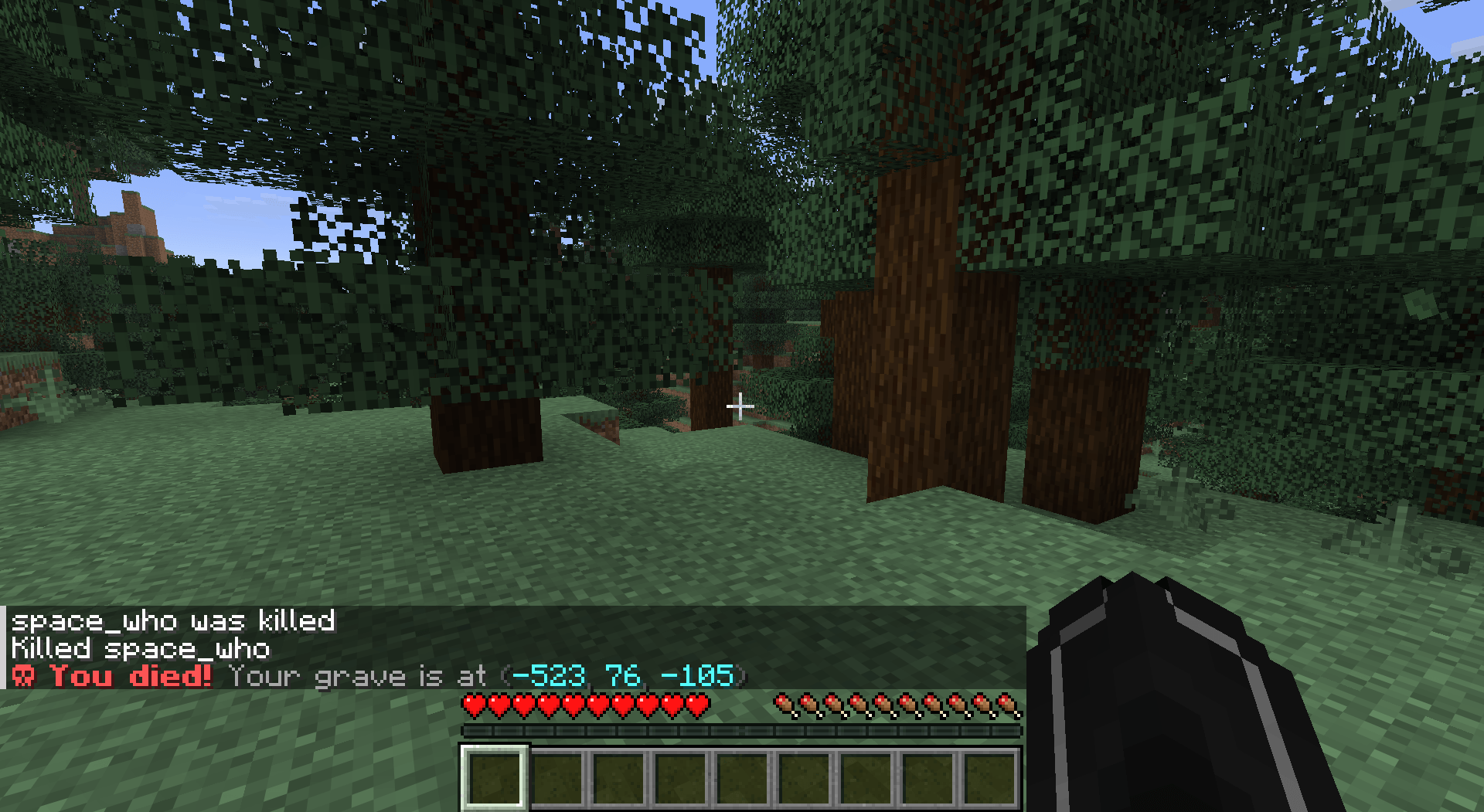
Key Features
Automatic Chest Placement: Upon death, the mod checks your inventory. If you are carrying items, it instantly places a chest (or a double chest) at your feet to store everything safely.
Death Coordinates: No more guessing where you fell. The moment you respawn, a private message appears in your chat with the exact X, Y, and Z coordinates of your grave.
Lava Protection: The mod attempts to find the safest nearby spot to place the chest, preventing your items from burning away instantly.
Minimalist & Lightweight: No new blocks, no complex GUI, and no "magic" items. It feels like a feature Mojang forgot to add.
How it Works
Die: (Try not to, but it happens!)
Generate: The mod searches for air or replaceable blocks at your death site.
Store: Your items are moved from your inventory into a standard Minecraft chest.
Recover: Check your chat, travel to the coordinates, and grab your gear.
Note: If you aren't carrying any items when you die, no chest will be placed to keep the world clutter-free!
Technical Details
Compatibility: Works seamlessly with most modded biomes and dimensions.
Server-Side: This mod can be installed on a server without requiring players to have it on their local machines (perfect for SMPs!).
Cómo instalar Space's Simple Graves
With Millida Launcher
Install Millida Launcher
The launcher is free: download it at millida.net/launcher and sign in with any nickname.
Click “Install” on this page
The launcher opens and installs the mod for Minecraft 1.21–26.3 on Fabric, Forge, NeoForge or Quilt automatically.
Launch the game
A profile with it appears in the launcher: click “Play”.
Manually
Install Fabric, Forge, NeoForge or Quilt
The loader must match the game version of the mod file, for example Minecraft 26.3. After installing it, a separate profile appears in your launcher.
Download the file for your version
In the version list above, pick the file vanilla-graves-1.21.x-1.0.jar (11 KB) for your game version and loader.
Put it in the mods folder
The folder is inside .minecraft (Windows: %appdata%\.minecraft\mods). If it does not exist, create it.
Launch the loader profile
Open “Mods” in the main menu: Space's Simple Graves should be in the list.
Versiones
Con dependencias
| Minecraft | Cargador | Archivo | Fecha | Acciones |
|---|---|---|---|---|
| 1.21 | Fabric, Forge, NeoForge, Quilt | vanilla-graves-1.21.x-1.0.jar10.9 KB 13 |
FAQ
Which Minecraft versions does Space's Simple Graves work on?
There are files for 1.21–26.3, 17 versions in total. The newest is 26.3.
Is Space's Simple Graves for Forge or Fabric?
There are files for Fabric: 1.21–26.3, for Forge: 1.21–26.3, for NeoForge: 1.21–26.3 and for Quilt: 1.21–26.3.
Does Space's Simple Graves need other mods?
The author lists no required dependencies: the Fabric, Forge, NeoForge or Quilt loader is enough.
Where can I download Space's Simple Graves safely?
On this page: the file vanilla-graves-1.21.x-1.0.jar (11 KB) is stored on Millida’s server, with no link shorteners. SHA-1 checksum: 20313fbe5837a7a8c42419c68536dc031cd94e52.
Reseñas
Sé el primero en valorar Space's Simple Graves


