

Seamless Sleep Mod para Minecraft 26.2
Añade una transición fluida y cinematográfica entre la noche y el día cuando los jugadores duermen, mejorando la cámara de dormir, el HUD y los visuales en general. ¡MADE IN HEAVEN!
 Forge
Forge NeoForge
 Fabric
In constant development!


A mod made with love for you guys <3
In a 3-step nutshell:
- A player sleeps
- MADE IN HEAVEN!!!
- honk mimimi hooonk mimimimi
Seamless Sleep is a server-client mod that turns going to bed into a smooth, in-world transition instead of a hard cut to daytime. A lot of mods do something similar, but this mod takes a different approach to that.
The whole night-skipping sequence is animated locally on the client, so it doesn’t depend on the server or a perfect connection. The transition stays consistent and fluid for the player even with higher latency.
Video about it
Version Control
This is a version control for Seamless Sleep as of 04/07/2026
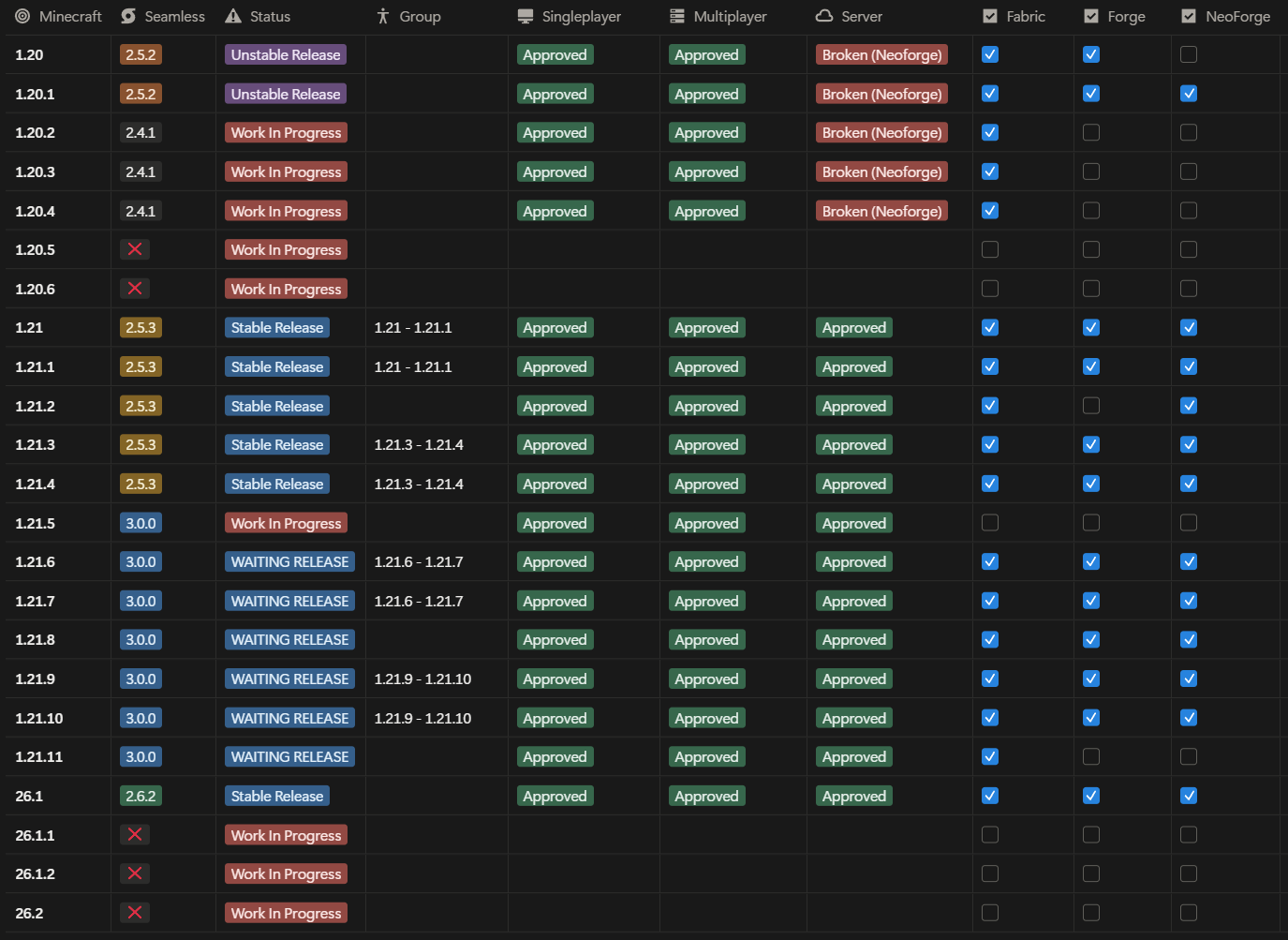
Feel free to add me on Discord (gabrielfl4) or post an issue on GitHub to share your feedback on improvements :)
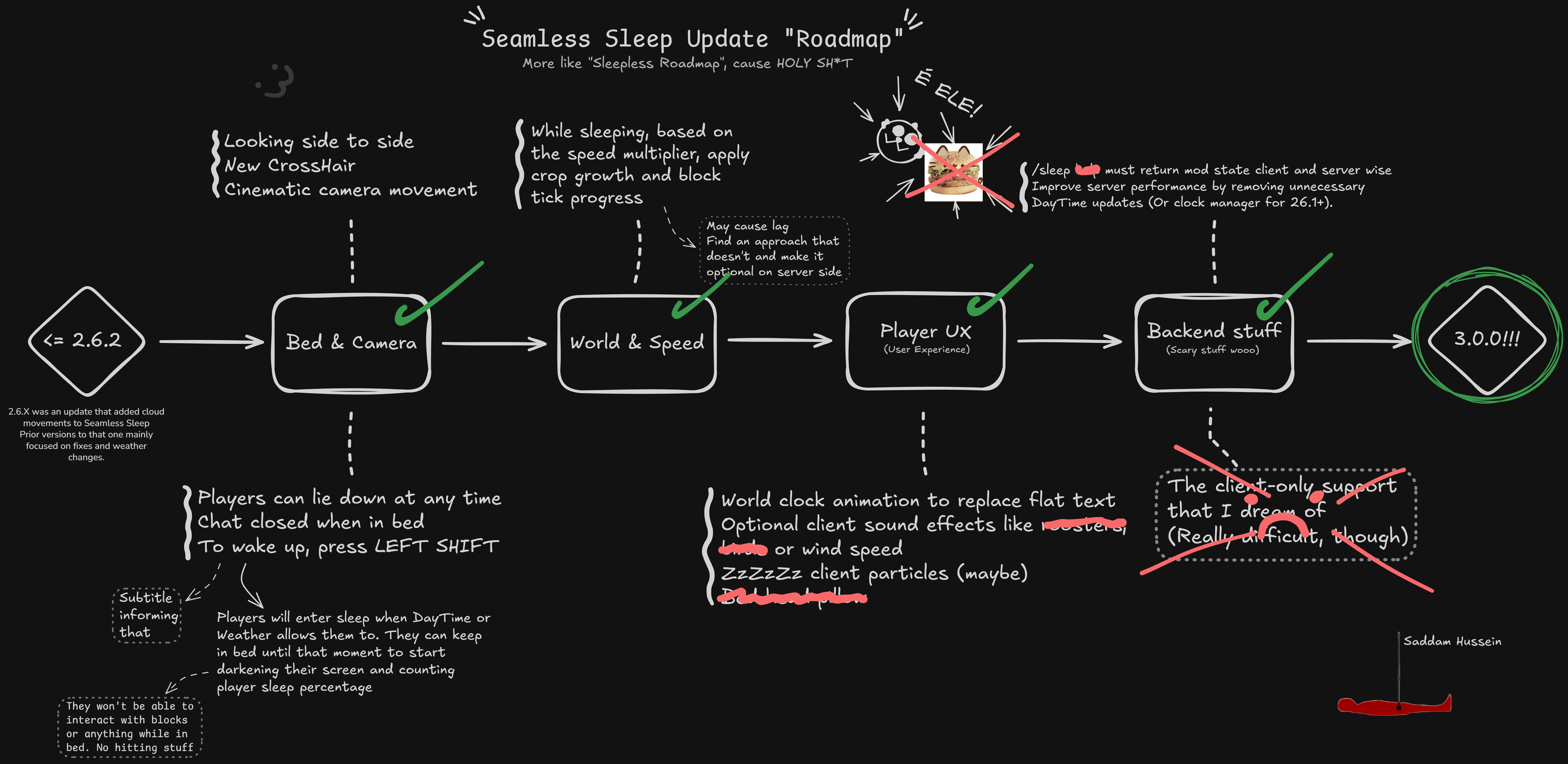
Update Roadmap to 3.0.0!
(ALL/Most to be released together)
Features
- Smooth night → day transition
Replaces the abrupt time jump with a clean, blended animation when players sleep.
- Shared sleep animation
The transition is synchronized visually so all players see the same progression as the night is skipped.
- Sleep HUD polish
- Brightens and cleans up the default sleep HUD.
- Slightly tilts the camera while you’re in bed for a more relaxed feeling.
- Configurable chat while sleeping
Adjust the opacity of both chat text and background specifically during sleep. Useful for servers where players still talk while skipping the night.
- Cleaned-up messages
Hides the vanilla “passing the night” text and replaces it with a more subtle indicator.
Multiplayer timing & clock sync
If you notice that your sleep animation on a server is happening much later than other players, it’s usually a local clock issue on your machine.
To fix it: (I'll be working on it to improve this)
- Open the Date & Time settings in Windows.
- Enable automatic time synchronization or manually sync the system clock with an internet time server.
- Done!
Once your system time is corrected, your sleep animation should line up much more closely with everyone else’s.
Configuration
Seamless Sleep integrates with:
- Mod Menu – quick access to settings from the mods list.
All options are saved in seamless_sleep-*.toml, so advanced users can tweak things directly if they want.
License & usage
This project is currently marked as All Rights Reserved on Modrinth. Even so, you are explicitly allowed to:
- Use Seamless Sleep in any modpack, public or private.
- Run it on any server or singleplayer world.
Please avoid reuploading the mod jar as your own or distributing modified copies separately – instead, link back to this Modrinth page.
Feedback & future plans
🐛 Found a bug or have a suggestion? Please open an issue or discussion on the Git repository linked on this page – feedback is very welcome.
The current focus is to bring Seamless Sleep to most versions on range of (1.20 - 1.21.11) in Fabric, Forge (when available) and Neoforge.
Lie down, let the night fade out smoothly, and wake up to a cleaner, less jarring morning transition.
Cómo instalar Seamless Sleep
With Millida Launcher
Install Millida Launcher
The launcher is free: download it at millida.net/launcher and sign in with any nickname.
Click “Install” on this page
The launcher opens and installs the mod for Minecraft 1.21.11–26.2 on Fabric, Forge or NeoForge automatically, together with its dependencies: YetAnotherConfigLib (YACL), Fabric API, Mod Menu.
Launch the game
A profile with it appears in the launcher: click “Play”.
Manually
Install Fabric, Forge or NeoForge
The loader must match the game version of the mod file, for example Minecraft 26.2. After installing it, a separate profile appears in your launcher.
Download the file for your version
In the version list above, pick the file seamlesssleep-forge-26.2-2.6.2.jar (169 KB) for your game version and loader.
Put it in the mods folder
The folder is inside .minecraft (Windows: %appdata%\.minecraft\mods). If it does not exist, create it. Required dependencies go there too: YetAnotherConfigLib (YACL), Fabric API, Mod Menu.
Launch the loader profile
Open “Mods” in the main menu: Seamless Sleep should be in the list.
On a server
A server on Fabric, Forge or NeoForge
The mod only works on a server with the same loader and game version, for example 26.2.
File goes into the server’s mods folder
Stop the server, put the mod file into the mods folder and start the server again.
Use the “To server” button
On Millida Hosting, the button at the top of the page uploads the file to your server and restarts it for you.
Versiones
Con dependencias
| Minecraft | Cargador | Archivo | Fecha | Acciones |
|---|---|---|---|---|
| 26.2 | Forge | 26.2169 KB 1 | ||
| 26.2 | NeoForge | 26.2166 KB | ||
| 26.2 | Fabric | 26.2600 KB 3 | ||
| 26.1.1 | NeoForge | 26.1.1167 KB | ||
| 26.1.1 | Forge | 26.1.1169 KB | ||
| 26.1.1 | Fabric | 26.1.1599 KB | ||
| 1.21.11 | NeoForge | 1.21.11164 KB | ||
| 1.21.11 | Forge | 1.21.11156 KB |
Qué necesita para funcionar
- YetAnotherConfigLib (YACL)obligatorio
- Fabric APIobligatorio
- Mod Menuobligatorio
FAQ
Which Minecraft versions does Seamless Sleep work on?
There are files for 26.2, 26.1.1, 26.1, 1.21.11. The newest is 26.2.
Is Seamless Sleep for Forge or Fabric?
There are files for Fabric: 26.1–26.2, for Forge: 1.21.11–26.2 and for NeoForge: 1.21.11–26.2.
What does Seamless Sleep need to work?
Required: YetAnotherConfigLib (YACL), Fabric API, Mod Menu. Without them the mod will not start: dependencies go into the same mods folder.
Does Seamless Sleep work on a server?
Yes. Seamless Sleep works both in singleplayer and on a server.
Where can I download Seamless Sleep safely?
On this page: the file seamlesssleep-forge-26.2-2.6.2.jar (169 KB) is stored on Millida’s server, with no link shorteners. SHA-1 checksum: a1f9efca7ec9a1349ea14f931f04aa82a4e98ace.
Reseñas
Sé el primero en valorar Seamless Sleep


