
Roughly Enough Resources Mod para Minecraft 1.20.1, 1.16.5
Compatibilidad de generación del mundo para Roughly Enough Items
 NeoForge
 Forge
Forge Fabric
Roughly Enough Resources
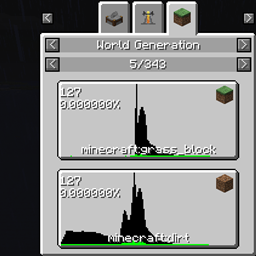
This is meant to be a replacement for Just Enough Resources, which itself is meant as a replacement for Not Enough Resources.
In short, it will show you what blocks spawn at what heights in the world. Note that there are some cases where blocks (which are what the world is made of) and items (which is what REI will show recipes for) don't completely mesh up. RER tries to account for this in several ways. Some of these will show up as multiple recipes attached to the same item -- for example, torches on walls and torches on the floor are different blocks, but the same item. Others will show as a vaugely related item -- water and lava show as their corresponding buckets, and fire blocks show up as flint & steel. A few different blocks show up as a question mark. but you can get the name of the block by hovering over it. REI, somewhat sadly, has strangely partial support for air -- if you try hitting the "R" button on an air item, nothing will happen. Recipes for air are only visible on the list of all "world generation" recipes.
License:
MIT License
Images:
Cómo instalar Roughly Enough Resources
With Millida Launcher
Install Millida Launcher
The launcher is free: download it at millida.net/launcher and sign in with any nickname.
Click “Install” on this page
The launcher opens and installs the mod for Minecraft 1.14–1.20.1 on Fabric, Forge or NeoForge automatically.
Launch the game
A profile with it appears in the launcher: click “Play”.
Manually
Install Fabric, Forge or NeoForge
The loader must match the game version of the mod file, for example Minecraft 1.20.1. After installing it, a separate profile appears in your launcher.
Download the file for your version
In the version list above, pick the file rer-2.9.0.jar (84 KB) for your game version and loader.
Put it in the mods folder
The folder is inside .minecraft (Windows: %appdata%\.minecraft\mods). If it does not exist, create it.
Launch the loader profile
Open “Mods” in the main menu: Roughly Enough Resources should be in the list.
Minecraft 1.20.1 runs on Java 17: with a different Java version the game may close right after launch.
Versiones
Con dependencias
| Minecraft | Cargador | Archivo | Fecha | Acciones |
|---|---|---|---|---|
| 1.20.1 | NeoForge, Forge | [Forge 1.20(.1)] v2.9.083.5 KB | ||
| 1.20.1 | Fabric | [Fabric 1.20(.1)] v2.9.079.6 KB 2 | ||
| 1.19.3 | Fabric | [Fabric 1.19.3] v2.7.079.3 KB | ||
| 1.19.3 | Forge | [Forge 1.19.3] v2.7.083.2 KB | ||
| 1.16.3 | — | rer-2.1.4.jar71.1 KB | ||
| 1.14.1 | — | rer-1.1.0.jar57.7 KB 2 | ||
| 1.14.1 | — | rer-1.0.0.jar24.6 KB |
Reseñas
Sé el primero en valorar Roughly Enough Resources


