
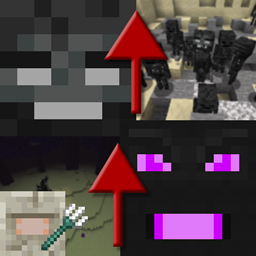
Progressive Bosses Mod para Minecraft 1.20.1, 1.16.5
Invoca versiones más fuertes del Wither y el Ender Dragon
- descargas
- 7 descargas
- visualizaciones
- 22 visualizaciones
- Actualizado
- Actualizado 17.10.2026
- 1.16 — 1.20.1
 Forge
Forge
Acerca del mod Progressive Bosses
Para la versión de Fabric, consulta [Fabric] Progressive Bosses (ten en cuenta que no está afiliado conmigo, por favor reporta los problemas al desarrollador)
Este mod requiere InsaneLib
Este mod hace que el Wither y el Ender Dragon sean más difíciles al permitirte invocar una versión más fuerte de ellos. También hace que la pelea del Elder Guardian sea más difícil.
La dificultad se adaptará según los jugadores que estén alrededor del jefe.
- Más salud: son jefes... ¿por qué pueden caer con unos pocos golpes?
- Nuevas habilidades: como Wither Charging o Dragon respawning crystals
- Esbirros: tanto el Dragon como el Wither tienen Esbirros
- Cristales enjaulados: aparecerán más jaulas alrededor de los cristales, y algunos cristales aparecerán dentro de torres
- Acidballs y Skulls más rápidos: esquivar es más difícil
- La pelea del Elder Guardian es más difícil ¡y con una recompensa real!
- Muchísimas correcciones de errores: a Mojang ya no le importa el aspecto de supervivencia del juego
- ¡Y mucho, mucho más! Esto es solo la punta del iceberg de la torre.
Conviértete en patreon para probar versiones más nuevas antes y jugar en el servidor público.
¡Mira mis otros proyectos!
Permisos de Modpack
¡Haz lo que quieras para los modpacks, públicos o privados!
Stop Mod Reposts
No descargues este mod desde ningún otro sitio web que no sea Curseforge o Modrinth. Podría ser malware y podría dañar tu PC. Consulta https://stopmodreposts.org para más información.
Cómo instalar Progressive Bosses
With Millida Launcher
Install Millida Launcher
The launcher is free: download it at millida.net/launcher and sign in with any nickname.
Click “Install” on this page
The launcher opens and installs the mod for Minecraft 1.16–1.20.1 on Forge automatically.
Launch the game
A profile with it appears in the launcher: click “Play”.
Manually
Install Forge
The loader must match the game version of the mod file, for example Minecraft 1.20.1. After installing it, a separate profile appears in your launcher.
Download the file for your version
In the version list above, pick the file progressivebosses-4.3.12.jar (999 KB) for your game version.
Put it in the mods folder
The folder is inside .minecraft (Windows: %appdata%\.minecraft\mods). If it does not exist, create it.
Launch the loader profile
Open “Mods” in the main menu: Progressive Bosses should be in the list.
Minecraft 1.20.1 runs on Java 17: with a different Java version the game may close right after launch.
Versiones
Con dependencias
| Minecraft | Cargador | Archivo | Fecha | Acciones |
|---|---|---|---|---|
| 1.20.1 | Forge | 4.3.12999 KB 7 | ||
| 1.20.1 | Forge | 4.3.3990 KB | ||
| 1.20.1 | Forge | 4.3.1959 KB | ||
| 1.16.3 | — | [1.16.x] Progressive Bosses 2.2.068 KB |
FAQ
Which Minecraft versions does Progressive Bosses work on?
There are files for 1.16–1.20.1, 7 versions in total. The newest is 1.20.1.
Is Progressive Bosses for Forge or Fabric?
Only for Forge: 1.20.1. There are no files for Fabric or NeoForge: a mod for another loader will not start.
Does Progressive Bosses need other mods?
The author lists no required dependencies: the Forge loader is enough.
Which Java does Progressive Bosses need?
Minecraft 1.20.1 runs on Java 17. If the game closes right after launch, the usual cause is the wrong Java version in the profile settings.
Where can I download Progressive Bosses safely?
On this page: the file progressivebosses-4.3.12.jar (999 KB) is stored on Millida’s server, with no link shorteners. SHA-1 checksum: 5ec938a9e975ec49ae461d6ca1dd6e798a1d0dbc.
Reseñas
Sé el primero en valorar Progressive Bosses


