

PlayerEx Mod para Minecraft 1.16.5, 1.19.2
Añade atributos, niveles y puntos de habilidad. Con temática RPG.
 Fabric
 Forge
ForgeAcerca del mod PlayerEx
11th Aug 2023: I am taking a break from modding. I will be back, but not sure when. I will still try to respond to comments when I can. Please note that only the latest version will be given support. Furthermore, I'm not developing for Forge any longer; this mod now uses Fabric.
Description

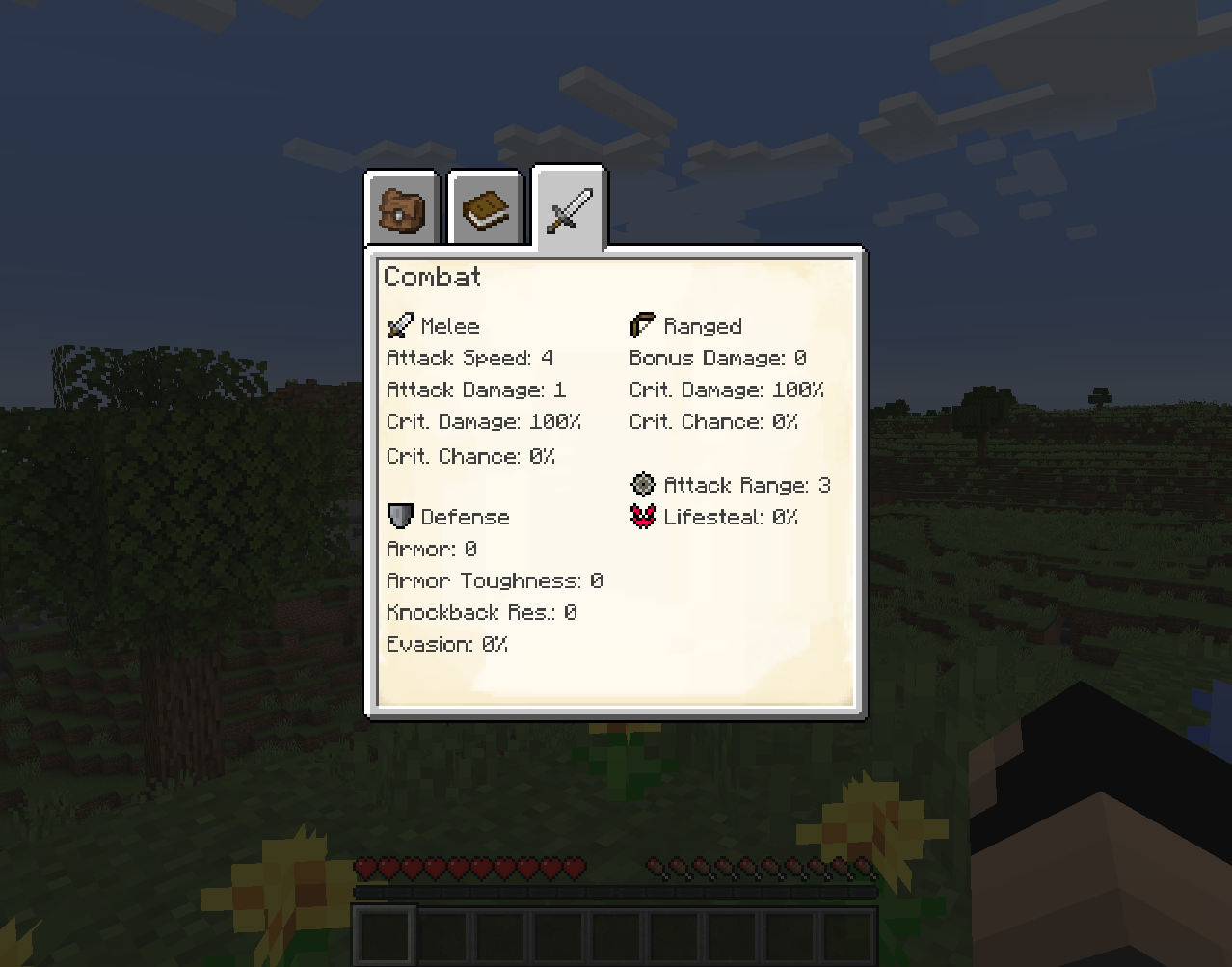
PlayerEx registers fully functional RPG themed attributes to the game, and adds them to the player by default ( these attributes can be added to other living entities). Also added are levels, skill points and configurable levelling. The latest iteration is powered by Data Attributes, which is where the bulk of the configurability comes from - please familiarise yourself with it before coming here to ask how to configure things.
For more detailed documentation on provided content and mechanics, among other things, please read the wiki.
Looking for the old HUD? It is now available as a standalone mod here.
An addon mod is also available: RelicEx; this mod offers some expansion items for PlayerEx attributes. Some videos kindly featuring PlayerEx:
- By Mischief of Mice (Forge)
- By bstylia14 (Forge)
- By AsianHalfSquat (Fabric)
Notes and Guidance
- The last version released for Forge was v1.1.8.
- Please always use the latest version.
- Please delete config files before updating to another version, as the config files tend to change between major versions as more configurability is implemented.
- Modpacks are fine.
- This mod comes bundled with (jar-in-jar) Cardinal Components (Base, Entity and Chunk modules), TextPlaceholderAPI, OfflinePlayerCache and exp4j (credit given).
Cómo instalar PlayerEx
With Millida Launcher
Install Millida Launcher
The launcher is free: download it at millida.net/launcher and sign in with any nickname.
Click “Install” on this page
The launcher opens and installs the mod for Minecraft 1.16.4–1.19.2 on Fabric or Forge automatically.
Launch the game
A profile with it appears in the launcher: click “Play”.
Manually
Install Fabric or Forge
The loader must match the game version of the mod file, for example Minecraft 1.19.2. After installing it, a separate profile appears in your launcher.
Download the file for your version
In the version list above, pick the file playerex-3.5.4+1.19.2.jar (607 KB) for your game version and loader.
Put it in the mods folder
The folder is inside .minecraft (Windows: %appdata%\.minecraft\mods). If it does not exist, create it.
Launch the loader profile
Open “Mods” in the main menu: PlayerEx should be in the list.
Minecraft 1.19.2 runs on Java 17: with a different Java version the game may close right after launch.
Versiones
Con dependencias
| Minecraft | Cargador | Archivo | Fecha | Acciones |
|---|---|---|---|---|
| 1.19.2 | Fabric | 3.5.4+1.19.2607 KB 1 | ||
| 1.16.5 | Forge | playerex-1.1.8-1.16.5.jar131 KB 3 |
FAQ
Which Minecraft versions does PlayerEx work on?
There are files for 1.19.2, 1.16.5, 1.16.4. The newest is 1.19.2.
Is PlayerEx for Forge or Fabric?
There are files for Fabric: 1.19.2 and for Forge: 1.16.4–1.16.5. There are no files for NeoForge: a mod for another loader will not start.
Does PlayerEx need other mods?
The author lists no required dependencies: the Fabric or Forge loader is enough.
Which Java does PlayerEx need?
Minecraft 1.19.2 runs on Java 17. If the game closes right after launch, the usual cause is the wrong Java version in the profile settings.
Where can I download PlayerEx safely?
On this page: the file playerex-3.5.4+1.19.2.jar (607 KB) is stored on Millida’s server, with no link shorteners. SHA-1 checksum: 48e9ef1dc6aafb45e9aa7c5d9ab2fe588f297d7c.
Reseñas
Sé el primero en valorar PlayerEx


