

One Enough Item Mod para Minecraft 1.20.1, 1.21.1
Con OEI, puedes reemplazar sin esfuerzo objetos duplicados por un único objeto representativo designado.
 NeoForge
 Forge
ForgeOneEnoughItem (OEI)
This mod was developed to resolve the issue of duplicated item dictionaries in modpacks – three types of silver, four types of lead, five types of tomatoes, six types of corn – each with distinct recipes.
With OEI, you can effortlessly replace duplicate items with unique designated representatives.
Typical Cases
17 types of tomatoes in a modpack
Six types of silver ore in a modpack
All with independent recipes!
Those days are now over. With OEI, items are replaced with their designated representatives immediately upon creation!
Usage
OEI is datapack-driven and supports hot reloading. Configure replacements at data/oei/replacements using this simple syntax:
[ { "matchItems": [ "#forge:ore", "minecraft:potato", "minecraft:carrot" ], "resultItems": "minecraft:egg" } ]
List item IDs to replace under matchItems, and specify the designated representative in resultItems.
Warning: Never replace an item with itself – this may cause critical bugs!
KubeJS Integration:
ServerEvents.highPriorityData(event => { event.addJson("oei:replacements/raw_materials.json", [ { "matchItems": ["#forge:raw_materials/silver"], "resultItems": "thermal:raw_silver" } ]); });
OEI supports tag matching. If tag-based replacements require game reloads, use raw item IDs instead (likely due to mod conflicts).
Built-in Editor (v1.0.3+): Press CTRL+R to open the GUI editor for codeless replacement configuration! The editor includes recipe deduplication – see official documentation.
Effects
OEI replaces items at the earliest possible stage – not by scanning player inventories.
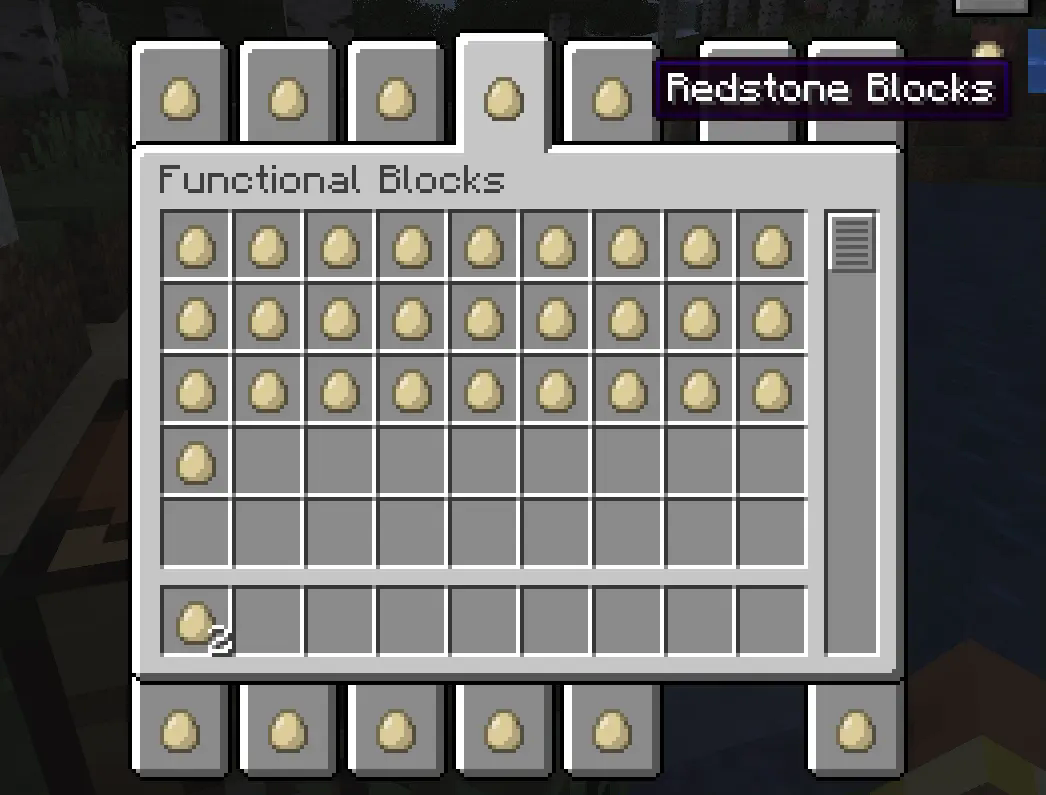
Example: Replacing all items with eggs instantly transforms the creative inventory:
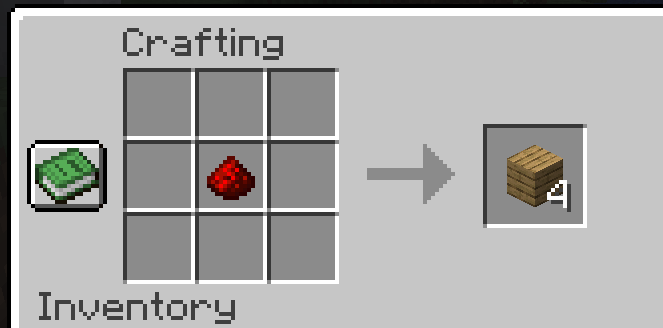
Recipes automatically adapt. Here, iron ingots → eggs in a furnace recipe:
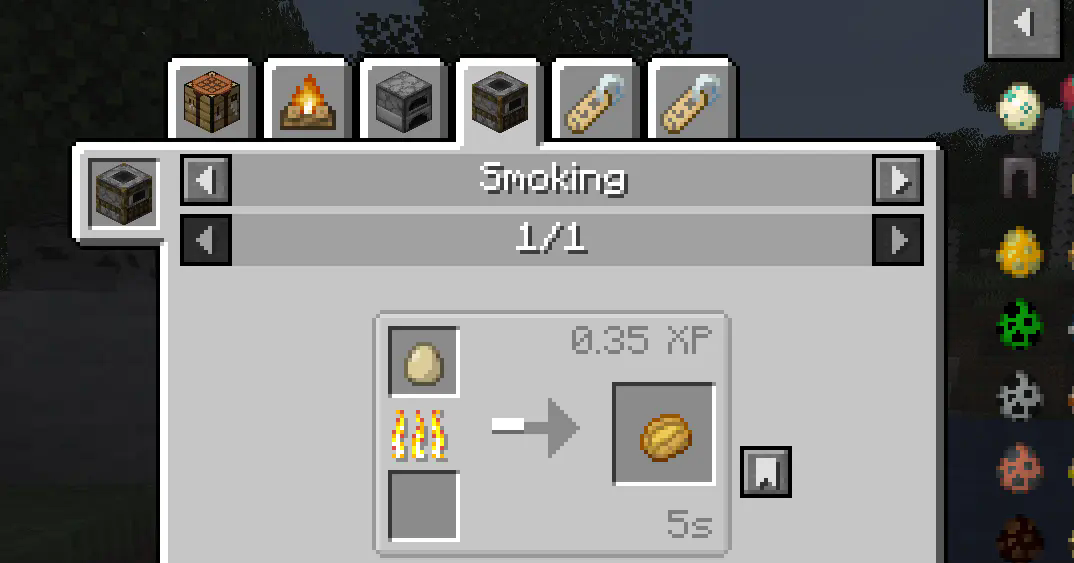
All recipes are automatically processed, including JEI displays:
Works with trades, advancements, and nearly all non-hardcoded recipes.
Additionally, replacing items with air will completely remove them. However, for compatibility reasons, such changes will not take effect in the Creative Mode inventory or JEI displays.
Deep Replacement
Enable in config to extend replacements to item interaction contexts (e.g., healing iron golems with eggs after replacing iron ingots).
Use when standard recipe replacement fails for specific mods. Note: Only affects item detection – does not fully inherit original item functionality.
Roadmap
- Properties Stripping: Remove properties of replaced items (e.g., food properties to exclude them from Spice of Life handbooks). Configurable.
- Tag Inheritance: Make representatives inherit all tags from replaced items.
- Tag Removal: Completely strip tags from replaced items to eliminate them from recipes.
Cómo instalar One Enough Item
With Millida Launcher
Install Millida Launcher
The launcher is free: download it at millida.net/launcher and sign in with any nickname.
Click “Install” on this page
The launcher opens and installs the mod for Minecraft 1.20.1–26.1.2 on Forge or NeoForge automatically, together with its dependencies: Dependency.
Launch the game
A profile with it appears in the launcher: click “Play”.
Manually
Install Forge or NeoForge
The loader must match the game version of the mod file, for example Minecraft 26.1.2. After installing it, a separate profile appears in your launcher.
Download the file for your version
In the version list above, pick the file OneEnoughItem-neoforge-26.1.2-1.0.0.jar (255 KB) for your game version and loader.
Put it in the mods folder
The folder is inside .minecraft (Windows: %appdata%\.minecraft\mods). If it does not exist, create it. Required dependencies go there too: Dependency.
Launch the loader profile
Open “Mods” in the main menu: One Enough Item should be in the list.
On a server
A server on Forge or NeoForge
The mod only works on a server with the same loader and game version, for example 26.1.2.
File goes into the server’s mods folder
Stop the server, put the mod file into the mods folder and start the server again.
Use the “To server” button
On Millida Hosting, the button at the top of the page uploads the file to your server and restarts it for you.
Versiones
Con dependencias
| Minecraft | Cargador | Archivo | Fecha | Acciones |
|---|---|---|---|---|
| 26.1.2 | NeoForge | 26.1.2255 KB | ||
| 1.21.1 | NeoForge | 1.21.1255 KB | ||
| 1.20.1 | Forge | 1.20.1257 KB 2 | ||
| 1.20.1 | Forge | 1.20.1258 KB | ||
| 1.20.1 | Forge | 1.20.1257 KB | ||
| 1.21.1 | NeoForge | 1.21.1255 KB | ||
| 1.21.1 | NeoForge | 1.21.1254 KB | ||
| 1.21.1 | NeoForge | 1.21.1256 KB |
Qué necesita para funcionar
- Dependencyobligatorio
FAQ
Which Minecraft versions does One Enough Item work on?
There are files for 26.1.2, 1.21.1, 1.20.1. The newest is 26.1.2.
Is One Enough Item for Forge or Fabric?
There are files for Forge: 1.20.1 and for NeoForge: 1.21.1–26.1.2. There are no files for Fabric: a mod for another loader will not start.
What does One Enough Item need to work?
Required: Dependency. Without it the mod will not start: dependencies go into the same mods folder.
Does One Enough Item work on a server?
Yes. One Enough Item works both in singleplayer and on a server.
Where can I download One Enough Item safely?
On this page: the file OneEnoughItem-neoforge-26.1.2-1.0.0.jar (255 KB) is stored on Millida’s server, with no link shorteners. SHA-1 checksum: a9ca340c4fef59a8aa7d822437be169dd7b927fc.
Reseñas
Sé el primero en valorar One Enough Item


