

More Mekanism Processing Mod para Minecraft 1.21.1, 1.16.5
Añade el procesamiento de minerales de Mekanism a los minerales de otros mods.
 NeoForge
 Fabric
 Forge
Forge# Add mekanism's ore processing to other mod's ores
This can 1 Ore process into up to 5 ingots 3 Raw Material process into up to 10 ingots 1 Raw Block process into up to 30 ingots
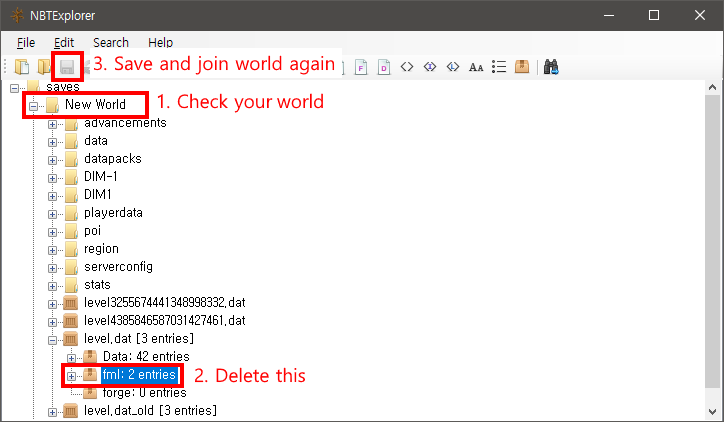
# Fix missing tags
I don't know if that was intentional, that ores names is same, but some tags missing
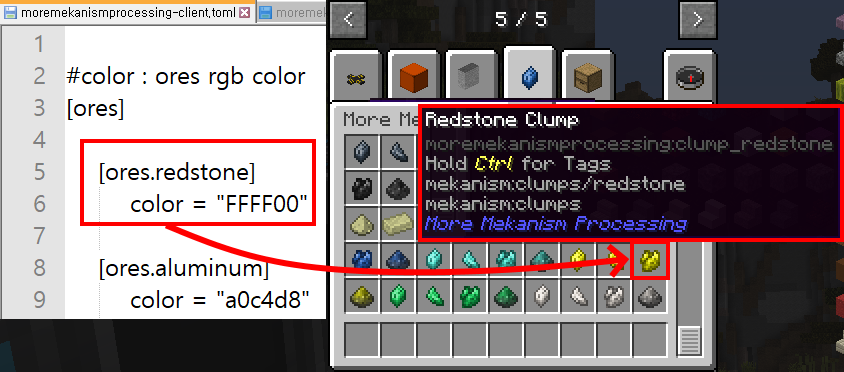
# Storage Block
This mod not register 'block of ingot' Each mods can has same block of ingot That blocks may have different properties
Can't decide one value each properties That's reason
# Combiner Recipe
This mod not add combiner recipes Mekanism Recipe's output require exact item registry name (e.g. xxxmod:silver_ore)
Can't determine one in many same name blocks
# Processing Tree
Depending on the final item of the ore, it is divided into 3 processing trees
## Dust
- Ore (or Raw Matrial or Raw Block)
- Dirty Slurry
- Clean Slurry
- Shard
- Clump
- Dirty Dust
- Dust
Ingot not exist ores's processing is finish to dust e.g.) Project Red's Electrotine
## Ingot
- Extends from 'Dust'
- Dust smelting into Ingot
- Ingot can split to nuggets
## Gem
- Extends from 'Dust'
- Dust enriching into Gem
# Support Mods/Ores
- List of mods, ores
- If want to add support mod, New Issue with 'curse forge project' or 'github' url
# License
MIT and while 'Mekanism' allows
# Modpacks
Can use in modpacks under license
# Issue or suggestion?
Here to "New Issue"
https://github.com/gisellevonbingen/Minecraft-MoreMekanismProcessing/issues
# Config not sync with Server to Client
Please put same config file to client with server's
Cómo instalar More Mekanism Processing
With Millida Launcher
Install Millida Launcher
The launcher is free: download it at millida.net/launcher and sign in with any nickname.
Click “Install” on this page
The launcher opens and installs the mod for Minecraft 1.16.5–1.21.1 on Fabric, Forge or NeoForge automatically.
Launch the game
A profile with it appears in the launcher: click “Play”.
Manually
Install Fabric, Forge or NeoForge
The loader must match the game version of the mod file, for example Minecraft 1.21.1. After installing it, a separate profile appears in your launcher.
Download the file for your version
In the version list above, pick the file MoreMekanismProcessing-1.21.1-6.8.jar (696 KB) for your game version and loader.
Put it in the mods folder
The folder is inside .minecraft (Windows: %appdata%\.minecraft\mods). If it does not exist, create it.
Launch the loader profile
Open “Mods” in the main menu: More Mekanism Processing should be in the list.
Minecraft 1.21.1 runs on Java 21: with a different Java version the game may close right after launch.
Versiones
Con dependencias
| Minecraft | Cargador | Archivo | Fecha | Acciones |
|---|---|---|---|---|
| 1.16.5 | Forge | 1.16.5-1.10570 KB | ||
| 1.21.1 | NeoForge | 1.21.1-6.8696 KB 4 | ||
| 1.18.2 | Fabric | 1.18.2-2.6617 KB | ||
| 1.18.1 | Forge | 1.18.1-2.0566 KB |
FAQ
Which Minecraft versions does More Mekanism Processing work on?
There are files for 1.21.1, 1.18.2, 1.18.1, 1.16.5. The newest is 1.21.1.
Is More Mekanism Processing for Forge or Fabric?
There are files for Fabric: 1.18.2, for Forge: 1.16.5–1.18.1 and for NeoForge: 1.21.1.
Which Java does More Mekanism Processing need?
Minecraft 1.21.1 runs on Java 21. If the game closes right after launch, the usual cause is the wrong Java version in the profile settings.
How do I download More Mekanism Processing?
With Millida Launcher: it installs More Mekanism Processing into a modpack by itself, for the right game version and loader. The launcher is free.
Reseñas
Sé el primero en valorar More Mekanism Processing


