
 NeoForge
 Fabric
 Forge
👋 Mannequins — Strike a pose!
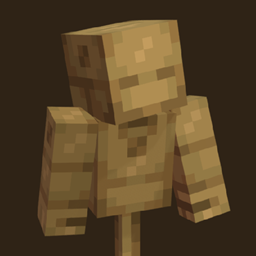
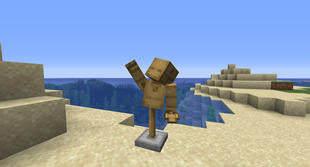
The Mannequin is the perfect companion for all your training needs. These wooden dummies can be posed, suited up with armor for that extra style, and even fought to test out the great strength of your best weapons. Want something a little more static? The Statue can provide everything the Mannequin can, but frozen in place by the stone. The Statue doesn't move when punched and it even has legs! (no, you cannot put anything on them or pose the legs. sorry!) Everything is easy to use and intuitive so even beginners can pose their mannequins with ease.
📦 Features:
- Easy to use posing GUI with scroll bars for absolute precision
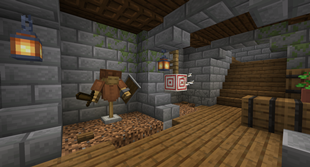
- Equip a chestplate and/or a helmet to show off your style
- Give your mannequin something to show in it's main or off hand
- The Mannequin and Statue can be given unique personalities! Sneak right-click them with an axe or pickaxe respectively to cycle through multiple faces.
- The Mannequin has a unique attack animation when punched and particles to visualize the damage you've caused
🧍 How to use:
It's quite simple! First of course you need to craft either the Mannequin or the Statue, then you place it down and right click it for all the customization you could want! On the left you have 4 slots for each item it can hold, in the center you can select which part you want to rotate, and lastly on the right you have 3 scroll bars for each axis; X, Y, and Z! Use your mouse's scroll wheel for super precision, or be brave with sliding it down with the click or drag of your mouse.
Cómo instalar Mannequins
With Millida Launcher
Install Millida Launcher
The launcher is free: download it at millida.net/launcher and sign in with any nickname.
Click “Install” on this page
The launcher opens and installs the mod for Minecraft 1.19.2–1.21.1 on Fabric, Forge or NeoForge automatically.
Launch the game
A profile with it appears in the launcher: click “Play”.
Manually
Install Fabric, Forge or NeoForge
The loader must match the game version of the mod file, for example Minecraft 1.21.1. After installing it, a separate profile appears in your launcher.
Download the file for your version
In the version list above, pick the file mannequins-3.0.0-rc.1.jar (162 KB) for your game version and loader.
Put it in the mods folder
The folder is inside .minecraft (Windows: %appdata%\.minecraft\mods). If it does not exist, create it.
Launch the loader profile
Open “Mods” in the main menu: Mannequins should be in the list.
Minecraft 1.21.1 runs on Java 21: with a different Java version the game may close right after launch.
Versiones
Con dependencias
| Minecraft | Cargador | Archivo | Fecha | Acciones |
|---|---|---|---|---|
| 1.21.1 | NeoForge | [NeoForge 1.21.1] Mannequins 3.0.0-rc.1162 KB 1 | ||
| 1.19.2 | Fabric | [Fabric 1.19.2] Mannequins 2.2.1187 KB | ||
| 1.19.2 | Forge | [Forge 1.19.2] Mannequins 2.2.1140 KB |
FAQ
Which Minecraft versions does Mannequins work on?
There are files for 1.21.1, 1.19.2. The newest is 1.21.1.
Is Mannequins for Forge or Fabric?
There are files for Fabric: 1.19.2, for Forge: 1.19.2 and for NeoForge: 1.21.1.
Does Mannequins need other mods?
The author lists no required dependencies: the Fabric, Forge or NeoForge loader is enough.
Which Java does Mannequins need?
Minecraft 1.21.1 runs on Java 21. If the game closes right after launch, the usual cause is the wrong Java version in the profile settings.
Where can I download Mannequins safely?
On this page: the file mannequins-3.0.0-rc.1.jar (162 KB) is stored on Millida’s server, with no link shorteners. SHA-1 checksum: 1f3194f376ae08ab2f3114637c8c87d70c2a0f90.
Reseñas
Sé el primero en valorar Mannequins


