

Maintenance Mode Mod para Minecraft 1.20.1, 1.21.1
¡Pon tu servidor en modo mantenimiento!
 Fabric
 Forge
Forge NeoForge
 Quilt
QuiltAcerca del mod Maintenance Mode
Maintenance Mode is a small server side utility that allows you to place your server in Maintenance mode. During this time, only players you choose will be able to access your server, and everyone else will be disconnected.
This utility is aimed at server owners to allow them to perform config changes, test new mods or configure new server features, without people randomly joining, or having to de-whitelist everyone (if you use whitelisting).

- Keeping people out of your server during maintenance/updates, except those allowed
- Scheduling when Maintenance should start and end
- Custom server icon/motd while in maintenance mode
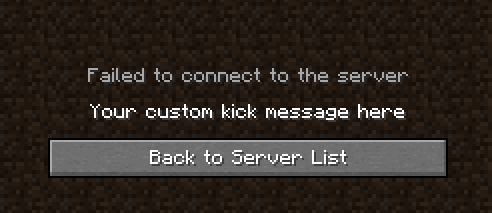
- Customizable kick message during maintenance mode
- Support for MiniMessage formatting in MOTD and Kick messages
- Support for Minecraft Formatting in MOTD and Kick messages
- Support for LuckPerms
- Full server backup (Make a full backup of your server including configs, mods, settings and more)
You are allowed to include this mod in your modpack, BUT, all downloads have to go through our offical Modrinth and Curseforge pages. You are not allowed to re-upload the mod to any other sites.
You are free to clone the code and distribute the mod as your own, but I ask that you please change the name, and you are not allowed to use any of our official docs/resources, as those are licensed under ARR.
The artwork contained on this page is licensed under All Rights Reserved (by HypherionSA) and may not be re-used anywhere else, aside from our official Curse/Modrinth/Documentation pages. This license excludes the BisectHosting logo, which is licensed under their respective licenses
Cómo instalar Maintenance Mode
Install Millida Launcher
The launcher is free: download it at millida.net/launcher and sign in with any nickname.
Click “Install” on this page
The launcher opens and installs the mod for Minecraft 1.18.2–26.2 on Fabric, Forge, NeoForge or Quilt automatically.
Launch the game
A profile with it appears in the launcher: click “Play”.
Versiones
Con dependencias
| Minecraft | Cargador | Archivo | Fecha | Acciones |
|---|---|---|---|---|
| 1.21 | Fabric, Forge, NeoForge, Quilt | [1.18.2-26.2] Maintenance Mode Universal - 1.3.4262 KB | ||
| 1.21 | NeoForge | [NeoForge 1.21.x] Maintenance Mode - 1.2.01.2 MB | ||
| 1.20.4 | Forge | [Forge 1.20.4] Maintenance Mode - 1.2.01.2 MB |
FAQ
Which Minecraft versions does Maintenance Mode work on?
There are files for 1.18.2–26.2, 19 versions in total. The newest is 26.2.
Is Maintenance Mode for Forge or Fabric?
There are files for Fabric: 1.18.2–26.2, for Forge: 1.18.2–26.2, for NeoForge: 1.18.2–26.2 and for Quilt: 1.18.2–26.2.
Does Maintenance Mode need other mods?
The author lists no required dependencies: the Fabric, Forge, NeoForge or Quilt loader is enough.
How do I download Maintenance Mode?
With Millida Launcher: it installs Maintenance Mode into a modpack by itself, for the right game version and loader. The launcher is free.
Reseñas
Sé el primero en valorar Maintenance Mode


