

Leaf Me Alone Mod para Minecraft 1.20.1, 1.21.1
Permite que cualquier entidad montable que controle a su pasajero se mueva a través de las hojas
 Fabric
 NeoForge
 Forge
ForgeDescription
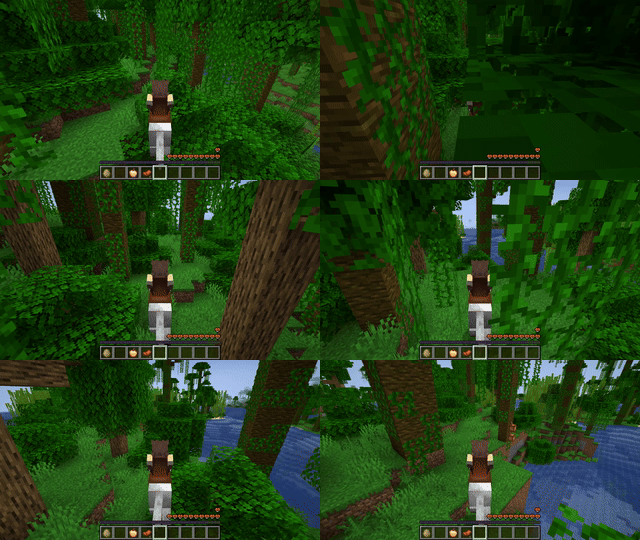
Allows any entity to move trough leaves blocks as long as it has passenger that can control it (i.e. player on the horse). This doesn't make leaves have no collision at all.
In addition to that makes camera ignore collision of leaves as long as you able to control vehicle entity.
Mod has to be installed on both server and client in order to work correctly.
Why?
Because navigating trough forests on big mounts as horses sucks, especially jungles. This greatly limits their usage.
Incompatibilities
Any mod that changes leaves block collision shape (more specifically makes its own version of getCollisionShape() method (Yarn mappings) in LeavesBlock.class). Mod may take no effect if leaves block added by mod gives it custom collision.
In less technical terms, if other mod messes with collision of leaves, it can be incompatible with this mod
Cómo instalar Leaf Me Alone
With Millida Launcher
Install Millida Launcher
The launcher is free: download it at millida.net/launcher and sign in with any nickname.
Click “Install” on this page
The launcher opens and installs the mod for Minecraft 1.19.4–26.3 on Fabric, Forge or NeoForge automatically.
Launch the game
A profile with it appears in the launcher: click “Play”.
Manually
Install Fabric, Forge or NeoForge
The loader must match the game version of the mod file, for example Minecraft 26.3. After installing it, a separate profile appears in your launcher.
Download the file for your version
In the version list above, pick the file leafmealone-1.2.0.jar (26 KB) for your game version and loader.
Put it in the mods folder
The folder is inside .minecraft (Windows: %appdata%\.minecraft\mods). If it does not exist, create it.
Launch the loader profile
Open “Mods” in the main menu: Leaf Me Alone should be in the list.
On a server
A server on Fabric, Forge or NeoForge
The mod only works on a server with the same loader and game version, for example 26.3.
File goes into the server’s mods folder
Stop the server, put the mod file into the mods folder and start the server again.
Use the “To server” button
On Millida Hosting, the button at the top of the page uploads the file to your server and restarts it for you.
Versiones
Con dependencias
| Minecraft | Cargador | Archivo | Fecha | Acciones |
|---|---|---|---|---|
| 26.3 | Fabric, NeoForge | 26.326.2 KB 1 | ||
| 1.21.1 | NeoForge | 1.21.124.9 KB | ||
| 1.20.1 | Forge | 1.20.125.7 KB | ||
| 1.21.11 | Fabric | 1.21.1125.9 KB 1 | ||
| 1.20.6 | Fabric | 1.20.625.9 KB |
FAQ
Which Minecraft versions does Leaf Me Alone work on?
There are files for 1.19.4–26.3, 25 versions in total. The newest is 26.3.
Is Leaf Me Alone for Forge or Fabric?
There are files for Fabric: 1.19.4–26.3, for Forge: 1.20.1 and for NeoForge: 1.21–26.3.
Does Leaf Me Alone need other mods?
The author lists no required dependencies: the Fabric, Forge or NeoForge loader is enough.
Does Leaf Me Alone work on a server?
Yes. Leaf Me Alone works both in singleplayer and on a server.
Where can I download Leaf Me Alone safely?
On this page: the file leafmealone-1.2.0.jar (26 KB) is stored on Millida’s server, with no link shorteners. SHA-1 checksum: 0c741c8e366b229f2ab56ca9c65e3e1fd2994133.
Reseñas
Sé el primero en valorar Leaf Me Alone


