
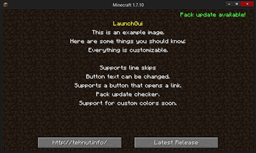
LaunchGUI Mod para Minecraft 1.12.2
¡Una forma de notificar a tus jugadores!
LaunchGUI
### A utility for modpack creators that creates a GUI when the player initially launches the pack.
The GUI is fully customizable with up to 8 lines of text, a custom title, custom button text, and a manually set modid to look for.
Alternate Downloads
Sometimes Curse publishing is slow. You can find every download (Along with all my other projects) on my Jenkins.
Links
IRC: #TehNut on Esper
Twitter: @OfficialTehNut
Website: http://tehnut.info/
Github: TehNut
Modpack Permissions
For full details, view our license. Distributor rights are automatically given to any user who wishes to include the mod in their modpack if the intent is not malicious and/or commercial. I reserve the right to change this section as needed.
Cómo instalar LaunchGUI
With Millida Launcher
Install Millida Launcher
The launcher is free: download it at millida.net/launcher and sign in with any nickname.
Click “Install” on this page
The launcher opens and installs the mod for Minecraft 1.9–1.12.2 automatically.
Launch the game
A profile with it appears in the launcher: click “Play”.
Manually
Download the file for your version
In the version list above, pick the file LaunchGui-1.9.4-2.0.3-22-client.jar (23 KB) for your game version.
Put it in the mods folder
The folder is inside .minecraft (Windows: %appdata%\.minecraft\mods). If it does not exist, create it.
Launch the loader profile
Open “Mods” in the main menu: LaunchGUI should be in the list.
Minecraft 1.12.2 runs on Java 8: with a different Java version the game may close right after launch.
Versiones
Con dependencias
| Minecraft | Cargador | Archivo | Fecha | Acciones |
|---|---|---|---|---|
| 1.9.1 | — | LaunchGui-1.9.4-2.0.3-24-client.jar22.6 KB | ||
| 1.9.4 | — | LaunchGui-1.9.4-2.0.3-22-client.jar22.5 KB |
Reseñas
Sé el primero en valorar LaunchGUI


