

Immersive Tips Mod para Minecraft 1.20.1, 1.21.1
Añade consejos de texto enriquecido a la pantalla de carga y a los objetos, creados por la comunidad y actualizados automáticamente.
 Fabric
 NeoForge
 Forge
ForgeAcerca del mod Immersive Tips

Immersive Tips is an accessibility mod for Minecraft that seeks to make the game easier for new players through a crowdsourced tips system. When your game starts up, the latest advice is pulled from GitHub from knowledgeable modded players making suggestions with the accompanying Discord bot--all without needing to update the mod!
Sometimes, all that's needed to make modpacks more accessible is a little reminder at startup, or a little blurb of text explaining an item. This mod adds two kinds of tips, both with their own systems: loading tips, shown on world creation and pause menu screens, and item tooltips, shown when you hover over that item.
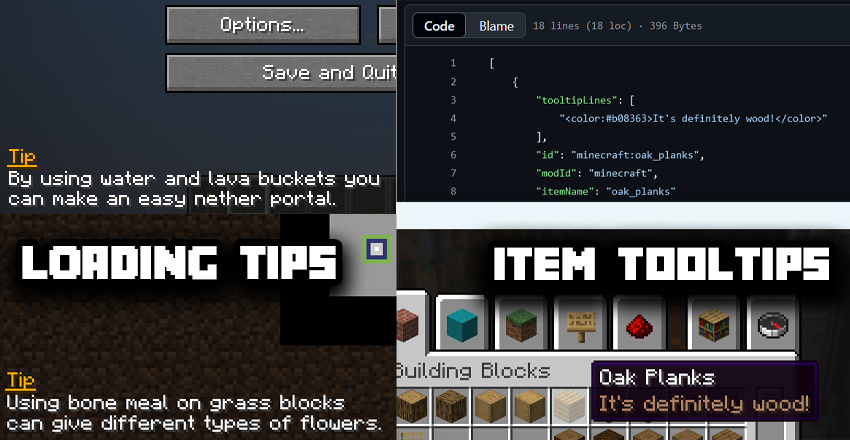
Both of these types of tips are pulled in from GitHub and are updated periodically by reviewers.
Users can suggest new messages using the Immersive Tips Discord Bot. These suggestions are sent to a queue, and either approved, edited, or denied by reviewers to filter for quality.
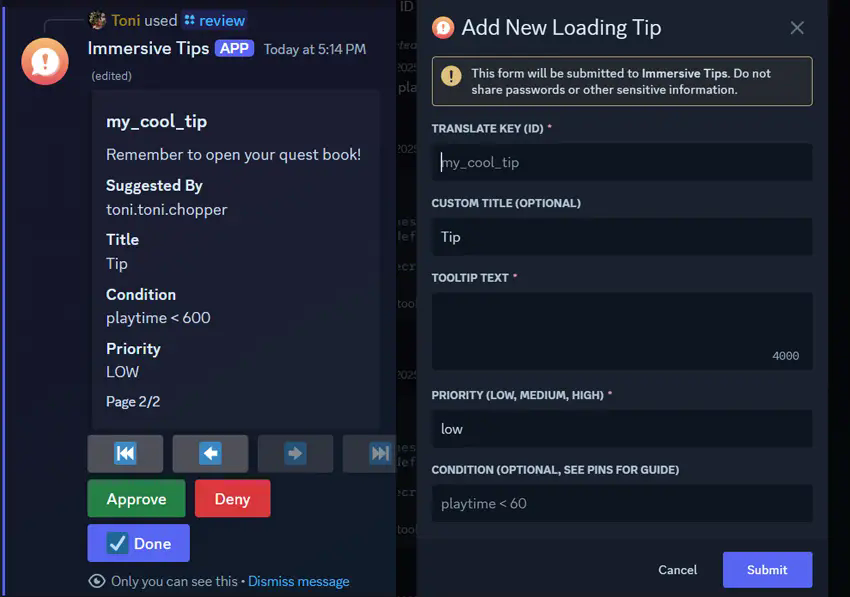
If you'd like to suggest tips to help guide players through your mods, or through other mods, you can join the Discord to help out.
This mod replaces Tips by DarkhaxDev and includes full support for this legacy tip format, as well as including the default pool of tips from the old mod (though this can be disabled)
Cómo instalar Immersive Tips
With Millida Launcher
Install Millida Launcher
The launcher is free: download it at millida.net/launcher and sign in with any nickname.
Click “Install” on this page
The launcher opens and installs the mod for Minecraft 1.20–1.21.1 on Fabric, Forge or NeoForge automatically, together with its dependencies: Fabric API, TxniLib.
Launch the game
A profile with it appears in the launcher: click “Play”.
Manually
Install Fabric, Forge or NeoForge
The loader must match the game version of the mod file, for example Minecraft 1.21.1. After installing it, a separate profile appears in your launcher.
Download the file for your version
In the version list above, pick the file immersivetips-fabric-1.0.2-1.21.1.jar (926 KB) for your game version and loader.
Put it in the mods folder
The folder is inside .minecraft (Windows: %appdata%\.minecraft\mods). If it does not exist, create it. Required dependencies go there too: Fabric API, TxniLib.
Launch the loader profile
Open “Mods” in the main menu: Immersive Tips should be in the list.
Immersive Tips works on the player’s side only: there is no need to install it on a server.
Minecraft 1.21.1 runs on Java 21: with a different Java version the game may close right after launch.
Versiones
Con dependencias
| Minecraft | Cargador | Archivo | Fecha | Acciones |
|---|---|---|---|---|
| 1.21.1 | Fabric | 1.21.1926 KB | ||
| 1.20.1 | Fabric | 1.20.1861 KB | ||
| 1.21.1 | NeoForge | 1.21.1272 KB | ||
| 1.20.1 | Forge | 1.20.1452 KB | ||
| 1.20.1 | Forge | 1.20.13.3 MB | ||
| 1.21.1 | NeoForge | 1.21.15.5 MB | ||
| 1.21.1 | Fabric | 1.21.1926 KB | ||
| 1.20.1 | Fabric | 1.20.1861 KB |
Qué necesita para funcionar
- Fabric APIobligatorio
- TxniLibobligatorio
FAQ
Which Minecraft versions does Immersive Tips work on?
There are files for 1.21.1, 1.20.1, 1.20. The newest is 1.21.1.
Is Immersive Tips for Forge or Fabric?
There are files for Fabric: 1.20–1.21.1, for Forge: 1.20–1.20.1 and for NeoForge: 1.21.1.
What does Immersive Tips need to work?
Required: Fabric API, TxniLib. Without them the mod will not start: dependencies go into the same mods folder.
Do I need to install Immersive Tips on a server?
No. Immersive Tips works on the player’s side only: there is no need to install it on a server.
Which Java does Immersive Tips need?
Minecraft 1.21.1 runs on Java 21. If the game closes right after launch, the usual cause is the wrong Java version in the profile settings.
Where can I download Immersive Tips safely?
On this page: the file immersivetips-fabric-1.0.2-1.21.1.jar (926 KB) is stored on Millida’s server, with no link shorteners. SHA-1 checksum: 3e7a5698d5eee65b51d53c12eb76f422081063be.
Reseñas
Sé el primero en valorar Immersive Tips


