

Health Indicators Mod para Minecraft 26.1.2
Mod sencillo de indicador de daño que muestra una barra de salud (o número) flotante sobre las entidades. Las funciones adicionales incluyen un indicador de dirección de ataque
 NeoForge
 Fabric
Acerca del mod Health Indicators
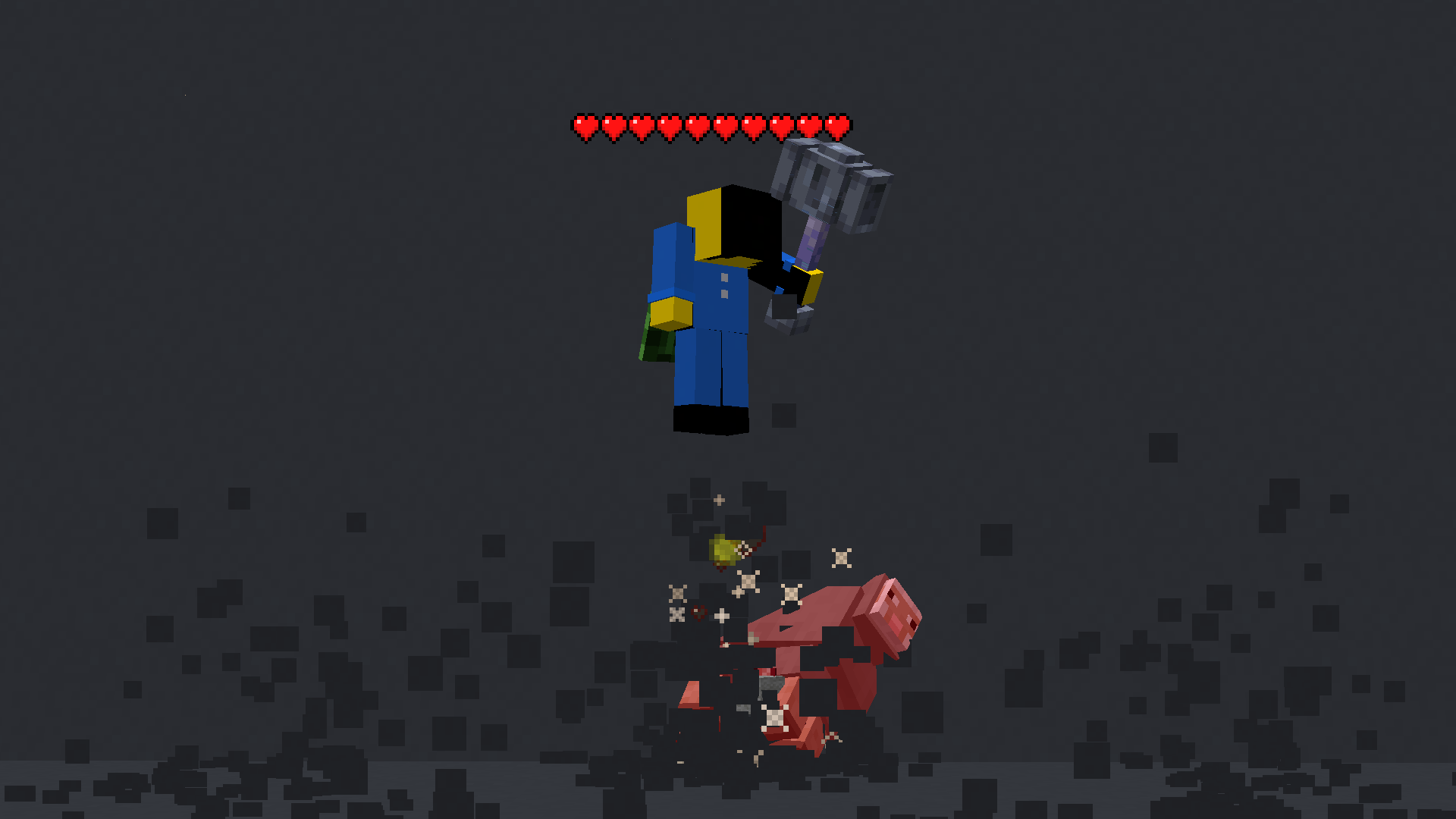
This mod displays other Players and Entities' health above them in the form of a health bar.
Features
This mod displays a highly-configurable health indicator (and optional armor indicator) above all entities that corresponds to their healths. The indicators have the following filters, where you can enable/disable visibility based on:
- Entity Categories (Hostile, Passive, Players, Self)
- Entity Types (eg: minecraft:pig or aether:aerbunny)
- Player Names
- Entities that have been attacked,
- Entities that have been damaged
- Entities that you are looking at
- Entities that are within a certain distance
You can also adjust the
- Size
- Offset
- Indicator Type (Hearts | Number)
- Percentage Based Health
- Text Color

Futher QOL features:
The indicator changes texture and appearance based on the effects the entity has, just like vanilla. The indicator will
- Turn green if the entitiy is Poisoned,
- Black if they are Withering
- Display yellow hearts seperately for Absorption.
- Vibrate if the entity has Regeneration
- Change textures for Hardcore.
All the above can be disabled in the config if you don't like it.

More Details
Mod Keybinds
Note: These are all default keybinds. They can be modified like any other keybind: by going into Options > Controls > Keybinds
- Enable Health Indicator: Left Arrow
- Increase Indicator Offset: Up Arrow
- Decrease Indicator Offset: Down Arrow
- Override Config Filtering: Right Arrow
- Enable Armor Indicator: Right Shift
- Open Config: I
What attributes can I change in the config?
- Indicator Type: Whether to display a floating health bar (like in the picture) or a numerical value.
- Show Effects: Whether to change the textures of the indicator if the player has poison/wither/regen/freezing effects
- Display offset: The health bar can be raised or lowered in the config. You also have the option to set a keybind to raise/lower it.
- Step size: You can set the step size of the keybind in the config. With this, you can modify the amount the health bar is raised/lowered per click.
- Size of the indicator: The indicator size can be modified in the config.
- Percentage based health: The indicator can display health in percentages instead of a hard value
- Toggle rendering: Health bar rendering can be disabled for specific entity types (Passive, Hostile, Player, Self)
- Indicator can also be toggled to
- Show only after you have hit the entity.
- Show only if you are looking at the entity
- Show only if the entity has been damaged (not at full health)
- Not show for specific mobs/players. This can be set in the blacklist
Cómo instalar Health Indicators
With Millida Launcher
Install Millida Launcher
The launcher is free: download it at millida.net/launcher and sign in with any nickname.
Click “Install” on this page
The launcher opens and installs the mod for Minecraft 1.21.6–26.1.2 on Fabric or NeoForge automatically, together with its dependencies: YetAnotherConfigLib (YACL), Fabric API, Architectury API.
Launch the game
A profile with it appears in the launcher: click “Play”.
Manually
Install Fabric or NeoForge
The loader must match the game version of the mod file, for example Minecraft 26.1.2. After installing it, a separate profile appears in your launcher.
Download the file for your version
In the version list above, pick the file HealthIndicators-neoforge-26.1.0.0-beta.jar (9 KB) for your game version and loader.
Put it in the mods folder
The folder is inside .minecraft (Windows: %appdata%\.minecraft\mods). If it does not exist, create it. Required dependencies go there too: YetAnotherConfigLib (YACL), Fabric API, Architectury API.
Launch the loader profile
Open “Mods” in the main menu: Health Indicators should be in the list.
Health Indicators works on the player’s side only: there is no need to install it on a server.
Versiones
Con dependencias
| Minecraft | Cargador | Archivo | Fecha | Acciones |
|---|---|---|---|---|
| 26.1.2 | NeoForge | 26.1.29.3 KB 1 | ||
| 26.1.2 | Fabric | 26.1.22.7 MB 1 | ||
| 1.21.11 | Fabric, NeoForge | 1.21.112.8 MB 86 | ||
| 1.21.11 | Fabric, NeoForge | 1.21.112.8 MB | ||
| 1.21.10 | Fabric, NeoForge | 1.21.102.9 MB 3 | ||
| 1.21.10 | Fabric, NeoForge | 1.21.102.9 MB | ||
| 1.21.10 | Fabric, NeoForge | 1.21.102.8 MB | ||
| 1.21.8 | Fabric, NeoForge | 1.21.82.8 MB 1 |
Qué necesita para funcionar
- YetAnotherConfigLib (YACL)obligatorio
- Fabric APIobligatorio
- Architectury APIobligatorio
- Mod Menuopcional
FAQ
Which Minecraft versions does Health Indicators work on?
There are files for 1.21.6–26.1.2, 9 versions in total. The newest is 26.1.2.
Is Health Indicators for Forge or Fabric?
There are files for Fabric: 1.21.6–26.1.2 and for NeoForge: 1.21.6–26.1.2. There are no files for Forge: a mod for another loader will not start.
What does Health Indicators need to work?
Required: YetAnotherConfigLib (YACL), Fabric API, Architectury API. Without them the mod will not start: dependencies go into the same mods folder. Optional: Mod Menu.
Do I need to install Health Indicators on a server?
No. Health Indicators works on the player’s side only: there is no need to install it on a server.
Where can I download Health Indicators safely?
On this page: the file HealthIndicators-neoforge-26.1.0.0-beta.jar (9 KB) is stored on Millida’s server, with no link shorteners. SHA-1 checksum: e0c458cf980cb02d254c05d9859d45facb68eab6.
Reseñas
Sé el primero en valorar Health Indicators


